Electronics / Paper Shredders
User Manual for HP OneShred 24CC and 16MC Shredders
Quick guide for the HP OneShred 24CC and 16MC shredders. Includes setup, operation, maintenance, troubleshooting, and technical specifications.
Quick answers from the manual
Quick answer
- The HP OneShred 24CC and 16MC are document shredders for paper, credit cards, staples, and paper clips. They feature automatic shredding, overload protection, and overheating protection. p. 10, 15, 17
Key actions
- Emptying the waste bin p. 18
- Oiling the cutting mechanism p. 18
First start
- Place on a stable surface, insert the waste bin, connect the power cable, and press the On/Off button. p. 14
Show 4 more answers Show less
Problems and fixes
Overheating
Wait for the cool down phase defined in Section Technical Data.
p. 17Maintenance and reset
- Empty the waste bin when the 'Bin full' status LED flashes red. p. 18
Technical specifications
| Parameter | Value | Meaning | Pages |
|---|---|---|---|
| Max. cutting capacity (24CC) | 24 sheets / 1 credit card | Maximum number of items that can be shredded at once. | p. 20 |
| Max. cutting capacity (16MC) | 16 sheets / 1 credit card | Maximum number of items that can be shredded at once. | p. 20 |
Where to find it in the PDF
- General View p. 13
- Technical Data p. 20
Table of contents
Manual images
Click an image to enlargeQuick guide from the manual
The HP OneShred 24CC and 16MC are document shredders designed for private use indoors. They are capable of shredding paper, credit cards, paper clips, and staples. Always read the safety information before use.
General View of the Shredder
The shredder consists of the following main components:
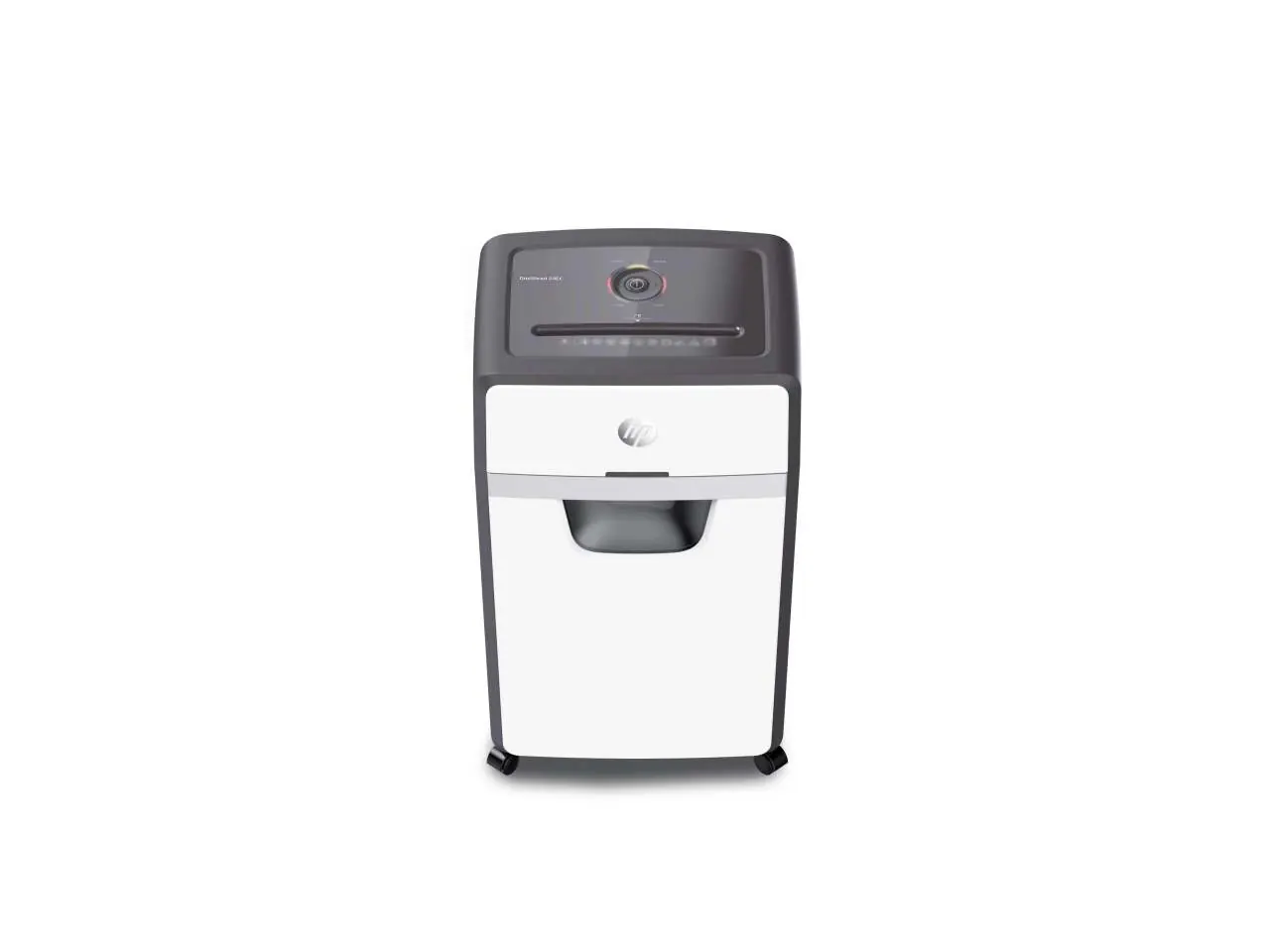
- Operating buttons / Status indicator
- Insertion slot
- Cutting mechanism
- Waste bin
- Castors
Positioning and Starting Up
Ensure the shredder is placed on a stable, level, horizontal surface near an easily accessible power socket. Maintain a distance of at least 10 cm from walls to ensure sufficient cooling. Slide the waste bin into the device until it latches audibly. Connect the power cable and press the On/Off button to start.
Operating the Shredder
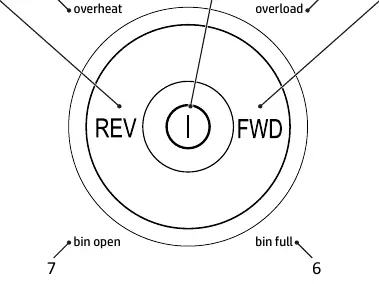
The shredder uses an automatic shredding mechanism. Simply feed the material into the center of the insertion slot. If the sensors do not detect the material, you can use the FWD button for manual operation. If the shredder is not used for 30 minutes, it enters Sleep mode.
Maintenance
To extend the working life of the shredder, oil the cutting mechanism at regular intervals using special oil or oiled sheets. Empty the waste bin when the "Bin full" status LED flashes red.
Troubleshooting
- Overheating: The shredder switches off automatically. Wait for the cool down phase defined in the Technical Data section.
- Overload: If too much material is inserted, the status indicator flashes red and the shredder runs in reverse for 5 seconds. Pull the material out to clear the blockage.
Technical Data
The 24CC model has a cutting capacity of 24 sheets, while the 16MC model has a capacity of 16 sheets. Both models operate at a speed of 1.6 m/min and have a 30-liter waste bin capacity.
Manufacturer information
HP Inc.
Practical help
Common problems
Shredder switches off automatically (Overheating)
Wait for the cool down phase defined in the Technical Data section.
Status indicator flashes red (Overload)
Pull the material out of the shredder to clear the blockage.
Bin full LED flashes red
Empty the waste bin.
Before use
- Check package contents for the shredder, power cable, and oiled sheet.
- Place the shredder on a stable, level, horizontal surface.
- Ensure at least 10 cm distance to walls for cooling.
- Slide the waste bin into the device until it latches audibly.
Show more Show less
Specs in practice
- Security level
- P-4 for 24CC (4x35mm particles) and P-5 for 16MC (2x15mm particles) according to DIN 66399-2.
- Continuous operation
- The shredder can operate for 40 minutes before requiring a 50-minute cool down phase.
Images and diagrams
- 1: Operating buttons / Status indicator
- 2: Insertion slot
- 3: Cutting mechanism
- 4: Status indicator, front
- 6: Viewing window / Grip
Model compatibility
- Suitable for paper, credit cards, paper clips, and staples.
- Only for private use indoors.

Manual page author
Emily Carter
User documentation editor