Electronics / Paper Shredders
User Manual for HP OneShred 15CC / 10MC Paper Shredder
Quick guide for the HP OneShred 15CC and 10MC paper shredder. Includes setup, operation, safety warnings, maintenance, and troubleshooting.
Table of contents
Quick guide from the manual
This guide helps you set up and operate your HP OneShred 15CC / 10MC paper shredder. Always ensure the waste bin is properly fitted before operation.
Safety Information
- Keep long hair, ties, scarves, and loose clothing away from the insertion slot.
- Keep children and pets away from the device.
- Do not spray flammable gases or air sprays near the shredder.
- Do not touch the cutting mechanism.
- Always unplug the device when not in use for an extended period.
Setup
Place the shredder on a stable, level surface near an accessible power socket. Maintain at least 10 cm distance from walls for proper cooling. Slide the waste bin into the device until it latches audibly. The shredder will not operate if the bin is not properly fitted.
Operation
The shredder features automatic operation. Insert material into the center of the insertion slot. The device will start automatically and stop when no more material is fed.
Maximum cutting capacity:
- OneShred 15CC: 15 sheets
- OneShred 10MC: 10 sheets
Maintenance
Check the fill level of the waste bin through the viewing window. Empty the bin when it is approximately 80% full to prevent malfunctions.
Troubleshooting
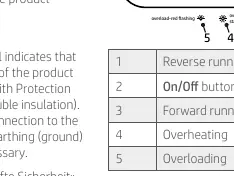
The status indicator provides information on the device state:
- Blue: Device is switched on and ready.
- Flashing Red: Paper jam.
- Red: Device is overheating.
Manufacturer information
HP Inc.
Practical help
Common problems
Shredder does not start
Ensure the waste bin is properly fitted and closed.
Paper jam
Status indicator flashes red. Check for jams and clear the insertion slot.
Overheating
Status indicator lights red. Allow the device to cool down for 50 minutes.
Before use
- Check package contents
- Place on stable, level surface
- Ensure 10cm distance from walls
- Connect power cable
- Ensure waste bin is fitted
Specs in practice
- Continuous operation
- 10 minutes of shredding before requiring a 50-minute cool-down period.
- Cutting capacity
- 15 sheets (15CC) or 10 sheets (10MC) per pass.
- Protection Class II
- Double insulation; no grounding required.
Images and diagrams
- 1: Operating buttons/Status indicator
- 2: Insertion slot
- 3: Cutting mechanism
- 4: Grip/Viewing window
Model compatibility
- Shreds paper, credit cards, paper clips, and staples.

Manual page author
David Miller
Documentation analyst
Organizes user manual content into clear summaries, with attention to model details, product context, and everyday usability.