Electronics / Paper Shredders
User Manual for HP OneShred 12CC Paper Shredder
Quick guide for the HP OneShred 12CC paper shredder. Includes setup, operation, maintenance, and safety instructions.
Table of contents
Manual images
Click an image to enlargeQuick guide from the manual
This manual provides instructions for the HP OneShred 12CC paper shredder. It covers setup, operation, and maintenance to ensure optimal performance.
Safety Information
- Keep hair, loose clothing, and jewelry away from the insertion slot.
- Do not use near flammable gases or air sprays.
- Keep out of reach of children and pets.
- Do not touch the insertion slot with hands.
- Credit cards must be inserted vertically.
Device Overview
The shredder consists of the following main parts:
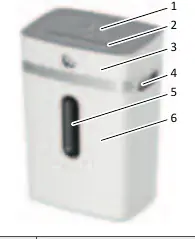
- Operating buttons / Status indicator
- Insertion slot
- Shredder attachment
- Grip
- Viewing window
- Waste bin
Setup and Operation
The shredder only operates when the waste bin is properly fitted.
- Place the shredder on a stable, level surface with at least 10 cm clearance from walls to ensure proper cooling.
- Mount the shredder attachment onto the waste bin until it latches audibly.
- Connect the power cable to the device and plug it into a power socket.
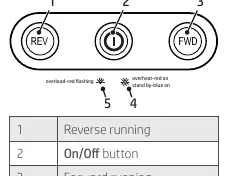
- Press the On/Off button to switch the device on. The status indicator will light up blue.
- Insert up to 12 sheets of paper into the center of the insertion slot. The shredder will start automatically.
Maintenance and Cleaning
Check the waste bin level through the viewing window regularly. Empty the bin when it is about 80% full to prevent malfunctions.
- Switch off the device and disconnect the power plug before emptying.
- Lift the shredder attachment by the grips to access the waste bin.
- Use the included oiled sheet for maintenance.
Troubleshooting
If the shredder does not function as expected:
- Status indicator flashes red: Paper jam.
- Status indicator lights up red: Overheating. Allow the device to cool down.
- Device won't start: Ensure the shredder attachment is properly fitted on the waste bin.
Technical Data
Power supply: 220-240 V~, 50/60 Hz, 1.2 A, 300 W
Continuous operation: 6 minutes
Cool down phase: 50 minutes
Max. ambient temperature: 25 °C
Manufacturer information
HP Inc.
Practical help
Common problems
Status indicator flashes red
Paper jam. Remove the jammed material.
Status indicator lights up red
Overheating. Allow the device to cool down for 50 minutes.
Device will not switch on
Ensure the shredder attachment is properly fitted on the waste bin.
Before use
- Check package contents for shredder, waste bin, and oiled sheet.
- Place on a stable, level, horizontal surface.
- Ensure at least 10 cm distance from walls.
- Connect the power cable to the device.
- Plug into an easily accessible power socket.
Images and diagrams
- 1: Reverse running
- 2: On/Off button
- 3: Forward running
- 4: Overheating indicator
- 5: Overloading indicator
Model compatibility
- Suitable for paper, credit cards, paper clips, and staples.
- Credit cards must be inserted vertically.

Manual page author
Emily Carter
User documentation editor
Prepares concise manual descriptions and highlights the most useful setup, operation, and maintenance information for readers.