Electronics / Paper Shredders
HP OneShred 8CC Paper Shredder User Manual
Quick guide for the HP OneShred 8CC paper shredder. Learn how to operate, maintain, and troubleshoot your device safely.
Table of contents
Manual images
Click an image to enlargeQuick guide from the manual
This guide provides essential information for operating your HP OneShred 8CC paper shredder. Always read the full operating manual before use and keep it for future reference.
Device Overview
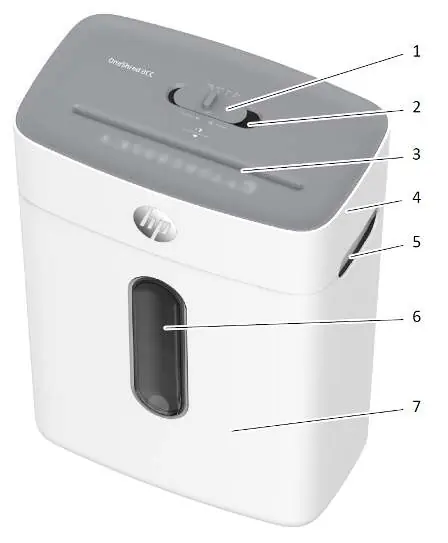
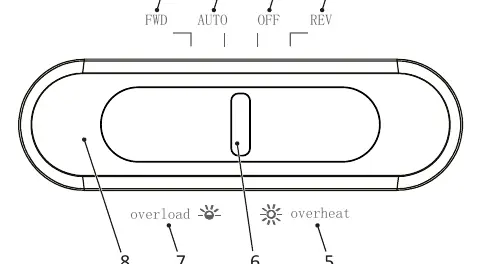
The shredder consists of a shredder attachment and a waste bin. The main switch on top allows you to select between FWD (manual forward), AUTO (automatic operation), OFF (power off), and REV (reverse operation).
Setup and Starting Up
- Place the waste bin on a stable, level, horizontal surface.
- Maintain a distance of at least 10 cm from walls to ensure proper cooling.
- Mount the shredder attachment onto the waste bin until it latches audibly.
- Connect the power plug to an easily accessible socket.
- Slide the main switch to AUTO to begin operation. The status indicator will light up blue.
Operating the Shredder
Automatic Shredding: Feed material into the center of the insertion slot. The shredder will start automatically and stop when the material has passed through.
Manual Shredding: If the sensors fail to detect the material, slide the main switch to FWD to manually feed the material, then return to OFF when finished.
Maintenance
Oiling: To extend the life of the cutting mechanism, oil it regularly using special shredder oil or oiled sheets. Apply oil in lines across a sheet of paper and feed it through the shredder.
Emptying the Waste Bin: Check the fill level through the viewing window. Empty the bin when it is approximately 80% full to prevent malfunctions.
Troubleshooting
Overheating: If the shredder overheats, it will switch off automatically and the status indicator will light up red. Wait at least 50 minutes for the device to cool down before resuming.
Overload: If too much material is inserted, the status indicator will flash red and the shredder will automatically reverse for 5 seconds to clear the jam.
Technical Data
- Security Level: P-4 (DIN 66399-2)
- Cutting Capacity: 8 sheets / 1 credit card
- Bin Capacity: 15 liters
- Continuous Operation: 4 minutes
- Cool Down Phase: 50 minutes
Manufacturer information
HP Inc.
Practical help
Common problems
Status indicator flashes red
Overload protection triggered. Pull the material out of the shredder to clear the blockage.
Status indicator lights up red
Overheating protection. The device has shut down. Wait at least 50 minutes for it to cool down.
Shredder does not start
Ensure the shredder attachment is properly mounted on the waste bin. It must latch audibly.
Before use
- Place the shredder on a stable, level surface.
- Ensure there is at least 10 cm of clearance from walls.
- Check that the shredder attachment is correctly mounted on the waste bin.
- Ensure the power socket is easily accessible.
Specs in practice
- Security Level P-4
- Suitable for sensitive and confidential data (particle area ≤ 160 mm²).
- Continuous operation 4 min
- The maximum time the shredder can run before requiring a 50-minute cool-down period.
- Max. cutting capacity 8 sheets
- Do not exceed 8 sheets of paper at once to avoid jams.
Images and diagrams
- 1: Main switch
- 2: Insertion slot
- 3: Shredder attachment
- 5: Viewing window
- 7: Status indicator
Model compatibility
- Suitable for paper, credit cards, paper clips, and staples.
- Only use special oil intended for shredders; do not use spray oils.

Manual page author
Emily Carter
User documentation editor
Prepares concise manual descriptions and highlights the most useful setup, operation, and maintenance information for readers.