Garden / Brushcutters & Trimmers
User Manual for Husqvarna 115iHD45 Cordless Hedge Trimmer
Quick guide for the Husqvarna 115iHD45 cordless hedge trimmer. Includes setup, operation, maintenance, and troubleshooting steps.
Table of contents
Manual images
Click an image to enlargeQuick guide from the manual
The Husqvarna 115iHD45 is a battery-powered hedge trimmer designed for cutting branches and twigs. This guide provides essential information for safe and efficient operation. Always read the full manual for complete safety instructions.
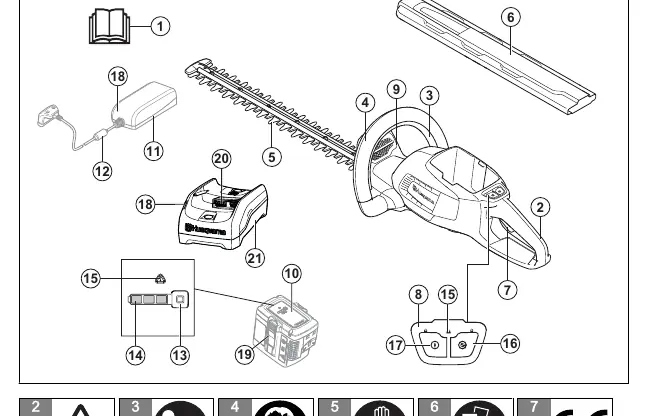
Product Overview
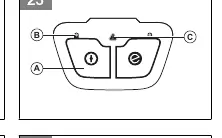
The hedge trimmer consists of a rear handle, front handle, power trigger, power trigger lockout, cutter blades, and a control panel. The control panel includes a start/stop button, SavE button, and battery status indicators.
Safety Information
Personal Protective Equipment: Always wear approved eye protection, hearing protection, protective gloves, and heavy-duty slip-resistant boots. Do not wear loose clothing or jewelry.
Battery Safety: Use only approved BLi batteries. Keep batteries away from metal objects, rain, and extreme heat. Do not disassemble or short-circuit the battery.
Assembly and Operation
Connecting the Battery: Push the battery into the battery holder until you hear a click. Ensure the battery is fully charged before first use.
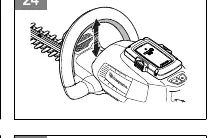
Starting the Product: Press and hold the start/stop button until the green LED lights up. Press the power trigger lockout on the front handle, then press the power trigger on the rear handle to apply power.
SavE Function: Use the SavE button to activate the power-saving mode. This does not reduce the cutting power of the product.
Stopping the Product: Release the power trigger or lockout, press the start/stop button until the green LED goes out, and remove the battery.
Maintenance
Regular maintenance is required to ensure the product's lifespan and safety. Perform checks before each use, including cleaning external parts, checking that the start/stop switch works, and ensuring the cutter blade and guard are undamaged. Lubricate the blades before long periods of storage and apply grease to the gear housing if it has been disassembled by an authorized dealer.
Troubleshooting
If the product does not start, ensure the power trigger and start button are pressed simultaneously. If the error LED flashes, check for overload (cutting attachment cannot move freely) or temperature deviation (let the product cool down).
Manufacturer information
Husqvarna
Practical help
Common problems
Product does not start
Push the power trigger and press the start button at the same time.
Error LED flashes (Overload)
The cutting attachment cannot move freely. Release the cutting attachment.
Error LED flashes (Temperature deviation)
Let the product cool down.
Before use
- Examine the work area for objects that can be thrown out
- Check that the blades are sharp and have no cracks or damage
- Ensure all nuts and screws are tight
- Check that the handle and safety devices are not damaged
- Ensure the battery is fully charged
Specs in practice
- Blade length
- 450 mm
- Blade speed (SavE mode)
- 2400 cuts/min
- Blade speed (Normal mode)
- 3000 cuts/min
- Weight (without battery)
- 3.2 kg
- Weight (with battery)
- 4.0 kg
Images and diagrams
- Fig 1: Product overview showing handles, trigger, and control panel
- Fig 23: Keypad controls and indicators
- Fig 27: Battery installation into the holder
- Fig 30: Battery charging status indication
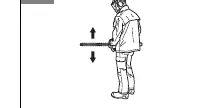
- Fig 34: Correct operating position
Model compatibility
- Use only Husqvarna BLi batteries
- Use only QC80 or 40-C80 battery chargers

Manual page author
David Miller
Documentation analyst
Organizes user manual content into clear summaries, with attention to model details, product context, and everyday usability.