Electronics / USB Extenders
User Manual for Icron USB 2.0 Ranger 2204 Extender System
Quick guide for the Icron USB 2.0 Ranger 2204 extender system. Learn how to install the LEX and REX units, connect USB devices, troubleshoot LED indicators, and understand technical specifications for 100m USB extension.
Table of contents
Manual images
Click an image to enlargeQuick guide from the manual
The Icron USB 2.0 Ranger 2204 is an extender system that allows you to connect USB 2.0 devices up to 100 meters away from your host computer using Cat 5e or better cabling. The system consists of two units: the LEX (Local Extender) which connects to the computer, and the REX (Remote Extender) which connects to your USB devices.
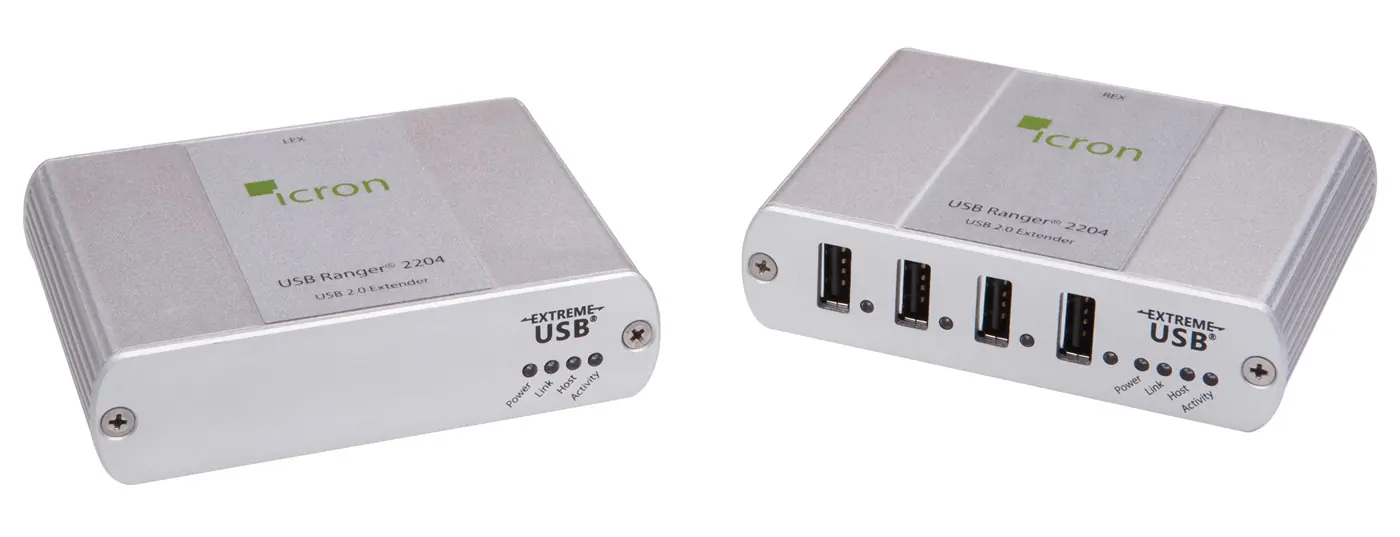
Product Overview
The system includes the LEX unit, REX unit, REX AC power adapter, and a USB 2.0 cable. The LEX unit is powered by the host computer's USB port, while the REX unit requires the included external AC power adapter to provide 500mA to each of its four USB ports.
Installation
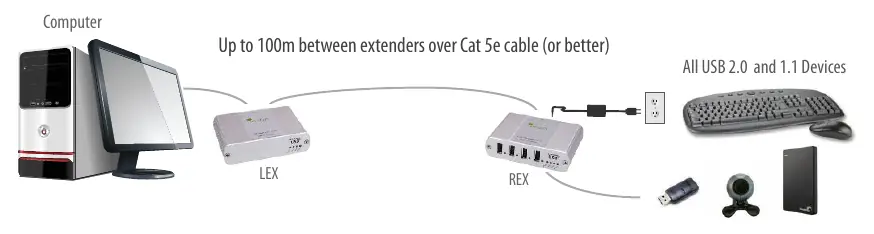
- Prepare the site: Ensure you have a Cat 5e or better cable (up to 100m) ready.
- Install the LEX unit: Place it near the host computer and connect it using the provided USB cable.
- Install the REX unit: Place it near your USB devices, connect the AC power adapter to a wall outlet, and plug it into the REX unit.
- Connect the units: Run the Cat 5e cable between the Link ports on the LEX and REX units.
Connecting the LEX Unit to the REX Unit
Use only Cat 5e (or better) Unshielded Twisted Pair (UTP) cabling with a straight-through configuration. The cable must be terminated with 8-conductor RJ45 connectors at both ends. The combined length of any patch cords must not exceed 10m.
Troubleshooting
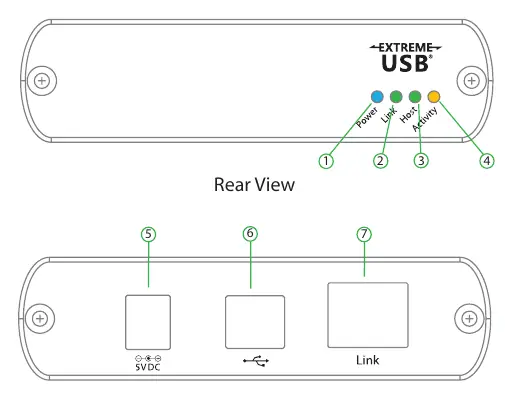
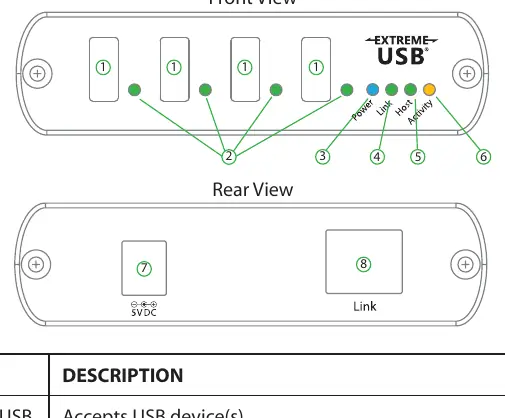
If you encounter issues, check the LED indicators on the front of the units:
- Power LED: Should be on when power is supplied.
- Link LED: Indicates a valid connection between LEX and REX. If off, check the Cat 5e cable.
- Host LED: Indicates the system is enumerated on the host computer.
- Activity LED: Blinks during data transmission.
- Device LED (REX only): If orange, an overcurrent condition has occurred (device drawing >500mA).
Specifications
The Ranger 2204 supports high-speed (480 Mbps), full-speed (12 Mbps), and low-speed (1.5 Mbps) USB devices. It operates in temperatures between 0°C and 50°C. The REX unit provides 500mA of current to each of its four USB ports.
Manufacturer information
Icron Technologies Corp
Practical help
Common problems
All LEDs on LEX unit are off
Ensure the USB connection between the LEX and host computer is properly installed or try a different USB port.
All LEDs on REX unit are off
Ensure the AC power adapter is properly connected to the REX unit and a live electrical outlet.
Link LEDs on LEX and REX units are off
Check that the Cat 5e cable is connected correctly. Ensure it is a straight-through cable with no crossovers.
Device LED is orange
This indicates an overcurrent condition. The attached USB device is attempting to draw more than 500mA. Power cycle the REX unit.
Before use
- Verify you have a Cat 5e or better cable (up to 100m).
- Ensure the host computer has a USB 1.1 or 2.0 compliant operating system.
- Confirm you have the REX AC power adapter ready.
- Check that USB device drivers are installed on the host computer.
Specs in practice
- Available Current
- 500 mA per USB port on the REX unit.
- Operating Temperature
- 0°C to 50°C (32°F to 122°F).
Images and diagrams
- LEX Unit: Connects to the host computer via USB Type B.
- REX Unit: Provides 4 USB Type A ports for devices and requires external power.
- Link Port: RJ45 connection for the Cat 5e cable linking the two units.
Model compatibility
- Compatible with USB 1.1 and 2.0 devices.
- Works with Windows, Mac OS X, and Linux.
- Not all USB devices are guaranteed compatible due to varying configurations.

Manual page author
Michael Turner
Technical manual editor
Reviews PDF manuals for structure, safety notes, and practical product details so readers can find the right information quickly.