Electronics / Video Transmission
Lindy 100m 2 Port USB 2.0 Cat.6 Extender
Quick guide for the Lindy 100m 2 Port USB 2.0 Cat.6 Extender (No. 43408). Learn how to install, connect, and troubleshoot your USB extender for reliable long-distance data transmission up to 100m.
Table of contents
Manual images
Click an image to enlargeQuick guide from the manual
The Lindy 100m 2 Port USB 2.0 Cat.6 Extender allows you to extend the distance between a host computer and USB peripheral devices by up to 100 meters. It utilizes a standard Cat.6 network cable to bridge the connection between the transmitter and receiver units. The system features bidirectional Power over Cable (PoC) functionality, meaning you only need to connect the power supply to either the transmitter or the receiver unit.
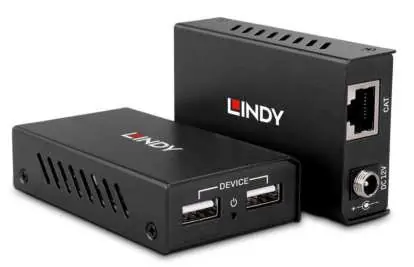
Package Contents
- Local/Transmitter Unit with Mounting Brackets
- Receiver Unit with Mounting Brackets
- USB 2.0 A/B male cable (approx. 90cm)
- Multi-Country Power Supply, 12VDC 3A
- User Manual
Installation
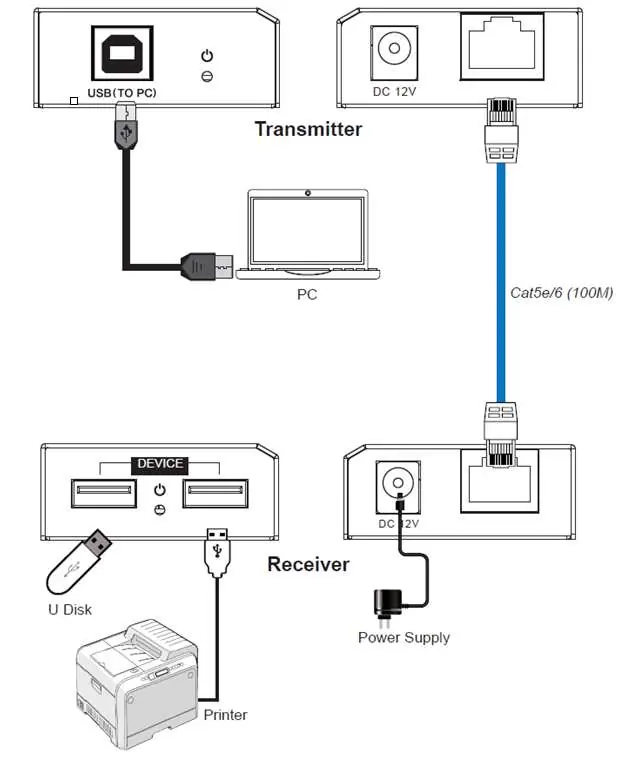
- Connect the transmitter unit to a USB port on the host computer using the included USB 2.0 Type A to B cable.
- Place the receiver unit near the USB device(s) in the desired remote location.
- Connect the included power supply to either the transmitter or the receiver unit, depending on your setup requirements.
- Connect the transmitter to the receiver unit using a Cat.5e/6 (or better) network cable (not included).
- The extender is now installed, and you can connect your USB devices to the receiver.
Power Supply Setup
The device includes a multi-country power supply. To assemble:
- Insert the appropriate country adapter from top to bottom into the recess on the power supply unit.
- Press the adapter firmly against the housing until it clicks into place.
- To remove the adapter, push the button located under the adapter and slide it out.
Features and Specifications
- USB Support: Supports USB 2.0 high-speed and USB 1.1 (full-speed, low-speed) devices.
- Hub: Integrated two-port USB hub on the receiver.
- Range: Up to 100 meters using Cat.5e/6 (or better) UTP/STP cables.
- Plug and Play: No driver installation required.
- Operating Temperature: 0°C to 40°C (32°F to 104°F).
- Storage Temperature: -20°C to 60°C (-4°F to 140°F).
- Humidity: 20% to 90% RH (non-condensing).
Safety Instructions
- Do not open the product or its power supply; there are no user-serviceable parts inside.
- Only qualified servicing personnel should carry out repairs.
- Use indoors only; do not expose to water or moisture.
- Do not use damaged cables.
- Ensure the product is placed in a well-ventilated area away from direct heat sources.
- Ensure all power adapters are firmly secured and locked in place before inserting into a wall socket.
Practical help
Common problems
Device not detected
Ensure the Cat.6 cable is securely connected between the transmitter and receiver and that the power supply is connected to either unit.
Power adapter loose
Ensure the country-specific adapter is pressed firmly into the power supply housing until it clicks into place.
Before use
- Verify you have both the Transmitter and Receiver units.
- Obtain a Cat.5e/6 or better network cable (not included).
- Select the correct country adapter for your power supply.
- Ensure the power supply is firmly assembled.
- Check that the USB host computer is powered on.
Specs in practice
- PoC (Power over Cable)
- Allows power to be supplied through the Cat.6 cable, requiring only one power supply at either the transmitter or receiver.
Images and diagrams
- The transmitter connects to the PC via USB and to the receiver via a Cat.6 cable.
- The receiver connects to USB devices and receives power via the Cat.6 cable from the transmitter (or vice versa).
Model compatibility
- Supports USB 2.0 high-speed and USB 1.1 devices.
- Compatible with all major Operating Systems with USB support.
- Recommended to use solid core patched cables for best performance.

Manual page author
David Miller
Documentation analyst
Organizes user manual content into clear summaries, with attention to model details, product context, and everyday usability.