Electronics / USB Extenders
User Manual for WyreStorm EX-100-IW-USBC USB 3.2 Transmitter and Receiver Kit
Quick guide for the WyreStorm EX-100-IW-USBC HDBT 3.0 kit. Includes wiring diagrams, connection instructions, troubleshooting tips, and technical specifications for the transmitter and receiver.
Table of contents
Manual images
Click an image to enlargeQuick Guide from the Manual
The WyreStorm EX-100-IW-USBC is a 100m USB 3.2 Single Gang In-Wall HDBT 3.0 Transmitter and Receiver Kit. For optimal performance, ensure all wiring is run and terminated before making connections. Use only Cat 6A/7 (F/FTP or U/FTP) cables with T568B straight-through termination. Do not use UTP, F/UTP, or U/UTP cables, as these will limit performance.
In the Box
- 1x EX-100-IW-USBC Transmitter
- 1x EX-100-IW-USBC Receiver
- 1x DC 20V/3A Power Adaptor (US/UK/EU/AU)
- 1x 2m USB 3.2 Type-C to Type-C Cable
- 1x Wall Plate Plastic Panel (1-gang US) with Screws
- 2x Mounting Bracket with Screws
- 1x Quickstart Guide
Wiring and Connections
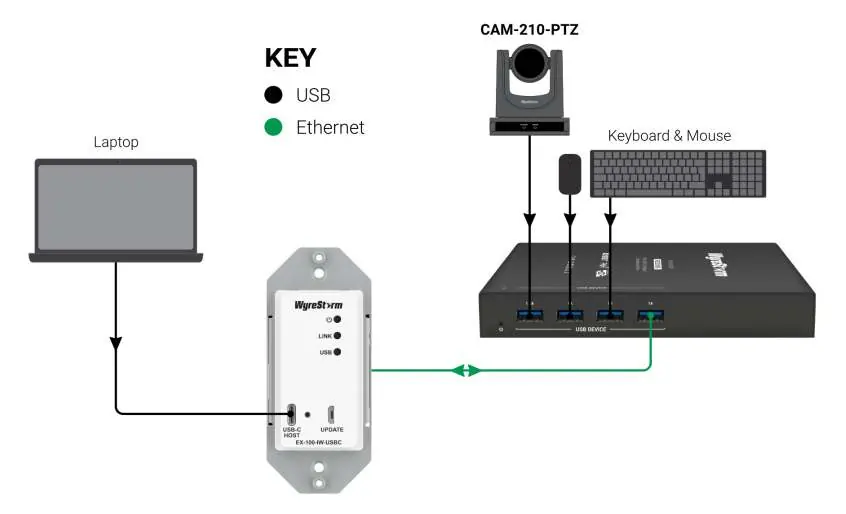
WyreStorm recommends using pre-terminated USB cables due to the complexity of the connector types. Ensure that USB inputs and RJ45 output connections are secure. Environmental interference, kinks in cables, or the use of patch panels can negatively affect signal transmission.
Device Layout
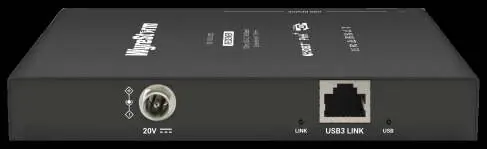
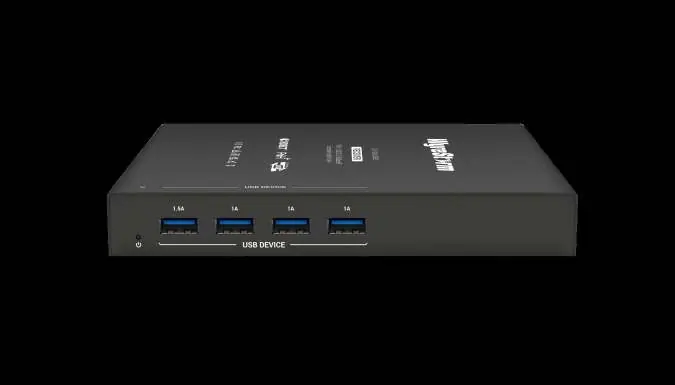
The transmitter and receiver units feature LED indicators for power, link status, and USB data transmission. The front panel of the transmitter includes a USB-C Host port and a Micro USB update port. The rear panel of the receiver provides USB 3.0 Type A ports for peripherals and a DC 20V power input.
Troubleshooting
If you experience "No Link" or the USB device is not recognized:
- Verify that all USB inputs and RJ45 output connections are not loose.
- Ensure you are using full-featured USB cables from reliable brands.
- Confirm you are using the recommended Cat 6A U/FTP or F/FTP cables.
- Use a cable tester or connect the cable to other devices to verify functionality.
Specifications
- Supported Standards: USB 3.2 Gen 1
- Transmission Distance: 100m/330ft (using Cat 6A/7)
- Power Supply: DC 20V 3A with locking connector
- Max Power Consumption: 39.79W (fully loaded); 6.94W (no load)
- Operating Temperature: 0 to +45°C (32 to +113°F)
Practical help
Common problems
No Link or USB Device not recognized
Verify USB and RJ45 connections are secure. Ensure full-featured USB cables are used. Use Cat6A U/FTP or F/FTP cables.
Before use
- Ensure all wiring is run and terminated before connecting to the transmitter/receiver.
- Use pre-terminated USB cables for best performance.
- Use Cat 6A/7 (F/FTP or U/FTP) cabling.
- Do not use UTP, F/UTP, or U/UTP cables.
- Verify power supply is 20V/3A.
Specs in practice
- Transmission Distance
- Up to 100m/330ft using Cat 6A/7 cables.
- Power Consumption
- 39.79W (fully loaded) to 6.94W (no load).
- Operating Temperature
- 0 to +45°C (32 to +113°F).
Images and diagrams
- Wiring Diagram: Shows the signal path from a laptop to the transmitter, then via Ethernet to the receiver, and finally to USB peripherals like a camera and keyboard/mouse.
Model compatibility
- Requires T568B straight-through category cable.
- Supports USB 3.2 Gen 1 standards.

Manual page author
David Miller
Documentation analyst
Organizes user manual content into clear summaries, with attention to model details, product context, and everyday usability.