Electronics / USB Extenders
User Guide for Icron USB 3.0 Spectra 3001-15 Active Extension Cable
Quick guide for the Icron USB 3.0 Spectra 3001-15 active extension cable. Includes installation steps, troubleshooting for LED indicators, power requirements, and technical specifications.
Table of contents
Manual images
Click an image to enlargeQuick guide from the manual
The Icron USB 3.0 Spectra 3001-15 is a 15-meter active copper extension cable designed to extend USB 3.0 connectivity. It features plug-and-play functionality and is compatible with major operating systems including Windows, macOS, Linux, and Chrome OS. Important: This cable supports only USB 3.0 devices and is not backward compatible with USB 2.0 or 1.1 devices.
Product description
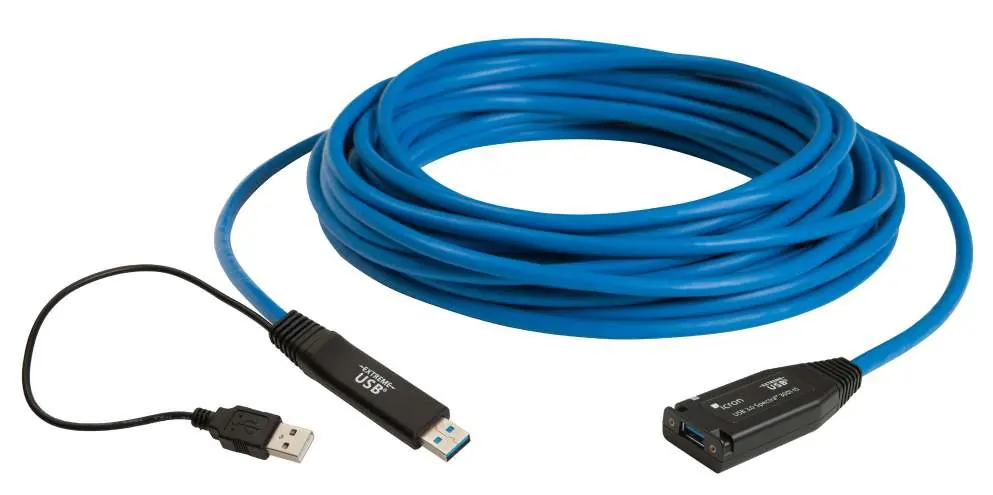
The system consists of the active cable with a host connector and a power connector on one end, and a locking receptacle on the device end. The cable includes an LED indicator to show the power and connection status.
Installation instructions

- Connect to Host: Plug the USB 3.0 host connector into a USB 3.0 port on your computer.
- Connect Power: It is recommended to plug the USB power connector into any USB port on your computer. This step is essential if your USB 3.0 device is not self-powered or draws more than 2.5W of power.
- Connect Device: Attach your USB 3.0 device into the Spectra 3001-15's USB 3.0 receptacle. AIA USB3 Vision locking USB connectors are supported if needed.
- Secure: You may use the included cable tie around the receptacle's mounting slots to secure the connection.
Troubleshooting
If you encounter issues, check the LED indicator on the cable:
- LED is GREEN: The active cable is powered on and functioning.
- LED is RED: The cable is not powered properly or not detected by the host. Ensure the power connector is plugged into a USB port on the host computer.
If the device is detected as an "Unknown Device" or does not operate correctly, ensure you are using a USB 3.0 port (not 2.0) and that all necessary drivers for your specific USB device are installed.
Specifications
- Range: 15m (49.21 ft)
- Speed: Up to 5Gbps
- Power Output: 5V, 900mA
- Operating Temperature: 0°C to 45°C
- Minimum Bend Radius: 28mm (1.10")
Safety and warranty
Do not attempt to open the product casing, as this may cause damage and will void the warranty. The product should be stored in a dry location between -20°C and 70°C. The product comes with a 2-year warranty. For technical support, visit www.icron.com/support or call +1 604 638 3939.
Official resources from the manual
Manufacturer information
Icron Technologies Corp
Practical help
Common problems
LED light on the cable is red
The device may draw more than 2.5W and requires the power connector to be plugged in. Ensure the power connector is connected to a USB port on the host computer.
USB 3.0 device not detected or 'Unknown Device'
Ensure the cable is connected to a USB 3.0 port, not a USB 2.0 port. Update system BIOS, chipset, or USB Host controller drivers.
Before use
- Ensure the host computer has a USB 3.0 port.
- Verify that all drivers for your USB 3.0 device are installed.
- Check if your USB device requires more than 2.5W of power.
- Ensure the cable is not bent beyond the 28mm bend radius.
Specs in practice
- Power Output
- Provides 5V, 900mA to the connected device.
Images and diagrams
- Item 1: LED indicator (Green for power/active, Red for error/no power).
- Item 2: USB 3.0 Type A Locking Receptacle for the device.
- Item 3: USB 3.0 Host Connector for the computer.
- Item 4: USB Power Connector for additional power.
Model compatibility
- Supports only USB 3.0 devices.
- Not backward compatible with USB 2.0 or 1.1 devices.
- Works with Windows, macOS, Linux, and Chrome OS.

Manual page author
Emily Carter
User documentation editor
Prepares concise manual descriptions and highlights the most useful setup, operation, and maintenance information for readers.