Lighting / Fixtures
Immax PUNTO-6 Ceiling and Wall Spotlight
Quick guide for the Immax PUNTO-6 ceiling and wall spotlight. Includes installation steps, technical specifications, bulb replacement, and maintenance instructions.
Table of contents
Quick guide from the manual
This document provides essential instructions for the installation and maintenance of the Immax PUNTO-6 ceiling and wall spotlight. Please ensure that all electrical work is performed by a qualified professional in accordance with local regulations.
Safety warnings
- Always switch off the fuses before starting any installation work.
- Installation requires a minimum of 2 persons for safety.
- Improper installation or tampering with the luminaire will result in the termination of the warranty.
Installation
Before beginning, unpack the luminaire and place it on a soft mat to prevent damage. Follow the 4-step installation process:
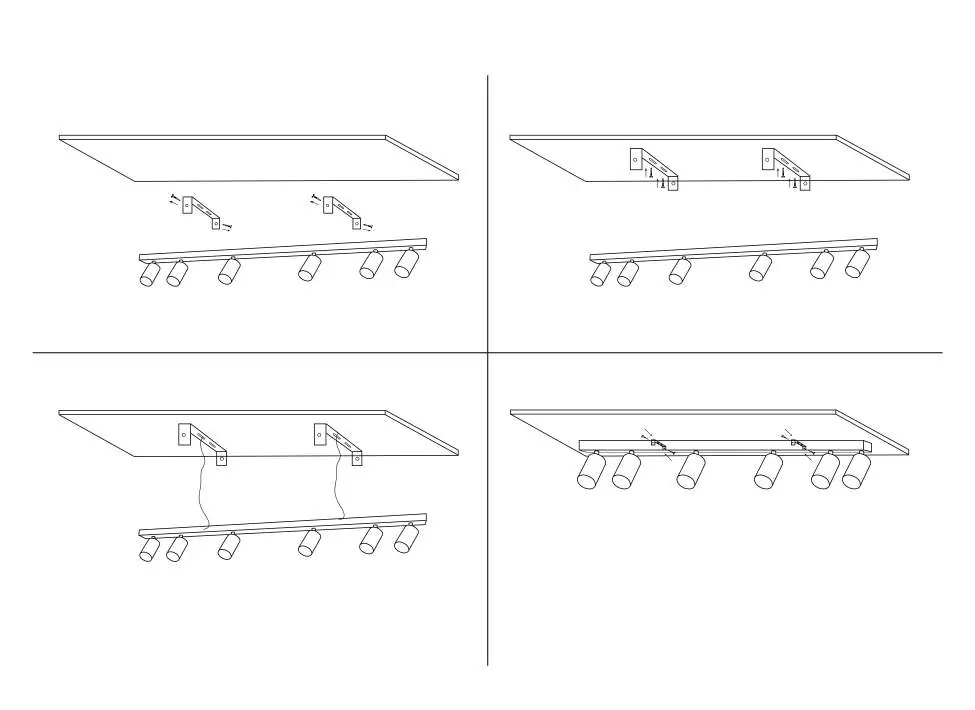
- Turn off the power supply and prepare the mounting area.
- Secure the mounting bracket to the ceiling or wall.
- Connect the electrical wiring according to standard safety procedures.
- Attach the luminaire body to the bracket and restore power.
Bulb replacement
The luminaire is designed for easy bulb replacement. The cylindrical body of the luminaire can be unscrewed, and each head is individually removable to facilitate the installation of new GU10 bulbs.
Maintenance
The surface of the luminaire does not require special maintenance. Simply wipe the surface with a soft cloth or dusting cloth to keep it clean.
Disposal
At the end of the technical life of the luminaire, disconnect it from the power supply, disassemble, and separate the individual parts before disposal. Hand over the separated waste to an authorized waste disposal organization.
Technical specifications
- Socket: GU10
- Power consumption: Max 6 x 9W
- Input voltage: AC 220-230V 50-60Hz
- Material: Aluminium, metal, plastic
- Warranty: 2 years
Manufacturer information
Immax
Practical help
Common problems
Installation difficulty
Ensure at least 2 people are performing the installation to handle the luminaire safely.
Warranty void
Do not tamper with the luminaire or perform improper installation; ensure a qualified worker performs the wiring.
Before use
- Ensure electricity is safely switched off at the fuses.
- Have at least 2 people available for safe installation.
- Prepare a soft mat to place the luminaire on during unpacking.
- Verify you have GU10 bulbs (max 6 x 9W).
Specs in practice
- Power consumption
- Maximum capacity is 6 bulbs, each up to 9W.
- Input voltage
- Standard AC 220-230V 50-60Hz power supply.
Images and diagrams
- Step 1: Turn off power and prepare mounting bracket.
- Step 2: Secure the mounting bracket to the surface.
- Step 3: Connect electrical wiring.
- Step 4: Attach the luminaire body to the bracket and turn power on.
Model compatibility
- Compatible with GU10 bulbs only.

Manual page author
Emily Carter
User documentation editor
Prepares concise manual descriptions and highlights the most useful setup, operation, and maintenance information for readers.