Industrial / Electrical
Immax 07538L Neo Pro 1-Button Smart Switch User Guide
Quick setup guide for the Immax 07538L 1-button smart switch, including installation steps, Bluetooth pairing, technical specifications, and safety precautions.
Table of contents
Quick guide from the manual
This document provides essential instructions for installing and configuring the Immax 07538L 1-button smart switch. The device requires a 230V power supply and must be installed by a qualified electrician in accordance with local regulations.
Installation
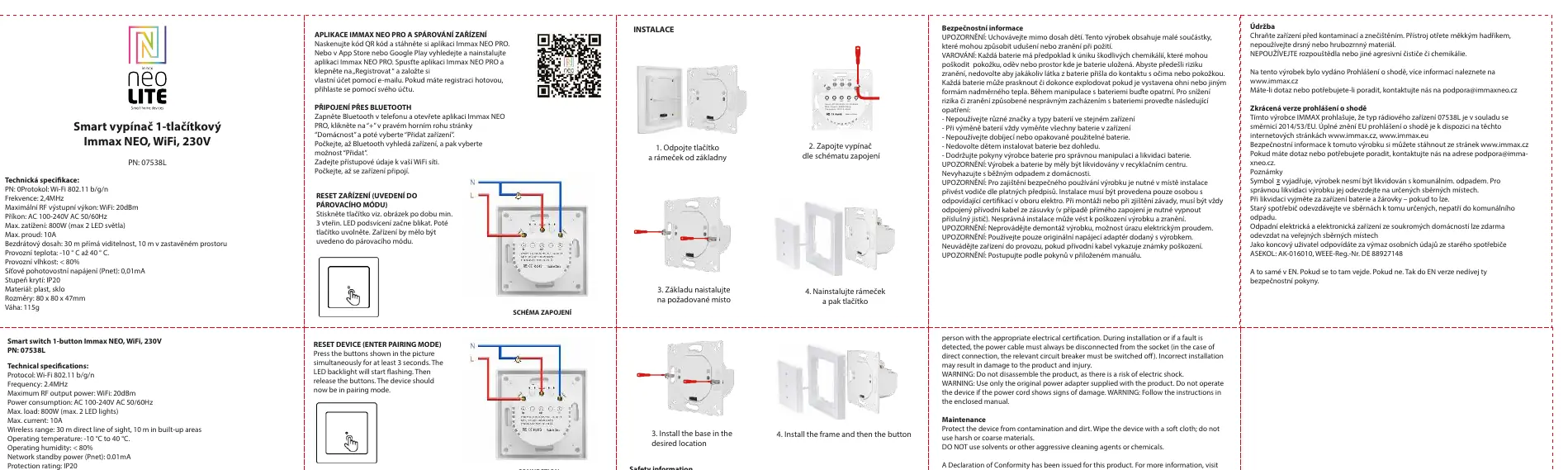
- Disconnect the button and frame from the base.
- Connect the switch according to the provided wiring diagram (L and N inputs).
- Install the base in the desired location.
- Install the frame and then the button.
App pairing and setup
To control the switch via your smartphone:
- Download the Immax NEO PRO app from the App Store or Google Play.
- Register an account using your email address.
- Turn on Bluetooth on your phone and open the app.
- Tap the + icon in the upper right corner of the Home page and select Add Device.
- Wait for the device to be discovered, select Add, and enter your WiFi network credentials.
Resetting the device
To enter pairing mode, press the button on the device for at least 3 seconds until the LED backlight starts flashing, then release the button.
Safety and maintenance
The device is rated IP20 and should be kept away from children. Do not disassemble the product to avoid the risk of electric shock. Clean the device only with a soft cloth; do not use solvents or aggressive chemicals. If the power cable shows signs of damage, do not operate the device.
Technical specifications
- Protocol: Wi-Fi 802.11 b/g/n
- Frequency: 2.4GHz
- Power supply: AC 100-240V 50/60Hz
- Max load: 800W (max 2 LED lights)
- Max current: 10A
- Operating temperature: -10°C to 40°C
- Dimensions: 80 x 80 x 47mm
Manufacturer information
Immax
Practical help
Common problems
Device not pairing
Ensure Bluetooth is enabled on your phone and the device is in pairing mode (LED flashing after holding the button for 3 seconds).
Device not working after installation
Verify that the wiring matches the connection diagram and that the circuit breaker is switched on.
Before use
- Ensure the power supply is disconnected before installation.
- Verify that the installation is performed by a qualified electrician.
- Check that your WiFi network is 2.4GHz.
- Download the Immax NEO PRO app.
- Ensure the device is within 10m of the router in built-up areas.
Specs in practice
- Max load 800W
- The maximum power capacity for connected lighting fixtures.
Images and diagrams
- The wiring diagram shows the L (Live) and N (Neutral) input terminals.
- The installation steps illustrate the physical separation of the button/frame from the base for mounting.
Model compatibility
- Requires 2.4GHz WiFi network.
- Compatible with Immax NEO PRO app.
- Designed for indoor use only.

Manual page author
Emily Carter
User documentation editor
Prepares concise manual descriptions and highlights the most useful setup, operation, and maintenance information for readers.