Industrial / Electrical
Immax 07540L Smart Switch for Blinds and Shutters User Guide
Quick setup and installation guide for the Immax 07540L smart switch. Includes wiring diagrams, pairing instructions, and technical specifications.
Table of contents
Manual images
Jump to the sectionQuick guide from the manual
This document provides essential instructions for the installation and configuration of the Immax 07540L smart switch designed for controlling blinds and shutters. The device requires professional electrical installation and connection to a 2.4GHz WiFi network for smart features.
Installation
Installation must be performed by a person with appropriate electrical certification. Always disconnect the power supply before starting work.
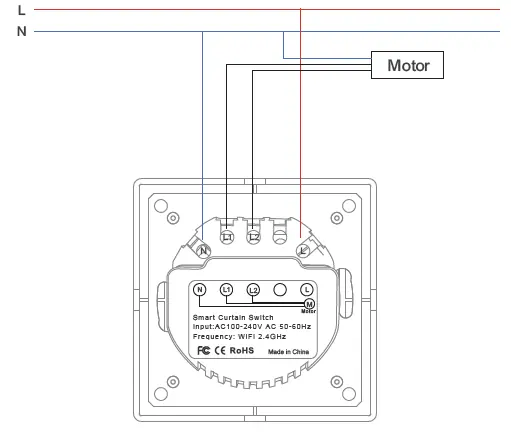
- Disconnect the button and frame from the base.
- Connect the switch according to the provided wiring diagram.
- Install the base in the desired location.
- Reattach the frame and the button.
Pairing and Setup
To connect the device to your smart home system:
- Download and install the Immax NEO PRO app from the App Store or Google Play.
- Register or log in to your account.
- Ensure Bluetooth is enabled on your phone.
- In the app, tap the + icon in the top right corner and select Add Device.
- Follow the on-screen instructions to enter your WiFi network details.
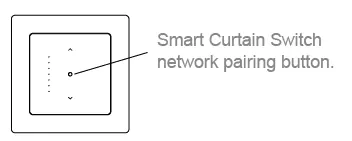
If the device needs to be reset to pairing mode, press the pairing button on the switch for at least 3 seconds until the LED backlight starts flashing.
Safety and Maintenance
The device is intended for indoor use only. Keep away from children as it contains small parts. Do not disassemble the product due to the risk of electric shock. Clean only with a soft, dry cloth; do not use aggressive chemicals or solvents.
Technical Specifications
- Protocol: Wi-Fi 802.11 b/g/n
- Frequency: 2.4MHz
- Power Supply: AC 100-240V 50/60Hz
- Max Load: 800W
- Max Current: 10A
- Wireless Range: 30m (direct line of sight), 10m (built-up area)
- Operating Temperature: -10°C to 40°C
- Protection Rating: IP20
Manufacturer information
Immax
Practical help
Common problems
Device not entering pairing mode
Ensure you are pressing the pairing button for at least 3 seconds until the LED backlight flashes.
Connection failure during setup
Verify that your phone has Bluetooth enabled and that you are connecting to a 2.4GHz WiFi network.
Before use
- Ensure the power supply is disconnected at the circuit breaker.
- Verify that the installation site has appropriate wiring.
- Download the Immax NEO PRO app.
- Ensure you have your WiFi network credentials ready.
Specs in practice
- Max Load: 800W
- The maximum power capacity the switch can handle for the connected motor.
- Wireless Range
- Up to 30m in open space, reduced to 10m in environments with walls or obstacles.
Images and diagrams
- The wiring diagram shows the connection of the Neutral (N) and Live (L) wires to the switch and the motor.
- The pairing button is located on the front panel of the switch.
Model compatibility
- Requires a 2.4GHz WiFi network.
- Compatible with the Immax NEO PRO application.

Manual page author
David Miller
Documentation analyst
Organizes user manual content into clear summaries, with attention to model details, product context, and everyday usability.