Lighting / Fixtures
Immax IDEAL LED Table Lamp with Multifunctional QI Charging User Guide
Quick guide for the Immax IDEAL LED table lamp, covering setup, touch controls, wireless charging, alarm settings, and battery replacement.
Table of contents
Manual images
Jump to the sectionQuick guide from the manual
The Immax IDEAL LED table lamp is a multifunctional lighting solution with integrated wireless charging and a clock/alarm display. The device comes fully assembled. Ensure you use the original power adapter and place the lamp on a stable, flat surface. The lamp arm can be adjusted vertically between 0° and 90°.
Device operation
The touch switch (B) controls all lighting functions:
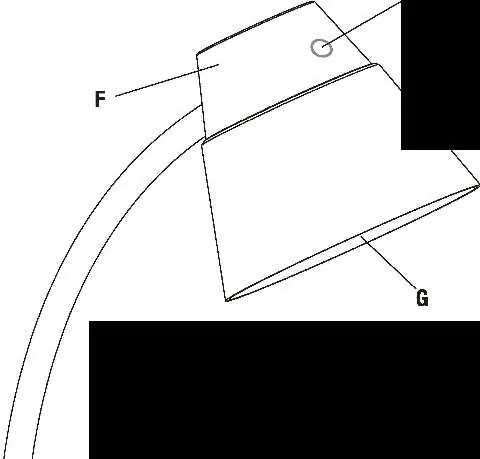
- On/Off: Touch once for level 1, twice for level 2, three times for level 3, and four times to turn off.
- Color Temperature: Press and hold switch (B) for three seconds to cycle through 5000K, 2700K, and 4000K modes.
Clock and alarm settings
Use the 'Setting Button' (C) to enter configuration modes, and the 'Up' (D) or 'Down' (E) buttons to adjust values.
- Clock: Hold (C) in normal mode to set 12/24h format, hour, and minutes.
- Calendar: Press (C) to display date, then hold (C) to set Year-Month-Day.
- Alarm: Press (C) twice to show A1, then hold (C) to set time. Use (D) to toggle the alarm on/off.
- Display Brightness: Press (E) to cycle through OFF, L1, L2, and L3 settings.
Wireless charging
The lamp features wireless charging areas (M) for mobile phones and (N) for headphones. Place the device face up in the center of the charging area. A red indicator light (S or V) will glow continuously when charging is active.
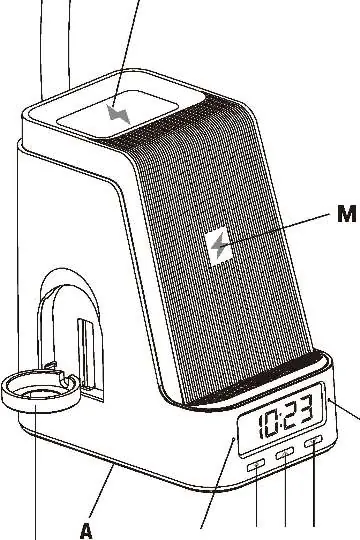
Watch charging stand
To charge a smartwatch, remove the cover (T) and insert your own wireless watch charger into the stand (P). Connect it to the USB-A or USB-C port (Q or R) located on the base.
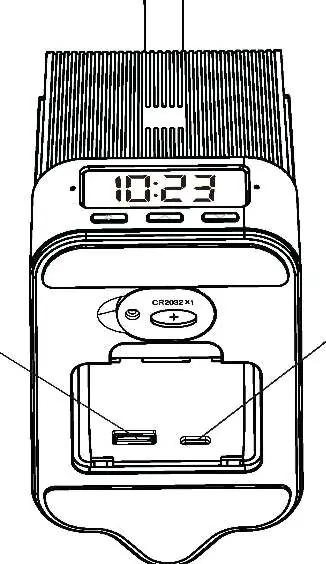
Battery replacement
The lamp uses a CR2032 button battery for memory settings. To replace it, use a screwdriver to remove the battery compartment cover (U) on the base. Insert the battery with the '+' side facing up.
Safety and maintenance
- Do not touch the LED panel (G) directly after prolonged use as it may be hot.
- Use only the original power cord.
- For indoor use only.
- If not in use for a long time, disconnect the power adapter.
- Clean with a soft cloth; avoid abrasive or chemical agents.
Manufacturer information
Immax
Practical help
Common problems
Light is flashing or making noise
Replace the power supply immediately as this indicates a malfunction.
Wireless charging not working
Ensure your device is Qi-certified and centered on the charging area (M) or (N).
Watch charger does not fit securely
Use one of the two included silicone covers over the charger before inserting it into the stand (P).
Battery leakage
If the battery leaks, replace it immediately and clean the contacts thoroughly.
Before use
- Place the lamp base (A) on a flat surface.
- Connect the power adapter (J) to the connector (K) at the rear.
- Plug the adapter (L) into a standard 120V socket.
- Verify the green indicator lights (S and V) flash and a beep sounds upon first connection.
- Ensure the lamp is not placed on an incline greater than 6 degrees.
Specs in practice
- Color Temperature (CCT)
- Adjustable between 5000K (cool), 2700K (warm), and 4000K (cool/warm).
- Battery Type
- CR2032 (3V) button battery used for clock/alarm memory.
Images and diagrams
- Diagram 1: Shows the vertical adjustment range of the lamp arm (0-90 degrees).
- Diagram 2: Illustrates the placement of the device on the wireless charging pad.
Model compatibility
- Wireless charging requires a Qi-certified device.
- Only one USB port can be used at a time; the first connected port takes priority.

Manual page author
Emily Carter
User documentation editor
Prepares concise manual descriptions and highlights the most useful setup, operation, and maintenance information for readers.