Home / Security
Immax 07543L NEO Smart Ultrasonic Liquid Level Sensor User Manual
Quick guide for the Immax 07543L NEO Smart Ultrasonic Liquid Level Sensor. Includes installation steps, app pairing, settings, and safety warnings.
Table of contents
Quick guide from the manual
This document provides essential instructions for installing and configuring the Immax 07543L Smart Ultrasonic Liquid Level Sensor. The device is designed to monitor liquid levels in tanks using ultrasonic technology and connects via WiFi to the Immax NEO PRO app.
Installation
Proper installation is critical for accurate readings. Follow these steps:
- Drill a 55 mm hole in the tank top.
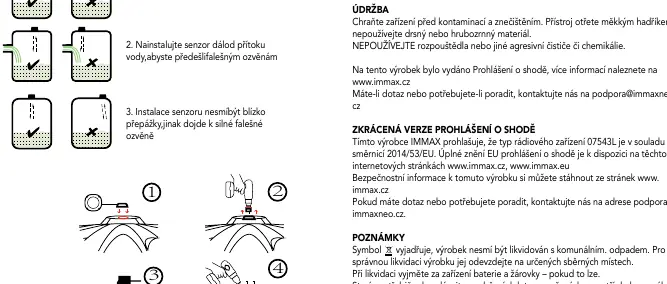
- Place the sensor over the hole, ensuring the ultrasonic sensors are not obstructed.
- Use a gasket between the sensor and the tank to ensure a proper seal.
- Secure the sensor to the tank using screws.
Important installation conditions:
- Install the sensor perpendicular to the liquid surface.
- Place the sensor away from water inlets to avoid false echoes.
- Do not install near tank walls or other internal obstacles that may cause strong false echoes.
Pairing with the App
- Connect the sensor to a power supply.
- Press and hold the button for at least 5 seconds to activate pairing mode (LED will flash).
- Open the Immax NEO PRO app on your mobile device (ensure you are connected to the same WiFi network).
- Tap '+' and select 'Add Device'.
- If prompted, enable Bluetooth to allow the app to automatically discover the sensor.
- Follow the on-screen instructions to enter your WiFi credentials and complete the pairing.
Settings
Configure the following parameters in the app:
- Installation height: Distance from the sensor to the bottom of the tank (A).
- Maximum liquid depth: Maximum height of the liquid in the tank (B).
- MAX setting: Level at which the maximum level alarm is triggered.
- MIN setting: Level at which the minimum level alarm is triggered.
Maintenance and Safety
Keep the device clean by wiping it with a soft cloth. Do not use solvents, aggressive cleaners, or coarse materials. The device is rated IP65. Ensure all electrical connections are performed by a certified professional in accordance with local regulations. Always disconnect power before installation or when a fault is detected.
Technical Specifications
- Protocol: WiFi 2.4 GHz IEEE 802.11b/g/n
- Detection Range: 0.1 m – 5 m
- Accuracy: ±0.02 m
- Operating Temperature: -20°C to +70°C
- Protection Rating: IP65
- Power Input: DC 5V 1A (Adapter included)
Manufacturer information
Immax
Practical help
Common problems
Device not connecting to WiFi
Ensure the device is in pairing mode (LED flashing) and that your phone is connected to the same 2.4GHz WiFi network.
Inaccurate level readings
Check that the sensor is installed perpendicular to the liquid surface and is not placed near the tank wall or water inlet, which can cause false echoes.
LED not lit
The device is not connected to the WiFi network. Check power supply and network status.
Before use
- Ensure the tank has a 55 mm hole for installation.
- Verify the WiFi network is 2.4 GHz.
- Download the Immax NEO PRO app.
- Ensure the sensor is placed away from obstacles and water inlets.
- Use only the original power adapter provided.
Specs in practice
- Detection range
- The sensor can measure liquid levels between 0.1 and 5 meters from the sensor head.
- Operating current
- The device requires more than 55 mA to function correctly.
Images and diagrams
- The sensor must be held perpendicular to the liquid surface.
- Avoid installing near water inlets to prevent false echoes.
- Avoid installing near partitions or tank walls to prevent false echoes.
Model compatibility
- Requires 2.4 GHz WiFi network.
- Compatible with Immax NEO PRO app.
- Requires professional installation for electrical wiring.

Manual page author
Emily Carter
User documentation editor
Prepares concise manual descriptions and highlights the most useful setup, operation, and maintenance information for readers.