Computers / Laptops
Inbox Zero 10391CFCB-GL 44 Inch Office Computer Desk
Comprehensive assembly and maintenance guide for the Inbox Zero 44-inch L-shaped office computer desk, featuring storage shelves and a side pocket.
Table of contents
Manual images
Jump to the sectionProduct Overview
The Inbox Zero 10391CFCB-GL is a versatile 44-inch office computer desk designed for modern workspaces. It features an L-shaped configuration with integrated storage shelving and a convenient side pocket for organizing documents or accessories. The desk is constructed with a sturdy metal frame and durable surfaces, providing a stable platform for your computer and office equipment.
Safety Guidelines
Safety is paramount during the assembly and use of this furniture. Please ensure that all small parts are kept out of the reach of children to prevent choking hazards. Do not allow children to climb or play on the desk, as this may cause it to tip over and result in serious injury. Always assemble the product in a spacious area and avoid placing unpackaged components directly on the ground to prevent surface damage. Wearing gloves during assembly is recommended to protect against sharp edges.
Assembly Instructions
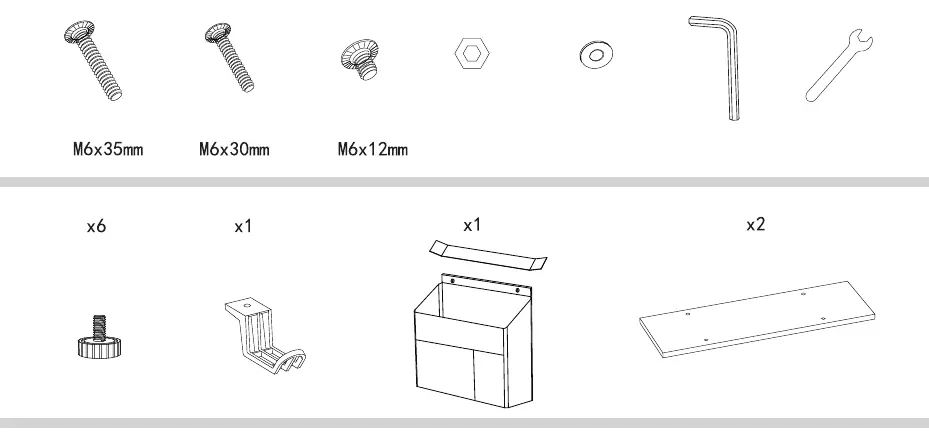
The assembly process involves connecting the metal frame components with the provided screws and hardware. It is crucial to align all screws with the pre-drilled holes loosely before tightening them individually to ensure structural integrity. Follow the numbered steps in the manual carefully, matching parts to their corresponding labels. Ensure that the desk is placed on a level, sturdy surface once assembly is complete. The desk includes adjustable feet to help stabilize it on uneven floors.
Maintenance and Care
To maintain the longevity of your desk, regularly check the tightness of all screws and retighten them if necessary. Avoid prolonged exposure to humid environments to prevent mold growth. Keep the desk away from direct heat sources, open flames, and direct sunlight. If liquids are spilled on the surface, wipe them clean immediately with a dry towel. Avoid using harsh chemicals or abrasive cleaners that could damage the finish. Do not exceed the maximum load capacity specified for the desk to prevent structural damage or failure.
Troubleshooting and Support
If you encounter any missing or damaged parts upon opening the package, stop the assembly process immediately and contact customer support. Ensure that all components match the parts list provided in the manual before beginning. If the desk feels unstable, verify that all screws are tightened correctly and that the adjustable feet are properly leveled.
Practical help
Common problems
Missing or damaged parts
Stop assembly immediately and contact customer support.
Desk feels unstable
Check that all screws are tightened and adjust the leveling feet at the base.
Difficulty aligning parts
Loosely align all screws with pre-drilled holes before tightening them individually.
Before use
- Verify all parts match the manual's parts list.
- Ensure assembly is performed in a spacious area.
- Wear gloves to protect against sharp edges.
- Check that all screws are tightened securely.
- Place the desk on a level and sturdy surface.
- Ensure the desk is not overloaded beyond its capacity.
- Keep small parts away from children.
Images and diagrams
- Steps 1-6 focus on building the main metal frame structure.
- Step 7 involves attaching the storage shelves to the frame.
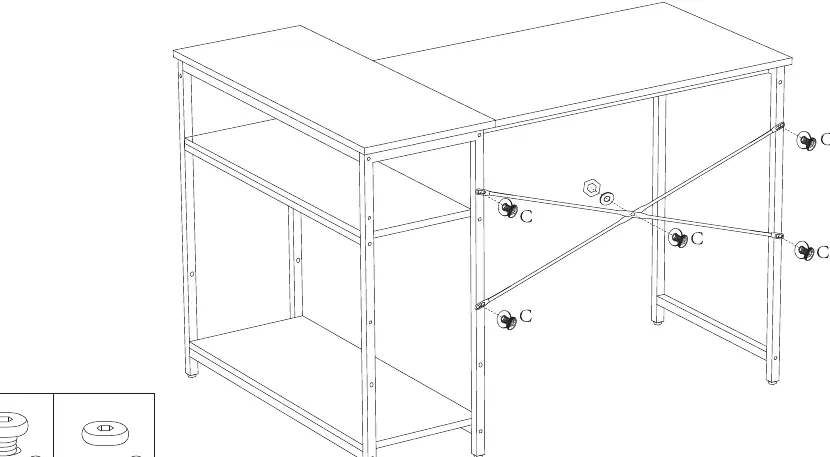
- Step 8 shows the installation of the cross-brace for stability.
- Step 9 details the attachment of the side pocket and accessory hook.
- Step 10 illustrates the two possible configurations for the desk layout.
Model compatibility
- The desk is designed for indoor office use only.
- Not intended for use in high-humidity environments.

Manual page author
David Miller
Documentation analyst
Organizes user manual content into clear summaries, with attention to model details, product context, and everyday usability.