Power / Batteries & Chargers
User Manual for INIU BI-B5 Power Bank
Quick guide for the INIU BI-B5 20000mAh Power Bank. Learn how to charge your devices, understand the LED display, and view technical specifications.
Quick answers from the manual
Quick answer
- The INIU BI-B5 is a 20000mAh power bank supporting 22.5W fast charging (PD 3.0 + QC 4.0). It features automatic device detection and an LED display for battery status. p. 2
Key actions
- Charge your devices by connecting them to the power bank with a suitable cable. p. 2
- Check battery level by pressing the power button. p. 2
First start
- The device detects charging automatically. Simply connect your device to the power bank. p. 2
Show 3 more answers Show less
Problems and fixes
Device not charging
Ensure the cable is connected properly.
p. 2Technical specifications
| Parameter | Value | Meaning | Pages |
|---|---|---|---|
| Capacity | 20000mAh | Total battery capacity | p. 2 |
| Max Output | 22.5W | Maximum charging speed | p. 2 |
Where to find it in the PDF
- Product Manual p. 2
Table of contents
Quick guide from the manual
The INIU BI-B5 is a 20000mAh portable charger designed for fast charging. It features automatic device detection, meaning charging begins as soon as you connect your device. The LED display provides real-time information on the remaining battery level.
Product Overview
The device includes the following components:
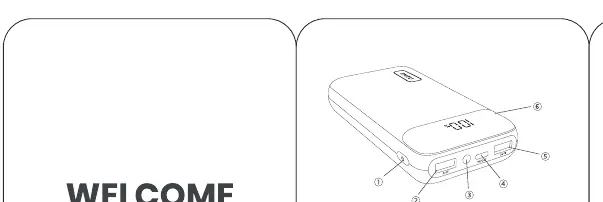
- Power Button: Located on the side, used to check the battery level.
- USB-C Port: Supports both input and output for charging.
- USB-A Ports: Used for output charging.
- LED Display: Shows the current battery percentage.
Charging Your Devices
To charge your devices, simply connect them to the power bank using a suitable cable. The power bank will automatically detect the device and begin charging. If the device does not start charging, press the power button to wake the power bank.
Turning On and Off
The power bank turns on automatically when a device is connected. To check the battery level, press the power button. The LED display will turn off automatically after approximately 20 seconds of inactivity.
Specifications
- Model: BI-B5
- Capacity: 20000mAh
- Max Output: 22.5W
- Supported Protocols: PD 3.0, QC 4.0
Warranty and Support
The product comes with a 30-day money-back guarantee and a 3-year warranty. For support, you can contact the manufacturer via email at [email protected].
Manufacturer information
INIU
Practical help
Common problems
Device not charging
Ensure the cable is securely connected to both the power bank and your device. The power bank detects charging automatically.
LED display is off
Press the power button on the side of the unit to check the current battery level.
Before use
- Check the battery level by pressing the power button
- Ensure you are using a compatible charging cable
- Verify that your device supports PD 3.0 or QC 4.0 for optimal fast charging speeds
Show more Show less
Specs in practice
- PD 3.0 + QC 4.0
- Fast charging standards supported by the power bank for efficient energy transfer.
Images and diagrams
- The power button is located on the side of the device
- The USB-C port is bidirectional (Input/Output)
- The LED display is located on the top surface
Model compatibility
- Compatible with iPhone 14, 13, 12 Pro, Samsung S21, Google, LG, and iPad tablets

Manual page author
Emily Carter
User documentation editor