Power / Power Banks
User Manual for INIU Power Bank BI-B41 / BI-B1
Quick start guide and user manual for the INIU Power Bank (models BI-B41 and BI-B1). Learn how to charge your devices, recharge the power bank, use the built-in LED light, and maintain battery health.
PDF source: Deutsch · summary: English
Quick answers from the manual
Quick answer
- This manual provides instructions for operating the INIU BI-B41/BI-B1 power bank, including how to charge devices, recharge the power bank, use the LED light, and perform basic maintenance. p. 4
Key actions
- Charge a device p. 4
- Recharge the power bank p. 4
- Toggle LED light p. 5
First start
- Connect the power bank to your device using a USB cable to start charging automatically. If it does not start, press the power button to restart the bank. p. 4
Show 4 more answers Show less
Problems and fixes
Device does not start charging automatically
Press the power button to restart the bank.
p. 4Maintenance and reset
- To preserve battery lifespan, use and recharge the power bank at least once every 6 months. p. 5
Technical specifications
| Parameter | Value | Meaning | Pages |
|---|---|---|---|
| Recommended Adapter | 5V/2A | Recommended adapter for best recharging performance. | p. 4 |
Where to find it in the PDF
- English Instructions p. 4, 5
- German Instructions p. 6, 7
- French Instructions p. 7, 8, 9
- Italian Instructions p. 9, 10
- Spanish Instructions p. 10, 11, 12
- Japanese Instructions p. 12, 13, 14
Table of contents
Quick Guide
This manual provides instructions for the INIU Power Bank models BI-B41 and BI-B1. The device features a power button, LED power indicators, a USB-C input/output port, a USB-A output port, and a built-in LED light.
Device Overview
The power bank is equipped with the following components:
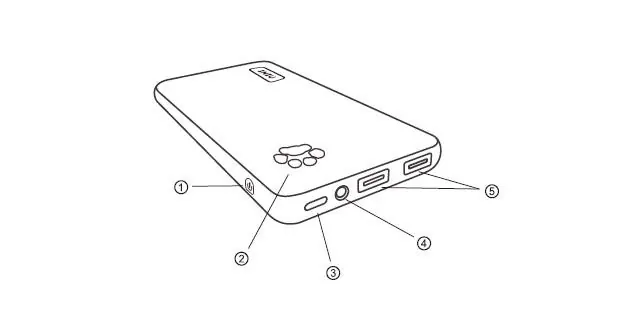
- Power Button: Used to restart the bank or toggle the LED light.
- Power Indicator: Displays the remaining battery level.
- USB-C Input & Output: Port for charging the power bank or charging your devices.
- LED Light: Built-in flashlight feature.
- USB-A Output: Port for charging your devices.
Charging Your Devices
To charge your phone or other devices:
- Connect your device to the power bank using a compatible USB cable.
- Charging will start automatically.
- If charging does not start, press the power button to restart the bank.
- The power bank will turn off automatically after 35 seconds if no device is connected.
Note: This model does not support QC, PD, or AFC fast charging protocols.
Recharging the Power Bank
To recharge the power bank:
- Connect the power bank to a power adapter using a USB-C cable.
- For optimal performance, use a 5V/2A adapter.
- The power bank will take approximately 5-8 hours to fully charge.
- The battery indicator lights will flash consecutively until all five lights remain solid, indicating a full charge.
Using the LED Light
The power bank includes a built-in LED light feature:
- To turn the LED light on, press the power button twice rapidly.
- To turn the LED light off, press the power button twice rapidly again.
Maintenance and Safety
To ensure the longevity of your power bank, follow these guidelines:
- Battery Health: Use and recharge the power bank at least once every 6 months to preserve battery lifespan.
- Handling: Do not drop, open, disassemble, or crush the device.
- Environment: Keep the power bank away from heat sources and liquids.
- Storage: Use the provided protective pouch to prevent scratches.
Manufacturer information
INIU
Practical help
Common problems
Device does not start charging automatically
Press the power button once to restart the power bank.
LED light does not turn on
Press the power button twice rapidly.
Power bank charges slowly
Ensure you are using a 5V/2A adapter for the best performance.
Before use
- Check the power bank for any physical damage
- Ensure you have a compatible USB cable for your device
- Charge the power bank fully before first use
- Verify your device's charging requirements
Show more Show less
Specs in practice
- 5V/2A Adapter
- Recommended input specification for optimal recharging speed.
Images and diagrams
- 1: Power Button
- 2: Power Indicator
- 3: USB-C Input & Output
- 5: USB-A Output
Model compatibility
- Not compatible with QC, PD, or AFC fast charging protocols.

Manual page author
David Miller
Documentation analyst