Lighting / Fixtures
User Manual for Innr SP 11X Smart Plug
Quick guide for the Innr SP 11X Smart Plug. Learn how to install, pair, manually operate, and factory reset your smart plug safely.
Table of contents
Manual images
Click an image to enlargeQuick guide from the manual
The Innr SP 11X Smart Plug is designed for indoor use to control connected electrical devices. The primary interface is a physical button on the side of the unit, which serves for manual switching, pairing, and factory resetting.
Safety Instructions
- Indoor use only: Do not use the device outdoors or in damp environments.
- Water protection: Do not immerse the product in water.
- Integrity: Do not disassemble the product. If any part is damaged, discontinue use immediately.
- Cleaning: Use a damp cloth for cleaning. Never use strong cleaning agents.
Installation
To install the smart plug, simply insert it into a standard wall power socket. Ensure the socket is easily accessible and the device is not obstructed.
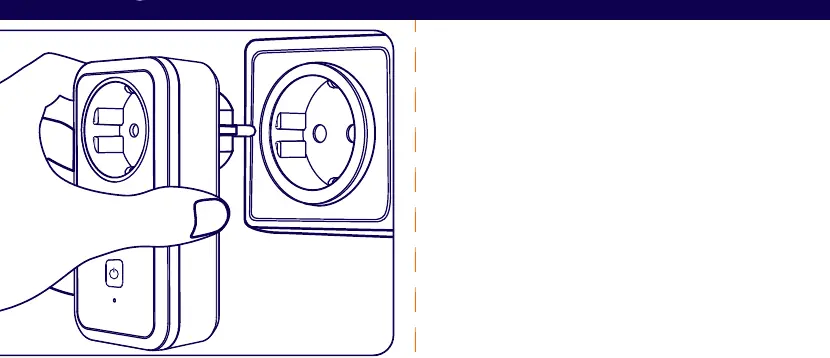
Manual Operation
You can manually turn the connected device on or off by pressing the button located on the side of the smart plug. A single press typically toggles the power state.
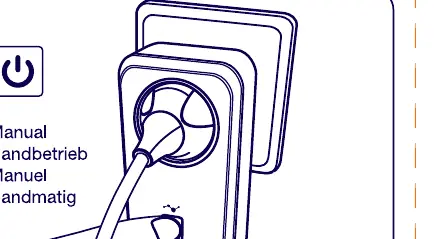
Pairing and Factory Reset
To reset the device or put it into pairing mode:
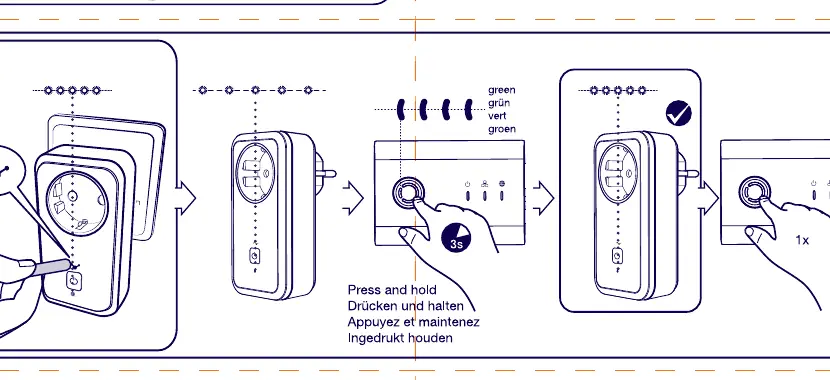
- Locate the button on the side of the smart plug.
- Press and hold the button for 3 seconds.
- The LED indicator will blink green, indicating the device is in pairing mode or has been reset to factory settings.
Manufacturer information
Innr Lighting
Practical help
Common problems
Device is not connecting or pairing
Perform a factory reset by pressing and holding the side button for 3 seconds until the LED blinks green.
Device is damaged
Do not use the product if any part is damaged; discontinue use immediately.
Before use
- Ensure the device is intended for indoor use only.
- Check the device casing for any signs of damage.
- Ensure the wall socket is compatible and accessible.
- Have a damp cloth ready for future cleaning needs.
Specs in practice
- 3s button hold
- Activates pairing mode and performs a factory reset.
- LED indicator
- Blinks green to confirm the device is in pairing/reset mode.
Images and diagrams
- The side button is the primary control for both manual switching and system resets.
- The LED indicator provides visual feedback during the pairing and reset process.
Model compatibility
- Indoor use only.
- Do not immerse in water.

Manual page author
David Miller
Documentation analyst
Organizes user manual content into clear summaries, with attention to model details, product context, and everyday usability.