Electronics / Networking
User Manual for Intellinet 561891 24-Port Gigabit PoE+ Switch
Quick guide for the Intellinet 561891 24-Port Gigabit PoE+ Switch. Learn about installation, LED indicators, slide switch modes, and technical specifications.
Quick answers from the manual
Quick answer
- The Intellinet 561891 is a 24-port Gigabit PoE+ switch with 2 SFP ports. It is plug-and-play, supports up to 30W per port (370W total budget), and features Green Ethernet technology. p. 2
Key actions
- Mounting the switch in a rack p. 3
- Grounding the switch p. 3
First start
- Connect the power cord to an AC outlet. p. 3
Show 3 more answers Show less
Problems and fixes
PoE LED flashing
Indicates abnormal power supply.
p. 2Technical specifications
| Parameter | Value | Meaning | Pages |
|---|---|---|---|
| Power Input | 100-240 V AC, 50/60 Hz | Supported power range | p. 3 |
| Total PoE Budget | 370 Watts | Maximum power capacity for PoE devices | p. 2 |
| Backplane Speed | 52 Gbps | Switching capacity | p. 2 |
Where to find it in the PDF
- Front Panel and LEDs p. 2
- Installation p. 3
Table of contents
Manual images
Click an image to enlargeQuick guide from the manual
The Intellinet 561891 is a 24-Port Gigabit Ethernet PoE+ Switch with 2 SFP ports. It is a plug-and-play device requiring no configuration. It features a backplane speed of 52 Gbps and supports up to 30 watts of power per port, with a total power budget of 370 watts. The device includes Green Ethernet technology to reduce power usage on unused ports and adjust power output based on cable length.
Front Panel and LED Indicators
The front panel contains the ports and LED indicators for monitoring status:
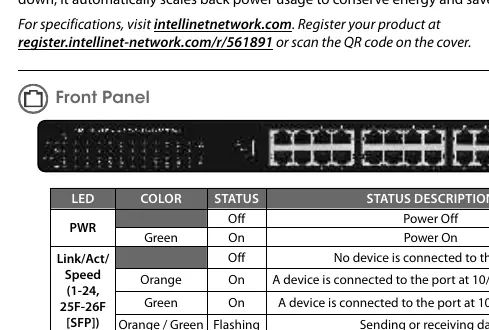
- PWR: Green light indicates the device is powered on.
- Link/Act/Speed (1-24, 25F-26F): Indicates connection status. Orange indicates 10/100 Mbps, Green indicates 1000 Mbps. Flashing indicates data transmission.
- PoE (1-24): Green light indicates the connected device is receiving power. A flashing light indicates an abnormal power supply.
Slide Switch Modes
The switch features a slide switch to change operation modes:
- Normal: Default mode; allows normal communication between ports 1–26.
- Flow Control: Disables the switch's flow-control function.
- VLAN: Isolates ports 1–24 from each other while allowing them to connect to ports 25 and 26.
Installation
Desktop Installation
Place the switch on a level surface capable of supporting its weight. Ensure at least 25 mm (approx. 1 inch) of clearance on all sides for proper ventilation. Keep the device away from sources of electrical noise such as radios or broadband amplifiers and within 100 m of connected network devices.
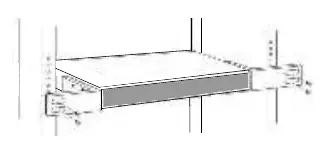
Rackmount Installation
The switch can be mounted in an EIA standard-sized, 19-inch rack. Attach the included mounting brackets to the side panels of the switch (one on each side) and secure them using the provided screws.
Rear Panel
The rear panel contains the power input and grounding features:
- Power: Connect the included power cord to an AC outlet (100–240 V, 50/60 Hz).
- Chassis Ground Column: Located next to the power connector, this terminal should be wired to an object that provides earth ground to ensure proper grounding. In rackmount installations, this is typically provided by the metal frame of the rack.
Manufacturer information
Intellinet Network Solutions
Practical help
Common problems
LED does not indicate link or activity
Check the connected device for proper setup, configuration, and power.
PoE LED is flashing
This indicates an abnormal power supply to the port.
Before use
- Ensure power source is 100-240V AC, 50/60 Hz
- Provide at least 25mm clearance for ventilation
- Use Cat5e/6/6a/8.x UTP/STP cables for optimal performance
- Verify rackmount brackets are securely attached for rack installation
- Connect chassis ground to an earth ground source
Show more Show less
Specs in practice
- Total PoE Budget
- 370 Watts maximum power available for all PoE devices.
- Max Power per Port
- Up to 30 Watts.
- Backplane Speed
- 52 Gbps total switching capacity.
Images and diagrams
- Front panel diagram shows port layout and LED locations
- Slide switch diagram illustrates the three operation modes
- Rackmount diagram shows bracket attachment points
Model compatibility
- Compatible with 10/100/1000 Mbps network devices
- Fits EIA standard-sized 19-inch racks

Manual page author
David Miller
Documentation analyst