Electronics / Networking
User Guide for Intellinet 2-Port Outdoor Vandalproof Gigabit Ultra PoE Extender
Quick guide for the Intellinet 2-Port Outdoor Vandalproof Gigabit Ultra PoE Extender (561648 v2). Includes connection instructions, mounting tips, and safety guidelines.
Quick answers from the manual
Quick answer
- The Intellinet 2-Port Outdoor Vandalproof Gigabit Ultra PoE Extender extends PoE signals up to 100m. Connect your PoE source to the 'PoE In' port and your device to the 'PoE Out' port. p. 1
Key actions
- Connect PoE source to PoE In port p. 1
- Connect PoE device to PoE Out port p. 1
Maintenance and reset
- Clean with a dry cloth only; do not use liquid or spray cleaners. p. 2
Technical specifications
| Parameter | Value | Meaning | Pages |
|---|---|---|---|
| Cable Type | Cat5e/6 | Required network cable standard | p. 1 |
| Max Cable Length | 100m | Maximum length per segment | p. 1 |
Where to find it in the PDF
- Installation and Overview p. 1
- Safety Instructions p. 2
Table of contents
Quick guide from the manual
This document provides installation and safety instructions for the Intellinet 2-Port Outdoor Vandalproof Gigabit Ultra PoE Extender (Model 561648 v2). The device is designed to extend PoE signals for network devices.
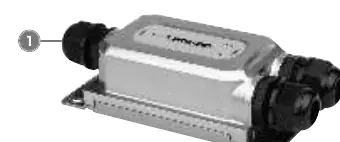
Connections
The device is designed for a simple setup:
- Connect a Cat5e/6 Ethernet cable (up to 100m) from your PoE source (injector or switch) to the PoE In port on the extender.
- Connect a second Cat5e/6 Ethernet cable (up to 100m) from the PoE Out port on the extender to your PoE-powered device (e.g., network camera).
Placement
The housing includes mounting holes. Use these to secure the extender in a suitable location to ensure efficient cabling.
Safety Instructions
- General: This device is not for non-critical applications. Do not use in environments where failure may result in serious harm.
- Handling: Keep away from children. Do not open the device.
- Electrical: Use only the original or approved power adapter. Keep away from moisture, heat, and direct sunlight.
- Cleaning: Unplug the device before cleaning. Use a dry cloth only; do not use liquid or spray cleaners.
- Maintenance: Do not attempt to repair the device yourself. Discontinue use if the device is damaged or exposed to liquid.
Manufacturer information
Intellinet Network Solutions
Practical help
Common problems
Device not powering on
Check the PoE source connection and ensure the cable length does not exceed 100m per segment.
Intermittent connection
Verify that all cable connections are secure and that the PoE source provides sufficient power.
Before use
- Verify the PoE source provides sufficient power for the connected device.
- Ensure Cat5e/6 Ethernet cables are used.
- Check that cable lengths do not exceed 100m per segment.
- Ensure the mounting surface is stable and suitable for outdoor use.
Images and diagrams
- The diagram illustrates the connection flow: PoE Source -> PoE In Port -> Extender -> PoE Out Port -> PoE Device.
Model compatibility
- Requires Cat5e or Cat6 Ethernet cabling.
- Maximum distance per segment is 100m.

Manual page author
David Miller
Documentation analyst
Organizes user manual content into clear summaries, with attention to model details, product context, and everyday usability.