Electronics / Networking
User Manual for Intellinet Network Solutions 16-Port Gigabit Ethernet Switch 561815
Quick guide for the Intellinet Network Solutions 16-Port Gigabit Ethernet Switch (Model 561815). Includes installation instructions for desktop and rackmount setups, LED status indicators, configuration modes, and technical specifications.
Table of contents
Manual images
Click an image to enlargeQuick Guide
The Intellinet Network Solutions 16-Port Gigabit Ethernet Switch is a plug-and-play device designed for small office or home networks. It features Green Ethernet technology (IEEE 802.3az) to reduce power consumption on inactive ports and automatically adjusts power output based on cable length. The switch supports a backplane speed of 32 Gbps and automatically senses link speeds of 10, 100, or 1000 Mbps.
Front Panel and LED Indicators
The front panel contains the network ports, the slide switch for mode selection, and LED indicators to monitor device status.
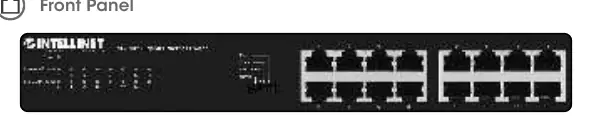
- Power LED: Off (Power Off), Green (Power On).
- Link/Act/Speed LED: Off (No device connected), Orange (Connected at 10/100 Mbps), Green (Connected at 1000 Mbps), Flashing (Sending/receiving data).
Slide Switch Modes
The slide switch allows you to configure the operation of the ports:
- Normal: Default mode; allows standard communication between ports 1–16.
- Flow Control: Disables the switch's flow-control function.
- VLAN: Isolates ports 1–14 from each other while allowing them to connect to ports 15 and 16; increases forwarding rate during broadcast storms.
- Extend: Allows ports 1–8 to achieve transmission distances up to 250 m (820 ft.) at a reduced speed of 10 Mbps.
Rear Panel and Power
The rear panel contains the power input and grounding terminal.
- Power: Connect the included power cord to an AC outlet (100–240 V, 50/60 Hz).
- Chassis Ground Column: Located next to the power connector. Use this to provide proper grounding for the switch. In rackmount installations, grounding is typically provided by the metal frame of the rack.
Installation
Desktop Installation
Place the switch on a level surface capable of supporting its weight. Ensure at least 25 mm (approx. 1 inch) of clearance around the device for ventilation. Keep the switch away from sources of electrical noise like radios or transmitters. Attach the included rubber feet to the bottom corners to increase stability.
Rackmount Installation
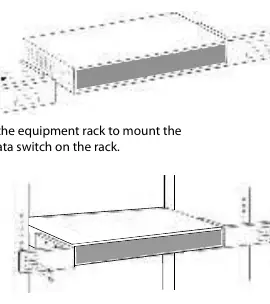
The switch is compatible with EIA standard 19-inch racks. Attach the mounting brackets to the side panels of the switch (one on each side) using the provided screws. Secure the switch to the equipment rack using the screws provided with the rack.
Safety and Regulatory
This equipment complies with FCC Class A limits for commercial environments. For detailed declarations of conformity, visit the manufacturer's support website at support.intellinet-network.com/barcode/561815.
Official resources from the manual
Manufacturer information
Intellinet Network Solutions
Practical help
Common problems
Power LED is off
Ensure the power cord is securely connected to the switch and a functioning AC outlet.
No Link/Act/Speed LED activity
Check that the network cable is properly connected to both the switch and the network device. Ensure the connected device is powered on.
Slow network speeds
Verify that the connected device and cable support Gigabit speeds. If using Extend mode, speed is limited to 10 Mbps.
Before use
- Verify AC power source (100-240V, 50/60 Hz).
- Ensure at least 25mm of clearance for ventilation.
- Attach rubber feet for desktop placement.
- Attach mounting brackets for rackmount installation.
- Connect network cables to the desired ports.
Specs in practice
- Green Ethernet
- Automatically reduces power usage on inactive ports and adjusts power based on cable length.
Images and diagrams
- Front Panel: Displays port layout, LED indicators, and the mode selection slide switch.
- Rackmount: Illustrates attaching brackets to the side panels for 19-inch rack installation.
- Rear Panel: Shows the location of the power input and the chassis grounding screw.
Model compatibility
- Supports 10/100/1000 Mbps auto-sensing.
- Compatible with EIA standard 19-inch racks.

Manual page author
Emily Carter
User documentation editor
Prepares concise manual descriptions and highlights the most useful setup, operation, and maintenance information for readers.