Electronics / Speakers & Soundbars
User Guide for ION Sport 320 Portable Speaker
Quick guide for the ION Sport 320 portable Bluetooth speaker. Learn how to set up, pair via Bluetooth, use Stereo-Link, charge devices, and troubleshoot your speaker.
Quick answers from the manual
Quick answer
- The ION Sport 320 is a portable Bluetooth speaker. To pair, hold the power button for 2 seconds, then select 'SPORT 320' on your device. p. 11
Key actions
- Pairing Bluetooth p. 11
- Using Stereo-Link p. 12
First start
- Charge the battery fully before first use (up to 10 hours). p. 4
Show 4 more answers Show less
Problems and fixes
Cannot connect via Bluetooth
Forget device in Bluetooth settings, power cycle speaker, and try again.
p. 16Maintenance and reset
- To reset Bluetooth, forget the device in your phone settings and re-pair. p. 16
Technical specifications
| Parameter | Value | Meaning | Pages |
|---|---|---|---|
| Output Power | 200 W (peak) | Peak audio output | p. 17 |
| Battery Life | Up to 100 hours | Estimated battery duration | p. 17 |
Where to find it in the PDF
- Features p. 7, 8, 9, 10
- Operation p. 11, 12, 13, 14
Table of contents
Manual images
Click an image to enlargeQuick guide from the manual
The ION Sport 320 is a portable Bluetooth speaker. Before using it for the first time, fully charge the battery for up to 10 hours. Ensure the unit is powered off during charging for optimal results. The speaker is water-resistant (IPX5) but not waterproof; avoid submerging it or placing it in standing water.
Setup and Battery Care
To maintain battery health, charge the unit completely after each use. Do not leave the battery level low for more than 3 months. For outdoor use, bring the speaker indoors during extreme weather and ensure all ports are dry before charging.





Operation
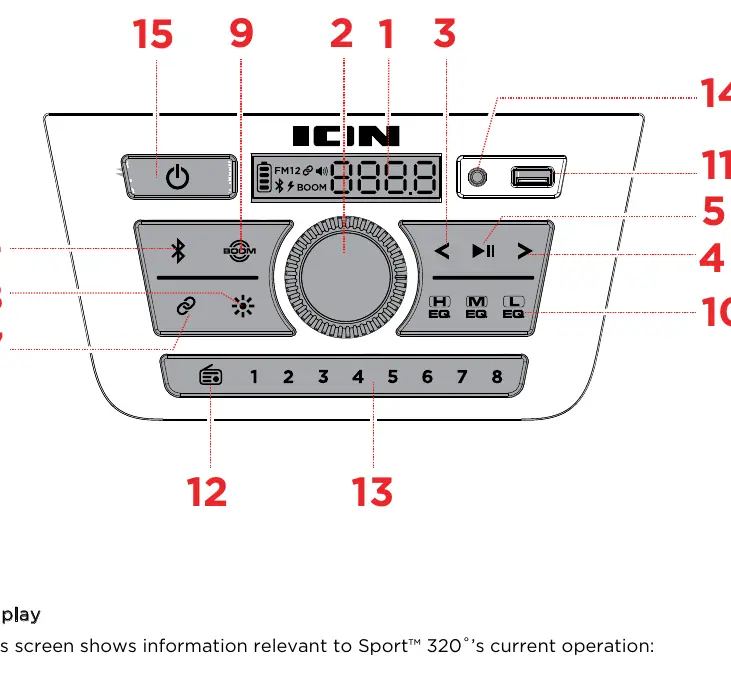
Bluetooth Connection
Power on the speaker by holding the Power button for 2 seconds. It will automatically enter pairing mode. Select SPORT 320 in your device's Bluetooth settings. If prompted for a code, enter 0000.
Stereo-Link
To sync two speakers for stereo sound:
- Press and hold the Stereo-Link button on both speakers.
- Wait for the link to be established (Link icon will appear on the display).
- Once linked, connect your Bluetooth device to the primary speaker.
Radio
Press the Radio button to cycle through FM1, FM2, and Off. Use the Previous/Next buttons to tune stations, and hold them to seek. Use the preset buttons 1-8 to save and recall favorite stations.
USB Charging
The speaker functions as a power bank. Connect your device to the USB-A port on the front or top panel. Note that USB charging only works when the speaker is powered on.
Troubleshooting
- Unit not charging: Ensure the power cable is securely connected to the power input and a wall outlet.
- Distorted sound: Lower the volume on your audio source.
- Too much bass: Adjust the EQ settings or turn off the BOOM function.
- Bluetooth connection issues: Forget the device in your phone's Bluetooth settings, power cycle the speaker, and try pairing again.
Manufacturer information
ION Audio
Practical help
Common problems
Unit not charging
Ensure the power cable is properly connected to the power input and the power outlet.
Sound is distorted
Try lowering the volume control of your sound source.
Too much bass
Adjust the tone or EQ control on your sound source or on the speaker to lower the bass level; ensure the BOOM function is off.
Cannot connect via Bluetooth
Forget 'SPORT 320' in your device's Bluetooth settings, power cycle the speaker, and try pairing again.
Before use
- Fully charge the battery for up to 10 hours before first use.
- Ensure the unit is dry before making any connections.
- Keep the speaker away from standing water or puddles.
- Power off the speaker while charging for optimal results.
Show more Show less
Specs in practice
- Output Power
- 200W peak power for audio output.
- Water Resistance
- IPX5 rating, capable of tolerating splashing water.
- Battery Life
- Up to 100 hours, depending on usage and volume.
- Bluetooth Version
- Version 5.0 with A2DP and AVRCP profiles.
Images and diagrams
- Front Panel: Contains main controls including Bluetooth, Radio, EQ, and Volume.
- Top Panel: Features the fast-charging USB port and secondary Aux input.
- Rear Panel: Contains the main power input.
Model compatibility
- USB charging requires the unit to be powered on.
- Stereo-Link mode disables Aux and FM modes.
- Do not connect to 'iPA159B_BLE' as it is reserved for the ION Sound Control app.

Manual page author
David Miller
Documentation analyst