Tools / Gas Refills
13.8V DC Regulated Power Supply User Guide
Quick guide for the Jaycar Electronics 13.8V DC Regulated Power Supply. Learn how to connect your equipment, understand safety precautions, and handle fuse replacements.
Table of contents
Quick guide from the manual
This document provides essential operating instructions and safety guidelines for the 13.8V DC Regulated Power Supply. It is designed for indoor use and features short-circuit protection with an automatic reset function.
Operation
Follow these steps to operate the power supply:
- Ensure the input power source is a 230V AC outlet.
- Connect your equipment's power cord to the output binding posts located on the front of the unit.
- Important: Ensure correct polarity. The red terminal is positive (+), and the black terminal is negative (-). Reversing polarity may damage your equipment.
- Turn the switch to the ON position; the light in the switch will illuminate.
Safety precautions
- Do not use the unit with equipment that requires more than the rated amperage.
- This unit is for indoor use only. Do not expose the unit to rain, moisture, water, or other liquids.
- Do not remove the cover. If the unit is damaged, return it to the dealer for repair.
- This is an economic type unit; do not use it at full load for long periods.
Maintenance and protection
The unit is protected by a fuse located at the rear. If the fuse is burnt out, replace it with a fuse of the same rating. The unit also features short-circuit protection with an automatic reset function.
Technical diagram and components
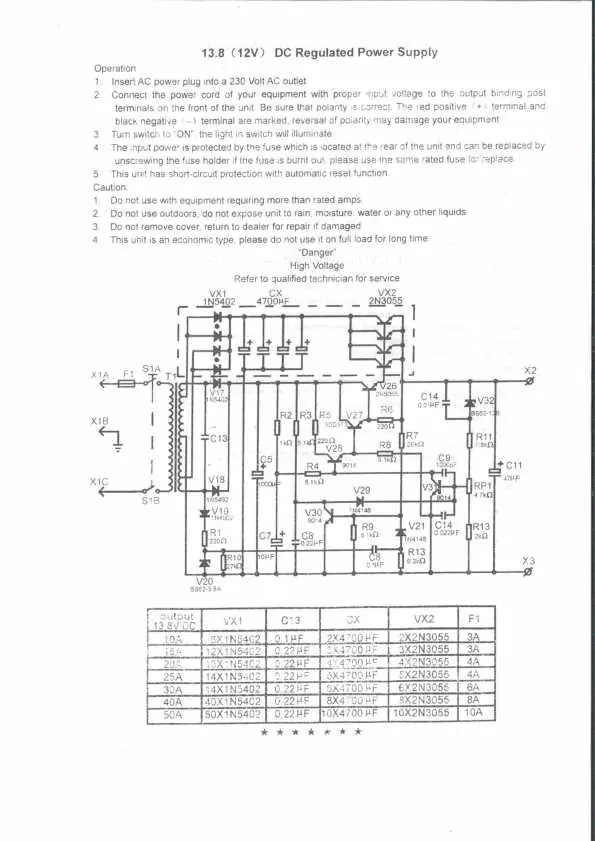
The manual includes a detailed circuit diagram. A table is provided to identify component values (VX1, C13, CX, VX2, F1) based on the specific output current of the unit (ranging from 10A to 50A).
Manufacturer information
Jaycar Electronics
Practical help
Common problems
Unit does not power on
Check the fuse located at the rear of the unit. If it is burnt, replace it with a fuse of the same rated value.
Equipment damaged after connection
Verify that the polarity is correct. The red terminal is positive (+) and the black terminal is negative (-). Reversing polarity can cause damage.
Before use
- Verify that the input power source is 230V AC.
- Check that the equipment to be powered does not exceed the unit's rated amperage.
- Ensure the operating environment is dry and indoors.
- Confirm that the unit is not being used at full load for extended periods.
Specs in practice
- Short-circuit protection
- An internal safety feature that automatically resets the unit if a short circuit occurs.
Images and diagrams
- The circuit diagram illustrates the internal electrical components including the transformer, diodes, and capacitors.
- The table at the bottom of the diagram specifies the correct component values (VX1, C13, CX, VX2, F1) required for different output current capacities (10A to 50A).
Model compatibility
- This is an economic type power supply; avoid continuous operation at full load.
- Ensure the connected equipment's current requirements do not exceed the unit's rating.

Manual page author
David Miller
Documentation analyst
Organizes user manual content into clear summaries, with attention to model details, product context, and everyday usability.