Computers / PC Components
User Manual for Cougar GEM Series Power Supply Unit
Quick guide for the Cougar GEM Series power supply unit. Includes installation steps, safety warnings, troubleshooting, and technical specifications for models GEM1050 and GEM1200.
Table of contents
Quick Guide from the Manual
The Cougar GEM Series is a high-efficiency, modular power supply unit designed for PC systems. Before installation, ensure the power switch is set to '0' and the unit is disconnected from the power network. Use only the provided power cord and screws. The unit features a Zero Fan mode for noise control and supports PCI Express 3.0 graphics cards.
Safety Warnings
- Never open the PSU cover: High voltage inside poses a life-threatening danger. Opening the unit voids the warranty.
- Disconnect power: Always switch the I/O button to '0' and unplug the power cord before working on the PSU or PC.
- Ventilation: Ensure ventilation slots are not covered or clogged. Keep the PC away from direct heat sources.
- Moisture: Protect the PSU against moisture.
- Adapters: Avoid using adapters such as 4Pin Molex to 6+2Pin PCI-Express or SATA to 4Pin Molex.
Installation
- Place the PSU into the designated spot within the PC case and secure it using the supplied screws.
- Insert the mainboard supply plugs (20/24 pin, 4 pin, and 8 pin if applicable) into the respective slots.
- Connect disk drives and graphics cards to the PSU.
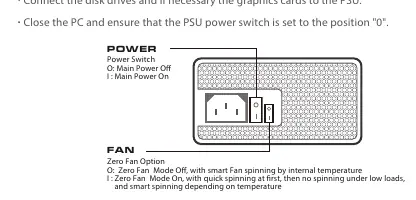
- Close the PC case and ensure the PSU power switch is set to '0'.
- Connect the PSU to the power network using the supplied power cord.
- Turn on the PSU switch and start your PC.
Fan Modes
The PSU features a Zero Fan function:
- O (Zero Fan Mode Off): Smart fan spinning based on internal temperature.
- I (Zero Fan Mode On): Quick spinning at start, then no spinning under low loads, with smart spinning depending on temperature.
Troubleshooting
If the system does not start after installation:
- Check the power cord and wall socket/multiple socket strip.
- Verify that the multiple socket strip can supply the necessary power.
- Check all internal PC connections to ensure cables are correctly seated.
- Check components for possible short-circuits or defects.
- Verify compatibility of mainboard chipsets with memory and graphics card solutions.
Specifications
The GEM series is suitable for 100-240V~/50-60 Hz operation. Ambient temperature should not exceed 40°C. Operating humidity should be between 20% and 85%.
Warranty
Cougar provides a 5-year limited warranty on the GEM series against manufacturing defects. To claim warranty service, contact the retailer where the PSU was purchased with a copy of the invoice and an error description. The warranty does not cover damages due to acts of nature, misuse, negligence, or unauthorized modification.
Practical help
Common problems
System does not start after installation
Check the power cord, wall socket, and all internal PC connections. Ensure the PSU switch is set to 'I' and verify component compatibility.
Short-circuit or defect
Check components for defects and ensure compatibility with mainboard chipsets. Do not attempt to repair the PSU yourself.
Before use
- Ensure the PSU switch is set to '0' before installation.
- Use only the provided power cord.
- Verify that ventilation slots are not covered.
- Ensure the ambient temperature does not exceed 40°C.
- Check that all cables are correctly connected to the mainboard and components.
Specs in practice
- 80-Plus Gold
- Indicates up to 91% efficiency for reduced electricity consumption.
- Zero Fan Mode
- Optional fan function; 'O' is Off (smart spinning), 'I' is On (quick spinning at start, then smart).
- Operating Temperature
- Must be between +10°C and +40°C.
Images and diagrams
- Power Switch: 'O' is Main Power Off, 'I' is Main Power On.
- Zero Fan Mode Switch: 'O' is Zero Fan Mode Off, 'I' is Zero Fan Mode On.
Model compatibility
- Supports PCI Express 3.0 graphic cards with 6+2pin connectors.
- Avoid using adapters like 4Pin Molex to 6+2Pin PCI-Express.

Manual page author
Emily Carter
User documentation editor
Prepares concise manual descriptions and highlights the most useful setup, operation, and maintenance information for readers.