Electronics / Speakers & Soundbars
JBL Control 1Xtreme Loudspeaker User Manual
Quick guide for the JBL Control 1Xtreme loudspeaker. Learn about proper speaker placement, wall-mounting, wiring connections, and technical specifications.
Quick answers from the manual
Quick answer
- Connect the (+) terminal on the speaker to the (+) terminal on the amplifier, and the (-) terminal on the speaker to the (-) terminal on the amplifier. Ensure polarities match to avoid poor sound quality. p. 3
Key actions
- Connect speaker wires matching (+) to (+) and (-) to (-). p. 3
- Position front speakers at a 45-degree angle toward the listening area. p. 2
Problems and fixes
No sound from any speaker
Check that the receiver/amplifier is on, a source is playing, and the receiver is operating correctly.
p. 3
No or low bass output
Ensure the polarities (+ and -) of the left and right speaker inputs are connected properly.
p. 3Technical specifications
| Parameter | Value | Meaning | Pages |
|---|---|---|---|
| Frequency Response | 80Hz – 20kHz | The range of frequencies the speaker can reproduce. | p. 4 |
| Nominal Impedance | 8 Ohms | Electrical resistance of the speaker. | p. 4 |
Where to find it in the PDF
- Speaker Placement p. 2
- Speaker Connections p. 3
- Specifications p. 4
Table of contents
Manual images
Click an image to enlargeQuick guide from the manual
The JBL Control 1Xtreme is a compact loudspeaker designed for home audio systems. Key setup requirements include proper polarity when connecting wires to your amplifier and correct placement to ensure optimal sound quality. These speakers are video-shielded, making them safe to place near televisions or video monitors.
Speaker placement
Proper positioning is essential for the best audio performance:
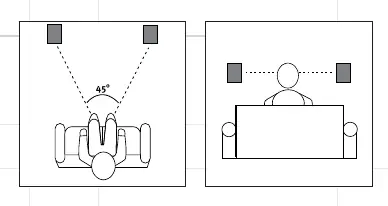
- Front speakers: Because the Control 1Xtreme is video-shielded, it can be placed near a television or video monitor. Position them at a 45-degree angle toward the listening area.
- Rear speakers: These can be placed behind the listening area.
Wall-mounting
The speakers are designed for wall-mounting. Please note the following:
- This product is not intended for ceiling mounting.
- Optional wall-mount brackets are available from JBL.
- If you need assistance or brackets, contact your dealer or visit www.jbl.com.
Speaker connections
To ensure correct sound reproduction, follow these wiring steps:
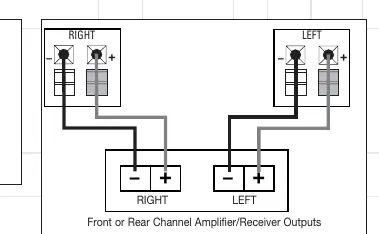
- Identify the (+) and (-) terminals on both the speaker and the amplifier.
- Connect the (+) terminal on the speaker to the (+) terminal on the amplifier.
- Connect the (-) terminal on the speaker to the (-) terminal on the amplifier.
- Warning: Wiring "out of phase" (reversing polarities) will result in thin sound, weak bass, and a poor stereo image.
Troubleshooting
If you encounter issues with your audio system, check the following:
- No sound from any speaker: Ensure the receiver/amplifier is powered on and a source is playing. Verify the operation of your receiver/amplifier.
- No sound from one speaker: Check the Balance control on your receiver. Inspect all wires and connections for damage (frayed, cut, or punctured).
- System shuts off at high volume: Check all connections. If using more than one pair of speakers, verify the minimum impedance requirements of your receiver/amplifier.
- No or low bass: Ensure the polarities (+ and -) of the left and right speaker inputs are connected correctly.
Technical specifications
- Frequency Response: 80Hz – 20kHz
- Nominal Impedance: 8 Ohms
- Recommended Amplifier Power: 10 – 80 Watts RMS
- Sensitivity: 89dB
- Low-Frequency Driver: 4" (100mm), Shielded
- High-Frequency Driver: 1/2" (12mm) Titanium-laminate, shielded
- Dimensions: 9" x 6-1/16" x 5-7/16" (228mm x 155mm x 139mm)
- Weight: 5.2 lb / 2.4kg (each)
Official resources from the manual
Manufacturer information
JBL
Practical help
Common problems
No sound from one speaker
Check the Balance control on your receiver and inspect all wires for cuts, frays, or loose connections.
System shuts off when volume is increased
Check for shorted wires and verify that your receiver supports the impedance of the speakers being used.
Thin sound or weak bass
Check that speaker polarities (+ and -) are matched correctly on both the speaker and the amplifier.
Before use
- Ensure the receiver/amplifier is turned off before making connections.
- Verify that you have speaker wire (not included).
- Check that the amplifier impedance is compatible with 8 Ohm speakers.
- Ensure the mounting surface is suitable for wall-mounting (not ceiling).
Specs in practice
- Nominal Impedance: 8 Ohms
- The standard electrical resistance of the speaker; ensure your amplifier is compatible with 8 Ohm loads.
- Recommended Amplifier Power: 10 – 80 Watts RMS
- The range of power the speaker is designed to handle safely.
- Video-shielded
- The speaker is protected against magnetic interference, allowing placement near CRT televisions without distorting the picture.
Images and diagrams
- The wiring diagram shows connecting the (+) and (-) terminals of the speaker directly to the corresponding (+) and (-) terminals on the amplifier.
- Placement diagrams illustrate the recommended 45-degree angle for front speakers and general positioning for rear speakers.
Model compatibility
- Not intended for ceiling mounting.
- Video-shielded design allows placement near video monitors.

Manual page author
David Miller
Documentation analyst
Organizes user manual content into clear summaries, with attention to model details, product context, and everyday usability.