Electronics / Speakers & Soundbars
JBL 4309 Studio Monitor Loudspeaker Owner's Manual
Comprehensive user manual for the JBL 4309 Studio Monitor Loudspeaker. This guide provides essential instructions on placement, connection methods (single-wire, bi-wire, and bi-amplified), UHF tone control adjustments, and proper...
Quick answers from the manual
Quick answer
- The JBL 4309 is a 2-way bookshelf studio monitor. This manual provides instructions for placement, single-wire, bi-wire, and bi-amplified connections, as well as UHF tone control adjustments and maintenance. p. 3, 4, 6, 7
Key actions
- Adjust UHF trim p. 7
- Connect speakers (Single-wire) p. 4
Problems and fixes
Poor stereo imaging or diminished bass
Do not reverse polarities (+ to - or - to +) when making connections.
p. 4Maintenance and reset
- Clean woofer cone p. 7
Technical specifications
| Parameter | Value | Meaning | Pages |
|---|---|---|---|
| Impedance | 4 Ohms | Nominal impedance | p. 8 |
| Recommended Amplifier Power | 25 - 150 WRMS | Power handling range | p. 8 |
Where to find it in the PDF
- Safety Instructions p. 2
- Placement and Positioning p. 3
- Connections p. 4, 6, 7
- Specifications p. 8
Table of contents
Manual images
Click an image to enlargeQuick guide from the manual
The JBL 4309 is a 2-way bookshelf studio monitor designed for home use. To achieve the best performance, ensure the speakers are placed correctly, connections are made with high-quality wire, and the UHF trim is adjusted to suit your room acoustics. Always turn off and unplug system components before making any connections.
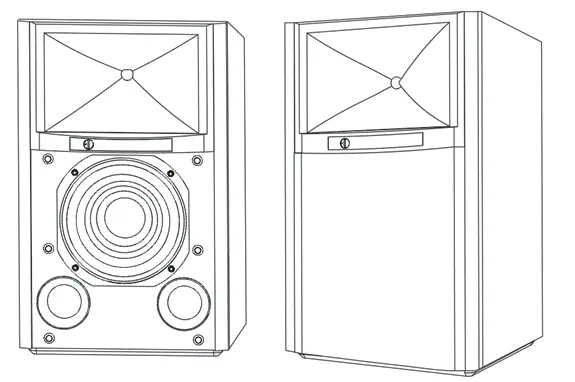
Placement and positioning
Proper placement is critical for an accurate stereo soundstage:
- Distance: Place speakers 1.8–2.4m (6–8 feet) apart. If placed further apart, angle them toward the listening position.
- Angle: The angle between the listener and the speakers should be between 40 and 60 degrees.
- Height: Position each speaker so the horn center is approximately at ear level.
- Environment: Avoid placing speakers near heat sources, in humid/dusty areas, or in direct sunlight.
- Walls: For best performance, place speakers at least 50cm (20 inches) away from side walls. Bass output generally increases as the speaker is moved closer to a wall or corner.
Connections
The 4309 features two sets of input terminals connected by gold-plated jumper straps. Caution: Ensure all system components are turned off and unplugged before connecting.
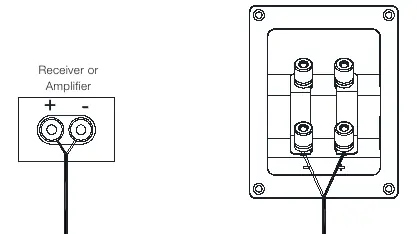
- Basic Single-Wire Connection: Connect the amplifier to either set of terminals. Do not remove the jumper straps.
- Bi-Wiring: Remove the jumper straps. Connect the high-frequency and low-frequency inputs to the amplifier using separate wires.
- Bi-Amplified Wiring: Remove the jumper straps. Connect the high-frequency and low-frequency inputs to separate amplifier channels.
Important: Do not reverse polarities (+ to - or - to +) as this will cause poor stereo imaging and diminished bass performance.
Controls and adjustments
The 4309 features a front-panel UHF trim control. This allows you to balance the ultra-high frequency (UHF) range relative to the woofer based on your room's acoustics or personal taste. To return to factory settings, set the control to 0 dB.

Caring for your speakers
- Wipe the cabinet with a clean, dry cloth. Do not use volatile liquids like benzene, paint thinner, or alcohol.
- Do not spray insecticide near the cabinet.
- Clean the grille fabric using a vacuum cleaner set to low suction. Do not wash the grille in water.
- If the woofer cone becomes dusty, gently sweep it clean with a soft, dry calligraphy or paint brush. Do not use a damp cloth.
Technical specifications
- Type: 2-way bookshelf loudspeaker
- Low-frequency driver: 6.5" (165 mm) Pure Pulp cone woofer
- High-frequency driver: 1" (25mm) 2401H-2 annular ring, Teonex diaphragm compression driver
- Recommended amplifier power: 25 - 150 watts RMS
- Impedance: 4 Ohm
- Frequency response: 42 Hz - 30 kHz (-6 dB)
- Sensitivity: 87 dB (2.83 V @ 1 m)
Manufacturer information
JBL
Practical help
Common problems
Poor stereo imaging or diminished bass performance
Check for reversed polarity (+ to - or - to +) on your connections. Ensure all wires are connected correctly.
Speakers not operating properly
If using bi-wire or bi-amp, ensure jumper straps are removed. If using single-wire, ensure jumper straps are firmly tightened.
Dust on woofer cone
Use a soft, dry calligraphy or paint brush to gently sweep it clean. Do not use a damp cloth.
Before use
- Ensure all system components are turned off and unplugged.
- Verify polarity (+ to +, - to -) for all connections.
- If bi-wiring or bi-amping, remove the gold-plated jumper straps.
- If single-wiring, ensure jumper straps are firmly tightened.
- Place speakers 1.8-2.4m apart, angled toward the listening position.
Specs in practice
- Recommended Amplifier Power
- 25-150 Watts RMS. Use an amplifier within this range for optimal performance.
- Frequency Response
- 42 Hz - 30 kHz. The range of frequencies the speaker can reproduce.
Images and diagrams
- Placement diagram shows speakers 1.8-2.4m apart with a 40-60 degree angle to the listener.
- Connection diagrams illustrate how to connect wires for single-wire, bi-wire, and bi-amp configurations.
- UHF Trim control diagram shows the adjustment range from -1.0 to +1.0 dB.
Model compatibility
- Compatible with bare wire, spade connectors, pin connectors, and banana connectors.

Manual page author
Emily Carter
User documentation editor
Prepares concise manual descriptions and highlights the most useful setup, operation, and maintenance information for readers.