Electronics / PA Systems
User Manual for JBL EON 210P Portable PA System
Comprehensive user guide for the JBL EON 210P Portable PA System. Includes setup instructions, module detachment, connection diagrams, mixer operation, troubleshooting, and technical specifications.
Quick answers from the manual
Quick answer
- The JBL EON 210P is a portable PA system with a detachable powered mixer. To set up, detach the mixer and storage modules, connect the mixer to the speakers using the provided unshielded cables, verify the voltage selector switch, and connect your audio sources. p. 9, 10
Key actions
- Detaching modules p. 9
- Connecting speakers p. 10
- Changing voltage p. 8
First start
- Initial setup p. 9, 10
Show 3 more answers Show less
Problems and fixes
No sound
Check AC power, volume levels, and cable connections.
p. 20
Distorted sound
Check for input overload (Peak LED) and lower channel volume.
p. 20Technical specifications
| Parameter | Value | Meaning | Pages |
|---|---|---|---|
| System Power | 300W | 2 x 150W Sine Wave Burst | p. 17 |
Where to find it in the PDF
- Safety Instructions p. 4, 5
- Getting Started p. 9, 10
- Specifications p. 17
Table of contents
Manual images
Click an image to enlargeQuick guide from the manual
The JBL EON 210P is a portable PA system featuring a detachable powered mixer and storage module. To set up the system, detach the modules from the speakers, mount the speakers on stands if desired, connect the mixer to the speakers using the provided unshielded cables, and verify the voltage selector switch before powering on.
Getting started
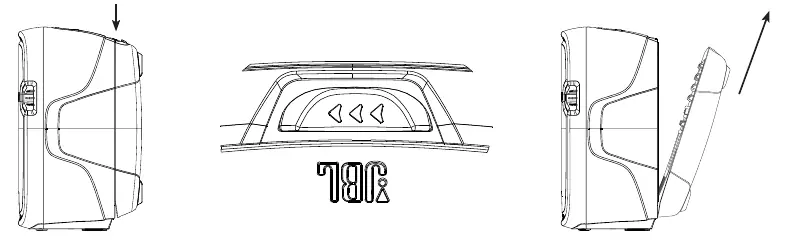
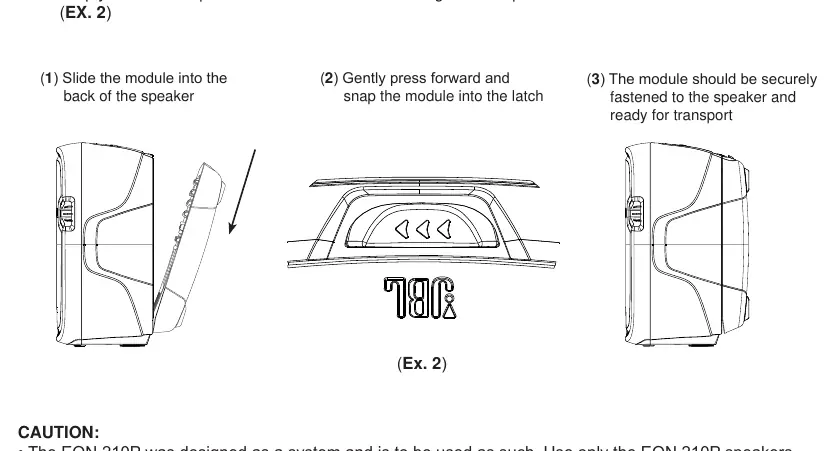
The system consists of two speakers with detachable modules: one containing the powered mixer and the other for storage. To detach, press and slide the button on the top of the speaker and lift the module. When storing, reverse this process to snap the modules back into the speaker enclosures.
Connections
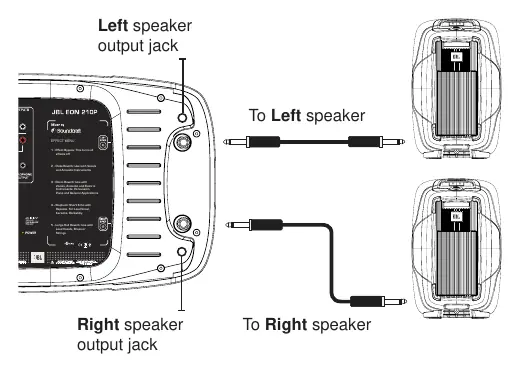
Mixer to Speakers: Connect the provided unshielded speaker cables from the 1/4" output jacks on the right side of the mixer to the jacks on the back of the speakers.
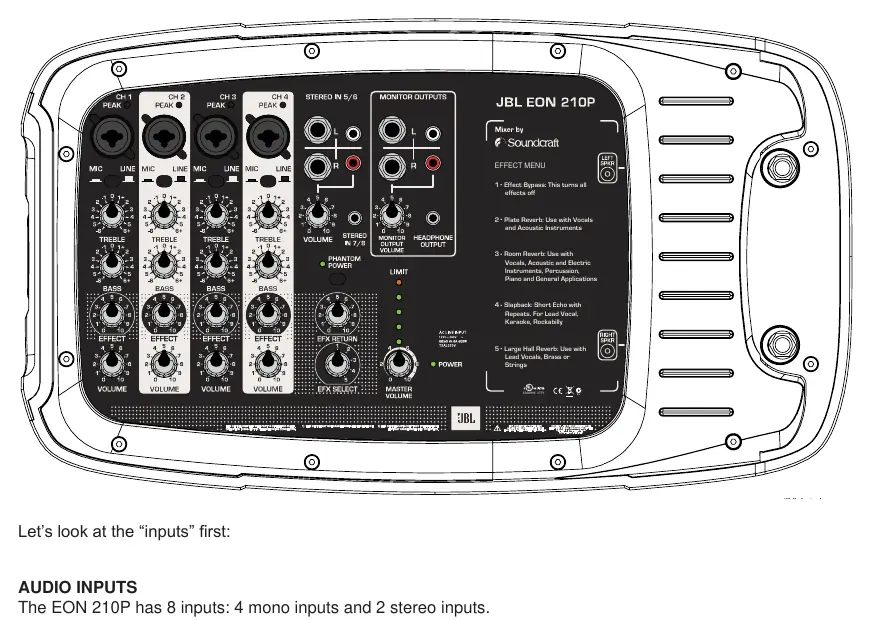
Audio Inputs: The mixer features 8 inputs: 4 mono mic/line inputs (XLR/1/4" combo) and 2 stereo inputs (5/6 and 7/8). Use the MIC/LINE switch for dynamic microphones. For condenser microphones, engage the PHANTOM POWER button.
Outputs: The system includes monitor outputs (1/4" and RCA) for recording devices or additional speakers, and a 3.5mm headphone output.
Mixer operation
The mixer allows for tone control (Treble/Bass), effect application, and volume management. The "Peak LED Ladder" provides a visual indication of power usage; if the red LED stays on, you are approaching maximum output. Use the "EFFECT" control on each channel and the "EFX RETURN" to adjust the global effect level.
Voltage and power
Before first use, verify the voltage selector switch on the mixer module matches your local power (115V or 230V). Ensure the Master Volume is set to 0 before turning the power switch on.
Troubleshooting
If you experience no sound, check AC power, ensure volume controls are turned up, and verify cable connections. If sound is distorted, check for input overload (Peak LED) and reduce channel or source volume. For hum or buzz, check grounding or use a DI box for long cable runs.
Safety and maintenance
Clean the system with a dry cloth only. Do not expose the unit to rain, moisture, or direct sunlight. Ensure adequate ventilation and do not block openings. The system is designed to be used as a complete unit; do not daisy chain speakers or use speakers with impedance lower than 8 ohms.
Manufacturer information
JBL
Practical help
Common problems
No sound
Check AC power, ensure volume controls are turned up, verify cable connections, and check if phantom power is needed for condenser mics.
Distorted sound
Check for input overload (Peak LED). Lower channel volume or reduce the output volume of the connected source device.
Hum or Buzz
Check for ground loops, use shorter cables, or use a DI box to convert to a balanced signal for long cable runs.
Feedback
Ensure microphones are positioned behind the speakers relative to the audience.
Before use
- Verify voltage selector switch matches local power (115V/230V)
- Ensure speakers are placed on a flat, stable surface
- Set Master Volume to 0 before powering on
- Check all cable connections for damage
- Ensure ventilation openings are not blocked
Show more Show less
Specs in practice
- System Power Rating
- 300 Watts (2 x 150W Sine Wave Burst)
- Frequency Range
- 60 Hz - 20 kHz (-10 dB)
- Phantom Power
- 30V provided for condenser microphones
Images and diagrams
- Module detachment and storage procedure
- Mixer to speaker connection diagram
- Mixer input and output layout
- Cable wiring diagrams for various connectors
Model compatibility
- Use only EON 210P speakers provided with the system
- Do not daisy chain speakers; max one 8 ohm speaker per output
- Minimum impedance 8 ohms per output

Manual page author
Emily Carter
User documentation editor