Electronics / Speakers & Soundbars
User Manual for JBL PartyBox Ultimate Party Speaker
Quick start guide and technical specifications for the JBL PartyBox Ultimate. Learn how to set up Wi-Fi, pair Bluetooth, use the JBL One app, connect microphones and guitars, manage lightshows, and connect multiple speakers.
Table of contents
Manual images
Click an image to enlargeQuick Start Guide
The JBL PartyBox Ultimate is a high-power party speaker. This guide provides the essential steps to get your speaker running, including app setup, connectivity, and basic controls.
App Setup
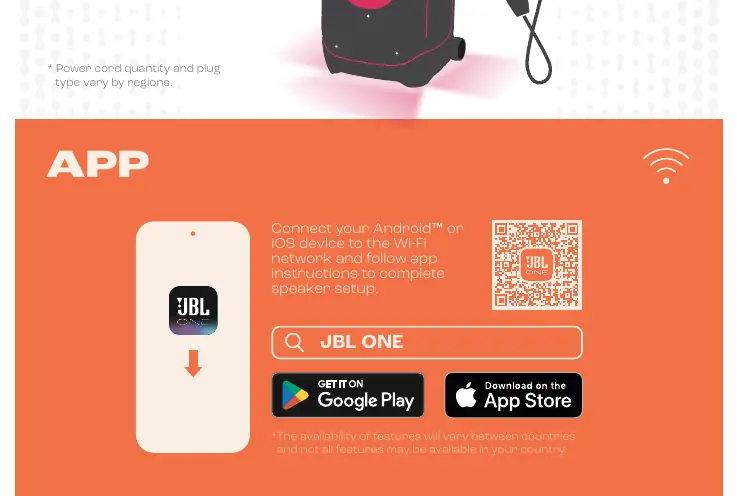
To unlock all features, connect your Android or iOS device to your Wi-Fi network. Download and open the JBL One app and follow the on-screen instructions to complete the speaker setup. Note that feature availability may vary by country.

Music Streaming
You can stream music directly through the JBL One app or via supported music services. Ensure your device is connected to the same network as the speaker for the best experience.
Bluetooth Pairing
To pair your device via Bluetooth:
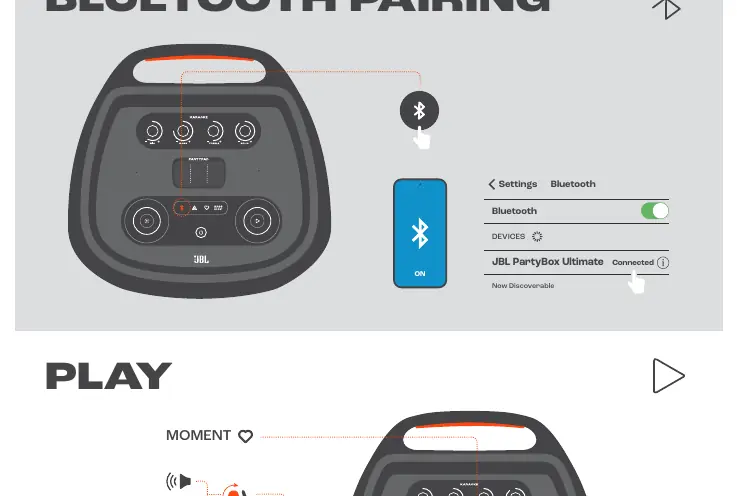
- Ensure the speaker is powered on.
- Open the Bluetooth settings on your mobile device.
- Select 'JBL PartyBox Ultimate' from the list of available devices.
- Once connected, the speaker will indicate it is paired.
Playback Controls
Use the top panel controls for playback:
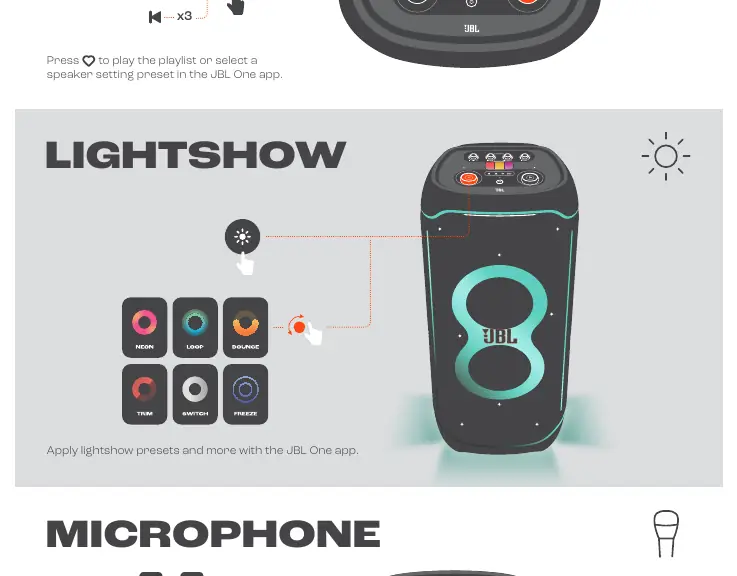
- Play/Pause: Press the play button once.
- Skip Forward: Press the play button twice.
- Skip Backward: Press the play button three times.
- Moment Button: Press the heart icon to play your preset playlist or select a speaker setting preset configured in the JBL One app.
Lightshow
Customize the speaker's lighting effects using the top panel or the JBL One app. You can apply various lightshow presets, including Neon, Loop, Source, Trim, Switch, and Freeze modes.
Microphone and Guitar
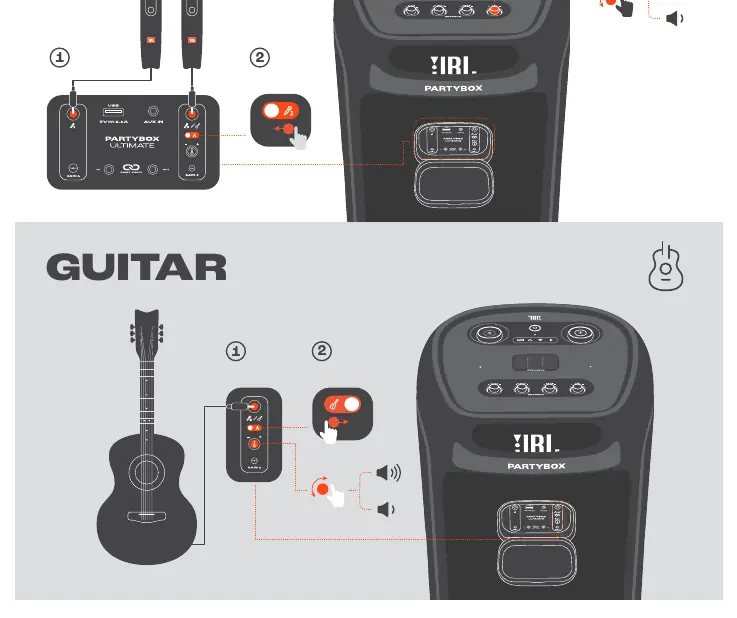
The speaker features dedicated inputs for live performance:
- Microphone: Connect your microphone to the Mic input. Adjust volume using the dedicated gain control.
- Guitar: Connect your guitar to the Guitar input. Adjust volume using the dedicated gain control.
JBL PartyPad
Use the interactive JBL PartyPad on the top panel to trigger sound effects. Available effects include Horn, Repeater, and Filter. Check the video tutorial via the QR code on the device for a demonstration.
Multi-Speaker Connection
You can connect multiple JBL PartyBox Ultimate speakers together to create a larger sound system. Follow the instructions in the JBL One app to sync multiple units.
Charging
Connect the provided power cord to the AC input on the back of the speaker and plug it into a wall outlet. Ensure the plug type matches your region's requirements.
Technical Specifications
- Output Power: 1100W RMS (IEC60268)
- Frequency Response: 30Hz - 20kHz (-6dB)
- Signal-to-Noise Ratio: >80dB
- Bluetooth Version: 5.3
- Wi-Fi Compatibility: 5G and 2.4G networks (802.11a/n/ac/ax)
- Inputs: Aux-In (3.5mm), Mic-In, Guitar-In
- USB Charging: 5V / 2.1A (max)
- Water Resistance: IPX4 Splash Proof
- Dimensions: 455mm x 1049mm x 440mm
- Weight: 39.5 kg
Manufacturer information
JBL
Practical help
Common problems
Speaker not connecting to Wi-Fi
Ensure your Android or iOS device is connected to the Wi-Fi network and follow the instructions in the JBL One app.
Bluetooth pairing issues
Ensure the speaker is in pairing mode and select 'JBL PartyBox Ultimate' in your device's Bluetooth settings.
Before use
- Check the box contents for the power cord.
- Download the JBL One app.
- Ensure the speaker is placed on a stable surface.
- Verify the power source matches the 100-240V AC requirement.
Specs in practice
- Bluetooth 5.3
- Latest Bluetooth standard for improved connection stability and range.
Images and diagrams
- The top panel contains controls for playback, lightshow, and input volume for Mic/Guitar.
Model compatibility
- Compatible with Android and iOS devices via JBL One app.
- Supports .mp3, .wma, .wav formats via USB.
- Requires iOS 13.4 or later for AirPlay 2 control.

Manual page author
David Miller
Documentation analyst
Organizes user manual content into clear summaries, with attention to model details, product context, and everyday usability.