Toys / Games
Owner's Manual for Kidzone 060-ROT-21L Licensed Bentley Bacalar Ride On
Complete owner's manual for the Kidzone 060-ROT-21L Licensed Bentley Bacalar Ride On. Includes assembly steps, charging instructions, remote control pairing, and troubleshooting tips.
Table of contents
Manual images
Jump to the sectionQuick guide from the manual
This ride-on vehicle is designed for children aged 37-72 months with a maximum weight capacity of 66lb (30kg). Adult supervision is required at all times. The vehicle should be operated on flat, smooth surfaces and never on roadways, near motor vehicles, or near water. Always ensure the seatbelt is fastened and the child wears protective gear like a helmet.
Assembly Instruction
The vehicle must be assembled by an adult. Keep small parts away from children during assembly.
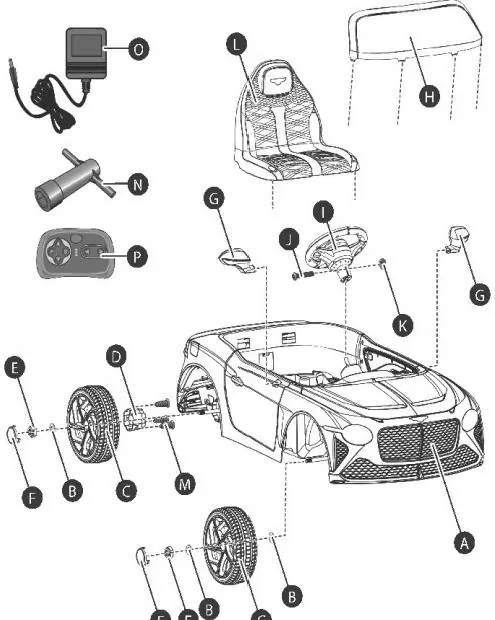
- Wheels: Attach the wheel hub to the wheel, then secure it to the rear gear box using the provided screws. Slide the wheel onto the axle, add a washer, and secure with a lock nut. Repeat for all wheels.
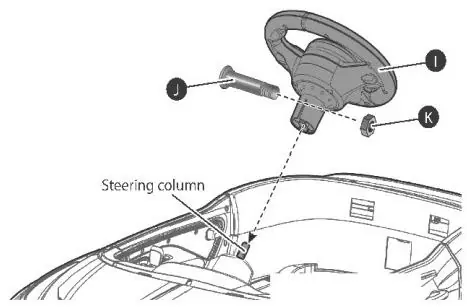
- Steering Wheel: Remove the screw from the steering wheel, insert 2x 1.5V AA batteries, and reattach the cover. Align the steering wheel with the steering column and secure it with the M5x30 machine screw and nut.
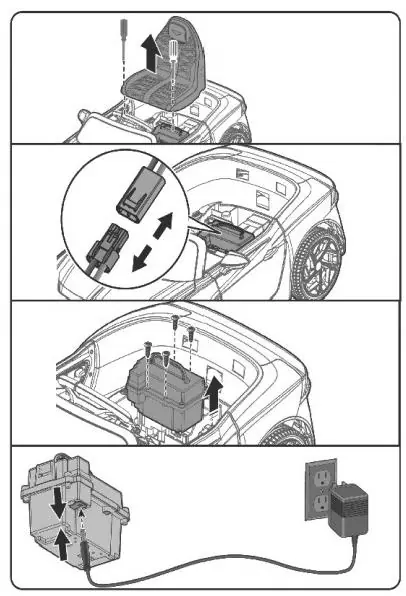
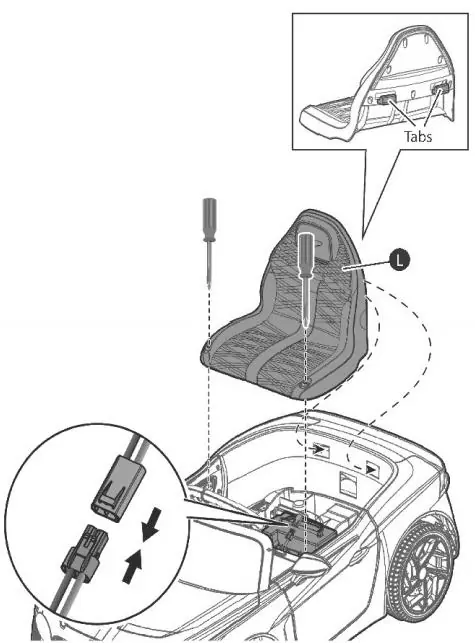
- Seat: Connect the battery wires, then fit the seat tabs into the grooves on the rear of the vehicle and tighten the screws.
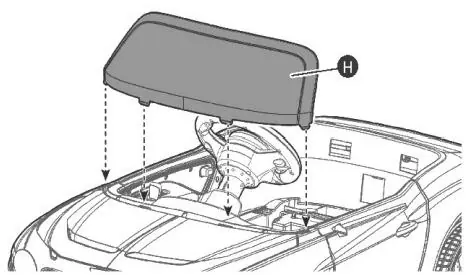
- Windshield and Mirrors: Fit the windshield tabs into the grooves until they click. Attach the side mirrors to the sides of the vehicle.
Charging the Battery
The battery must be charged by an adult. The vehicle must be turned OFF during charging.
- Option 1 (Charging Port): Connect the charger to the charging port on the vehicle, then plug it into a wall outlet.
- Option 2 (Direct): Remove the seat, disconnect the battery, and connect the charger directly to the battery.
- Charging Time: Charge for 8-12 hours. Do not exceed 20 hours of charging. The indicator light on the charger will turn red while charging and green when complete.
Remote Control Operation
The remote control requires 2x AAA 1.5V batteries (not included). To pair for the first time or after battery replacement:
- Press the connection button on the remote for 3 seconds until the indicator flashes.
- Turn on the vehicle power; the indicator should turn solid.
- Use the directional buttons to move the vehicle.
- Press the P button for emergency braking.
- Press the S button to switch between high and low speeds.
Media Player
The media player features a power button, volume controls, FM radio, Bluetooth, and track navigation. It supports MP3 files via a flash drive (up to 64GB) or 3.5mm AUX cable. The digital voltmeter displays battery status; recharge if the value drops below 12.5V.
Care and Maintenance
- Regularly check for loose parts and tighten if necessary.
- Clean the vehicle with a cloth; do not use a hose or immerse in water.
- Store away from heat sources and cover with a tarp if stored outdoors.
- Disconnect the battery if the vehicle will not be used for a long period.
- The battery features a thermal fuse that resets automatically after 5-15 seconds if overloaded.
Troubleshooting
If the vehicle does not move, check battery connections, charge the battery, or check the fuse. If the battery does not charge, ensure the charger is firmly plugged in and the battery is connected. For grinding sounds, contact customer service regarding the motor or gear box.
Manufacturer information
Kidzone Toys
Practical help
Common problems
Vehicle needs a push to go forward
Check if battery connectors are firmly connected or contact customer service for motor issues.
Battery does not charge
Ensure the charger is firmly plugged into the power source and the charging port. Reconnect the battery.
Loud grinding or clicking sound
This indicates a damaged motor or gear box; contact customer service.
Vehicle does not move
Check for low battery, fuse protection (wait 5-15 seconds), or disconnected battery.
Before use
- Charge the battery for 8-12 hours before the first use.
- Ensure all parts are securely assembled and screws are tightened.
- Verify the child is between 37-72 months old.
- Confirm the rider's weight is under 66lb (30kg).
- Connect the battery wires before attaching the seat.
- Ensure the remote control is paired if using remote mode.
Specs in practice
- Charger Output
- 12V 500mA.
- Charging Time
- 8-12 hours (do not exceed 20 hours).
Images and diagrams
- The parts diagram shows the vehicle body, wheels, steering wheel, seat, and hardware.
- The assembly diagrams illustrate the wheel installation sequence (hub, wheel, washer, nut).
- The remote control diagram identifies the connection button, speed selection, and directional controls.
- The media player diagram shows the port locations and button functions.
Model compatibility
- Use only the provided charger and battery.
- Do not mix old and new batteries.
- Do not mix alkaline, standard, or rechargeable batteries.
- Flash drive memory capacity should not exceed 64 GB.

Manual page author
Emily Carter
User documentation editor
Prepares concise manual descriptions and highlights the most useful setup, operation, and maintenance information for readers.