Electronics / Speakers & Soundbars
Digitech AA2236 2-in-1 Bluetooth Earbuds and Speaker Combo
Quick guide for the Digitech AA2236 2-in-1 Bluetooth 5.3 TWS Earbuds and Speaker Combo. Learn how to pair, control playback, use speaker modes, and charge your device.
Quick answers from the manual
Quick answer
- The Digitech AA2236 is a 2-in-1 Bluetooth 5.3 device. Pair the earbuds by searching for 'K086 Earbuds' in your phone's Bluetooth menu. The speaker supports Bluetooth, TF card, and USB playback. p. 1
Key actions
- Pairing Earbuds p. 1
- Charging the Device p. 1
First start
- Power on earbuds by long pressing the function button for 3 seconds. p. 1
Show 3 more answers Show less
Maintenance and reset
- To shut down, long press the function button for 5 seconds. p. 1
Technical specifications
| Parameter | Value | Meaning | Pages |
|---|---|---|---|
| Bluetooth Version | 5.3 | Wireless connectivity standard | p. 1 |
| Speaker Output | 5W | Audio power output | p. 1 |
Where to find it in the PDF
- Product Manual p. 1
Table of contents
Quick Start Guide
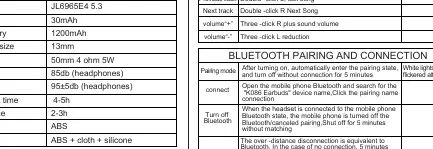
The Digitech AA2236 is a 2-in-1 device combining TWS earbuds and a Bluetooth speaker. To begin using the earbuds, ensure they are charged. Open the charging case to power on the earbuds; they will automatically enter pairing mode with white lights flickering alternately. On your mobile device, search for and connect to K086 Earbuds.
Earbuds Operation
The earbuds feature touch-sensitive buttons for control:
- Power On: Long press for 3 seconds.
- Power Off: Long press for 5 seconds or place in the charging case.
- Play/Pause: Click L/R ear button.
- Answer/Hang up: Click L/R ear button.
- Reject Call: Long press L/R ear button for 2 seconds.
- Next Track: Double-click R ear button.
- Previous Track: Double-click L ear button.
- Volume Up: Three-click R ear button.
- Volume Down: Three-click L ear button.
- Siri: Long press L/R ear button for 2 seconds.
Speaker Operation
The speaker includes physical buttons for playback and mode switching:
- Power On/Off: Long press the function button for 6 seconds (On) or 5 seconds (Off).
- Play/Pause: Short press the play button.
- Volume Control: Long press +/- buttons to adjust volume.
- Track Selection: Short press +/- buttons to switch tracks.
- Mode Switching: Short press the M button to switch between TF card, USB, Play, and Bluetooth modes.
- RGB Light Control: Long press the M button for 2 seconds to turn RGB lights on/off.
Charging
Earbuds: Place the earbuds into the charging case. The case will automatically charge them.
Speaker/Case: Use the provided USB cable to connect the charging port to a mobile phone charger or computer. The charging indicator will show the status.
Specifications
- Bluetooth: 5.3
- Earphone Battery: 30mAh
- Charging Case Battery: 1200mAh
- Speaker Output: 50mm 4 ohm 5W
- Playback Time: 4-5 hours
- Charging Time: 2-3 hours
Warranty Information
This product is covered by a 12-month warranty against manufacturing defects. For claims, contact the place of purchase with your receipt. This warranty is provided by Electus Distribution, 46 Eastern Creek Drive, Eastern Creek NSW 2766, Ph: 1300 738 555.
Practical help
Common problems
Earbuds not pairing
Ensure the earbuds are in TWS mode (white lights flickering alternately) and search for 'K086 Earbuds' in your phone's Bluetooth settings.
Bluetooth disconnection
If the connection is lost, the device will automatically attempt to reconnect if you return to range within 5 minutes.
Before use
- Charge the device fully before first use.
- Ensure the charging case is open to remove earbuds.
- Check that your phone's Bluetooth is enabled.
- Verify the charging cable is connected to a compatible power source.
Show more Show less
Specs in practice
- Bluetooth 5.3
- The latest wireless standard for improved connection stability and power efficiency.
- 1200mAh Battery
- Capacity of the charging case, providing multiple charges for the earbuds.
Images and diagrams
- The earbud diagram identifies the touch button, indicator light, and microphone locations.
- The speaker diagram shows the location of the charging port, TF card slot, and USB port.
- The charging diagram illustrates connecting the USB cable to the speaker/case.
Model compatibility
- Compatible with Bluetooth-enabled mobile phones.
- Supports TF card and USB playback modes.

Manual page author
Emily Carter
User documentation editor