Power / Batteries Chargers
KNOG PWR 10WSOLAR Solar Panel User Guide
Learn how to operate and optimize your KNOG PWR 10WSOLAR compact folding solar charger for efficient device charging.
Table of contents
Product Overview
The KNOG PWR 10WSOLAR is a compact, folding solar charger designed to provide a 5V power source for your devices. Its portable design makes it ideal for outdoor activities where access to traditional power outlets is limited.
Quick Start and Setup
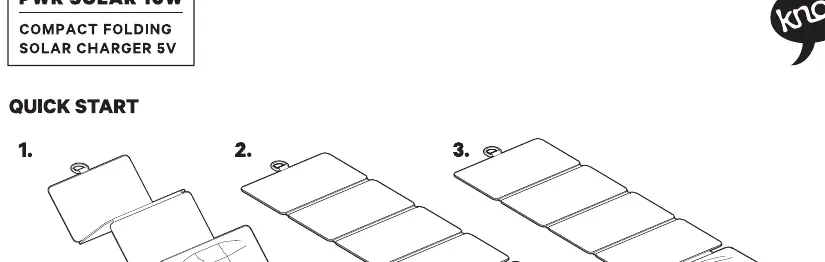
To begin using the solar charger, unfold the panels completely to expose the solar cells to direct sunlight. For optimal performance, position the panels at a 90-degree angle relative to the sun's rays. Avoid placing the panels at shallow angles, as this significantly reduces energy absorption efficiency.
Understanding LED Indicators
The device features an LED indicator system to help you monitor performance and charging status:
- Irradiation Levels: When no device is connected, solid LEDs indicate the current level of solar irradiation. More solid lights mean higher irradiation levels.
- Charging Rate: When a device is connected, flashing LEDs indicate the charging rate. Faster flashing corresponds to a faster charging rate, while slower flashing indicates a slower charging rate.
Usage Tips
To ensure the best results, keep the solar panels clean and free from obstructions such as dust, dirt, or shadows. Ensure the panels are placed on a stable surface where they can receive consistent, direct sunlight throughout the day. The charger is designed for 5V output, making it compatible with a wide range of USB-powered devices, but always verify your device's power requirements before connecting.
Manufacturer information
Knog
Practical help
Common problems
Slow charging speed
Ensure the solar panels are at a 90-degree angle to the sun and that there are no shadows or dirt covering the cells.
LEDs are not lighting up
Check if the panels are receiving sufficient direct sunlight. If the irradiation is too low, the LEDs may not activate.
Before use
- Unfold all solar panels completely.
- Ensure the surface is stable and flat.
- Verify that the solar cells are not covered by dust or debris.
- Position the panels to face the sun directly (90-degree angle).
Specs in practice
- Flashing LEDs
- Indicates the active charging rate when a device is connected to the panel.
Images and diagrams
- The diagram illustrates the three-step unfolding process for the solar charger.
- It highlights the importance of the 90-degree angle versus a 45-degree angle for maximum efficiency.
- It explains the visual feedback provided by the LED lights regarding irradiation and charging speed.
Model compatibility
- Designed for 5V USB-powered devices.
- Performance is directly dependent on the intensity of sunlight.

Manual page author
David Miller
Documentation analyst
Organizes user manual content into clear summaries, with attention to model details, product context, and everyday usability.