Home Appliances / Small Kitchen Appliances
User Manual for Korona 2-Cup Coffee Maker 12207/12208
Quick guide for the Korona 2-Cup Coffee Maker (models 12207/12208). Includes setup, brewing instructions, cleaning, descaling, and safety guidelines.
Quick answers from the manual
Quick answer
- The Korona 2-Cup Coffee Maker is designed for brewing coffee in private households. It uses a permanent filter and features an automatic shut-off one minute after the brewing cycle is complete. p. 16, 18
Key actions
- Brewing coffee p. 18
- Cleaning p. 19
First start
- Rinse the unit by running 2-3 cycles with water only (no coffee) before first use. p. 17
Problems and fixes
Filter clogged
Use medium ground coffee; finer grounds clog the filter.
p. 18Maintenance and reset
- Descale every 6-8 weeks. p. 20
Technical specifications
| Parameter | Value | Meaning | Pages |
|---|---|---|---|
| Voltage | 220 - 240 V ~ 50 / 60 Hz | Operating voltage | p. 22 |
| Rated Power | 420 - 500 W | Power consumption | p. 22 |
Where to find it in the PDF
- Product Description p. 16
- Operation p. 18
Table of contents
Quick guide from the manual
This coffee maker is designed for brewing coffee in private households. Before using the appliance for the first time, ensure you have removed all packaging and performed 2-3 rinse cycles with water only (no coffee) to prepare the unit. Always use medium ground coffee to prevent the permanent filter from clogging. The appliance features an automatic shut-off one minute after the brewing cycle is complete.
Product Description
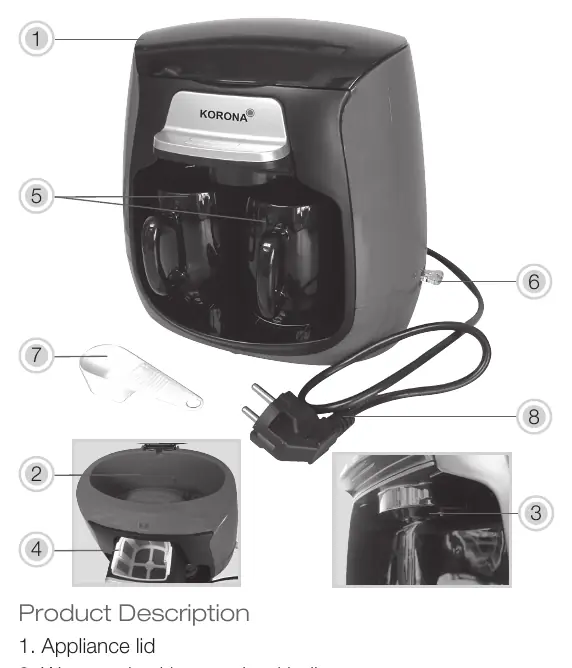
- 1. Appliance lid
- 2. Water tank with water level indicator
- 3. Water outlet
- 4. Removable filter holder + permanent filter
- 5. Ceramic coffee cup x 2
- 6. On/Off switch with indicator light
- 7. Measuring spoon
- 8. Power cord and plug
Brewing Coffee
- Place the appliance on an even, heat-resistant surface and connect to a wall socket.
- Open the appliance lid and fill the water tank with cold, fresh tap water. Do not exceed the Max. filling level.
- Close the lid.
- Pull out the filter holder and insert the permanent filter, ensuring it is properly aligned.
- Add the desired amount of medium ground coffee into the filter (approx. 1 leveled measuring spoon per cup).
- Push the filter holder back into position.
- Place the ceramic cups into the appliance and press the On/Off switch. The indicator light will turn on.
- Once the brewing cycle is finished (no more water dripping), the indicator light will turn off. You may then remove the cups.
- Press the On/Off switch to turn off the appliance.
Cleaning and Care
Always unplug the appliance and let it cool down completely before cleaning. Never immerse the appliance in water. Clean the body with a moistened soft cloth. Do not use aggressive cleaning agents. The ceramic coffee cups are not dishwasher safe; wash them and all detachable parts in warm water with dishwashing detergent.
Descaling
Descale the appliance every 6-8 weeks depending on water hardness and usage. Use a common, gentle descaler suitable for coffee makers. Follow the manufacturer's instructions on the descaler packaging. After descaling, always perform rinse cycles with water only before brewing coffee again.
Safety
- Never operate the appliance without water.
- Do not move the appliance during operation.
- Do not open the filter cover or lid during operation to avoid burns from hot steam.
- Keep the appliance and cord out of reach of children under 8 years.
- Do not use the appliance with an external timer or remote control system.
Technical Data
Voltage: 220 - 240 V ~ 50 / 60 HzRated Power: 420 - 500 WProtection Class: I
Guarantee
This product comes with a 2-year guarantee against defects in materials and workmanship. The guarantee does not cover damages due to improper use, wear and tear, or owner-caused damage. For service, contact KORONA Service at Am Steinbach 9, 59872 Meschede, Germany, or via email at [email protected].
Manufacturer information
Korona electric GmbH
Practical help
Common problems
Filter is clogged
Ensure you are using medium ground coffee. Finer grounds can clog the filter pores.
Appliance does not start
Check if the power cord is properly connected to the wall socket and the On/Off switch is activated.
Water overflowing
Never exceed the Max. filling level in the water tank.
Before use
- Remove all packaging materials.
- Unwind the power cord completely.
- Clean all detachable parts.
- Place on an even, heat-resistant surface.
- Run 2-3 brewing cycles with water only (no coffee) to rinse the system.
Specs in practice
- Protection Class
- I (Requires grounded electrical connection)
Images and diagrams
- The appliance lid (1) covers the water tank (2).
- The filter holder (4) contains the permanent filter.
- The On/Off switch (6) includes an integrated indicator light.
Model compatibility
- Use only medium ground coffee.
- Ceramic cups are not dishwasher safe.
- Do not use with external timers or remote control systems.

Manual page author
Michael Turner
Technical manual editor
Reviews PDF manuals for structure, safety notes, and practical product details so readers can find the right information quickly.