Electronics / Microphones
User Manual for KRUX EPIC 1000S Microphone
Quick guide for the KRUX EPIC 1000S USB microphone. Learn how to install, mount, adjust RGB lighting, use the mute function, and check technical specifications.
Table of contents
Manual images
Click an image to enlargeQuick guide from the manual
This document provides essential instructions for the KRUX EPIC 1000S USB microphone. It covers the setup, mounting, and operation of the device, including RGB lighting control and mute functionality.
Set includes
- Microphone with shock mount
- Metal base
- USB Type-C adapter
- Pop filter
- USB cable
- User manual
Installation
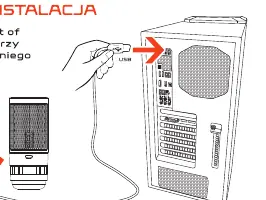
Connect the microphone to the USB port of your computer using the provided USB cable. The device is plug-and-play and compatible with Windows, macOS, Linux, Android (requires OTG adapter), PS4, and PS5.
Mounting
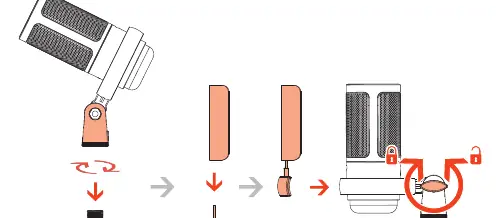
Assemble the microphone by attaching it to the shock mount and the metal base. Ensure the locking mechanism is tightened securely to hold the microphone in the desired position.
Device details and controls
The microphone features several physical controls and indicators:
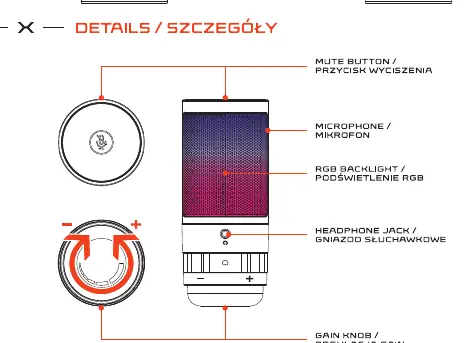
- Mute button: Located on top of the microphone. Used to mute the audio and control RGB lighting.
- Gain knob: Located at the bottom of the microphone. Use the plus (+) and minus (-) signs to adjust the input sensitivity.
- Headphone jack: Located on the front for direct audio monitoring.
- RGB backlight: Integrated into the microphone mesh.
RGB backlight settings
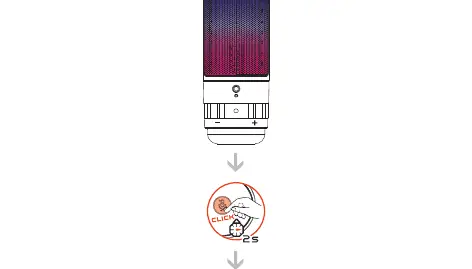
To change the RGB lighting modes, click the mute button and hold it for 2 seconds. You can cycle through different lighting effects or turn the backlight off.
Mute function
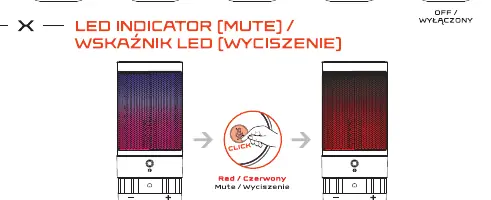
To mute the microphone, click the mute button. The LED indicator will turn red to signify that the microphone is muted.
Technical specifications
- Microphone type: Condenser
- Directivity: Cardioid
- Connector: USB Type-C
- Cable length: 2.2 m
- Sampling rate: 24 bit / 192 kHz
- Frequency range: 30-20 000 Hz
- Weight: 122 g
- Dimensions: 55 x 55 x 130 mm
Safety and warranty
The device contains small parts that may be swallowed; keep away from children under 5 years. Avoid rapid changes in ambient temperature; if the device is exposed to extreme temperatures, wait approximately 30 minutes for the temperature to stabilize before use. The product comes with a 24-month warranty.
Practical help
Common problems
Microphone not working on Android
Ensure your Android device supports the OTG function and use an OTG adapter with a USB Type-C socket.
Device exposed to rapid temperature changes
Wait approximately 30 minutes for the device temperature to stabilize before connecting or using it.
Before use
- Verify all parts are included: microphone, shock mount, metal base, pop filter, and USB cable.
- Ensure your computer or console has a compatible USB port.
- If using with Android, confirm the device supports OTG.
- Allow the microphone to reach room temperature if it was stored in a cold or hot environment.
Specs in practice
- Directivity: Cardioid
- The microphone captures sound primarily from the front, which helps reduce background noise.
- Sampling Rate: 24 bit / 192 kHz
- Indicates high-resolution audio recording capability for clear sound quality.
- Frequency Range: 30-20 000 Hz
- The range of audio frequencies the microphone can effectively capture.
Images and diagrams
- The installation diagram illustrates connecting the USB cable to the computer port.
- The mounting diagram shows the assembly sequence of the microphone, shock mount, and base.
- The details diagram identifies the location of the mute button, headphone jack, and gain knob.
Model compatibility
- Compatible with Windows, macOS, Linux, Android (with OTG), PS4, and PS5.

Manual page author
Emily Carter
User documentation editor
Prepares concise manual descriptions and highlights the most useful setup, operation, and maintenance information for readers.