Electronics / Microphones
User Manual for Saramonic BTW Wireless Lavalier Microphone
Quick guide for the Saramonic BTW Wireless Lavalier Microphone. Learn how to pair, operate, use the status indicators, and set up accessories with this compact lavalier mic.
Table of contents
Manual images
Click an image to enlargeQuick guide from the manual
The Saramonic BTW is a compact, portable wireless lavalier microphone designed for content creation, live streaming, interviews, and online classes. It features an omnidirectional capsule and is compatible with iOS and Android devices. The device operates via Bluetooth with a range of up to 80m. For the best recording experience, the manufacturer recommends using the SmartRecorder application.
Safety Cautions
- Do not dismantle the outer case.
- Keep the unit away from heat sources such as heaters or ovens.
- Do not attempt to replace the battery yourself.
- Clean the product only with a soft, dry cloth.
- Protect the device from dust and moisture during use and storage.
Product Structure
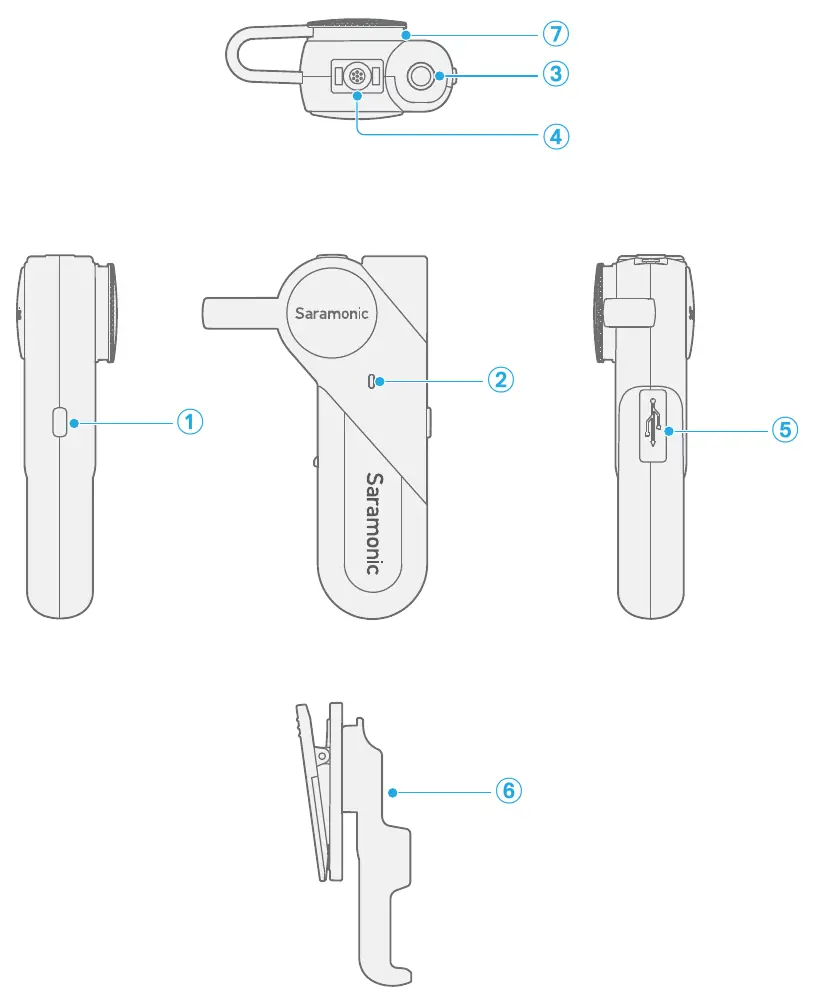
The microphone features a power button, status indicator, 3.5mm headphone jack, built-in microphone, USB Type-C charging port, detachable belt clip, and a magnetic clip.
Power Button and Status Indicators
Power Button Operations:
- Power ON: Press and hold for 2 seconds.
- Power OFF: Press and hold for 3 seconds.
- Play/Pause: Short press (when successfully connected).
- Clear Pairing Records: Ensure the unit is off, then press and hold for 5 seconds.
Status Indicator Meanings:
- Unpaired (waiting for pairing): Blinks blue 3 times, then flashes blue and green alternately.
- Standby Mode: Slow flashing green light.
- Paired Successfully: Slow flashing blue light.
- Charging: Solid green light.
- Fully Charged: Lights up blue for 2 seconds, then flashes green slowly.
- Low Battery: Voice prompt "Low Battery" every two minutes.
Accessory Setup
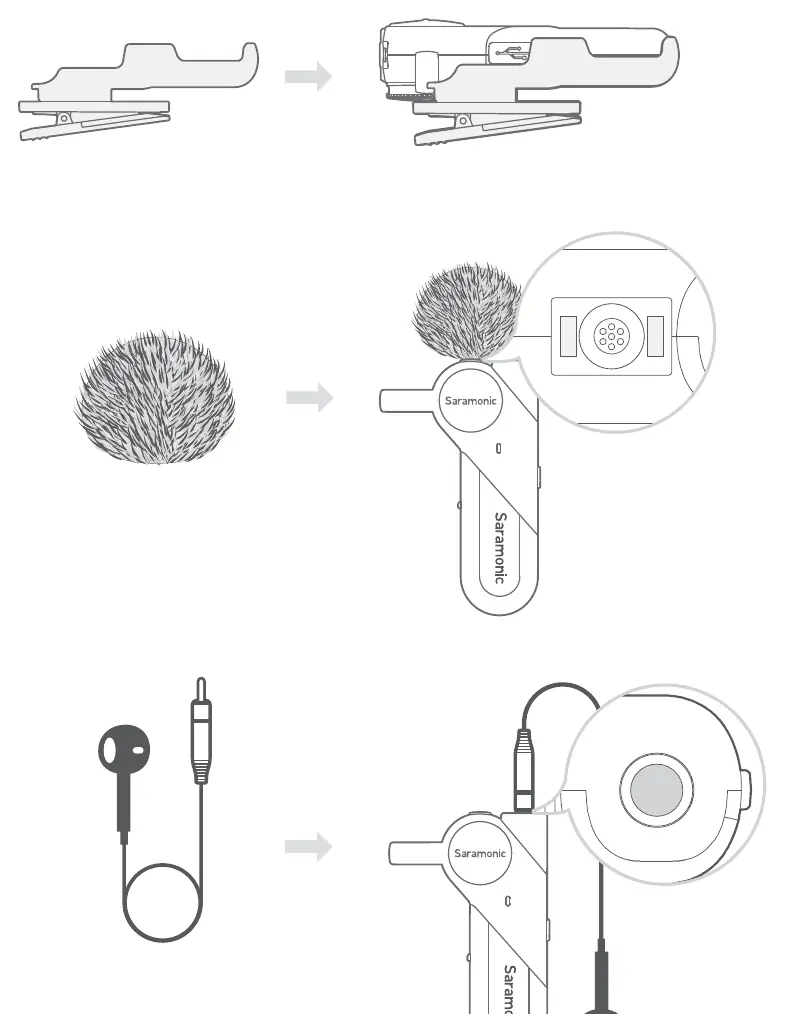
The microphone supports various accessories for different recording scenarios. Attach the belt clip to the rear of the unit. Use the fur windshield over the microphone capsule to reduce wind noise. Connect the supplied single earbud to the 3.5mm headphone jack for real-time audio monitoring.
Operation Guide
First Time Pairing:
- Press and hold the power button for 2 seconds to turn on the BTW.
- The device will enter pairing mode automatically (indicator flashes blue and green).
- Turn on Bluetooth on your smartphone or recording device.
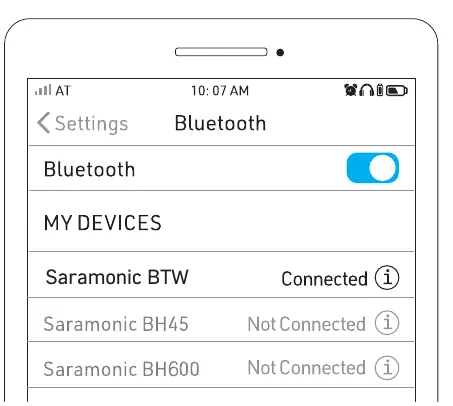
- Select "Saramonic BTW" from the available devices list.
- Once connected, the indicator will flash blue slowly.
Automatic Connection: Turn on Bluetooth on the last connected device, then turn on the BTW; the connection will be established automatically.
Specifications
- Transmission Type: 2.4GHz wireless
- Operating Range: 80m (line-of-sight)
- Battery Life: 10 hours
- Polar Pattern: Omnidirectional
- Audio Connector: 3.5mm headphone jack (stereo output, supports TRRS mic input)
- Charging Port: USB Type-C
- Dimensions: 67.6 x 42.6 x 18.4mm
- Weight: 24.5g
Packing List
- 1 x BTW Wireless Lavalier Microphone
- 1 x USB-A to USB-C Charging Cable
- 1 x Single Earbud
- 1 x Fur Windshield
- 1 x Belt Clip
Practical help
Common problems
Device will not pair
Ensure the BTW is turned off, then press and hold the power button for 5 seconds to clear previous pairing records before trying again.
Low battery warning
The device will provide a voice prompt 'Low Battery' every two minutes. Charge immediately using the provided USB Type-C cable.
Not connecting automatically
Ensure Bluetooth is enabled on the last connected device before turning on the microphone.
Before use
- Charge the device fully using the USB Type-C port.
- Ensure the device is within 80m of the recording device.
- Download the SmartRecorder app for an optimized recording experience.
- Check that the status indicator is flashing blue and green for pairing mode.
Specs in practice
- Operating Range
- Up to 80 meters in a clear line-of-sight environment.
- Polar Pattern
- Omnidirectional, meaning it captures sound equally from all directions.
- Audio Connector
- 3.5mm jack supports stereo monitoring and TRRS microphone input.
Images and diagrams
- The structure diagram identifies the power button, status indicator, and charging port locations.
- The setup guide illustrates how to attach the belt clip, wind shield, and monitoring earbud.
Model compatibility
- Compatible with both iOS and Android devices.
- Works with third-party audio and video recording applications.

Manual page author
Michael Turner
Technical manual editor
Reviews PDF manuals for structure, safety notes, and practical product details so readers can find the right information quickly.