Home / Clocks
User Manual for La Crosse Technology 11-Inch Cormac Wall Clock
Quick guide for the La Crosse Technology 11-Inch Cormac Wall Clock. Learn how to install the battery, set the time, mount the clock, and maintain it properly.
Table of contents
Manual images
Click an image to enlargeQuick guide from the manual
This document provides instructions for setting up and maintaining your La Crosse Technology 11-Inch Cormac Wall Clock. The clock requires one AA alkaline battery to operate.

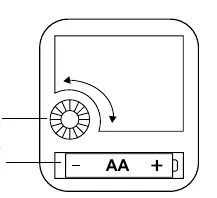
Powering up and setting the time
- Insert one fresh AA alkaline battery into the movement compartment, ensuring correct polarity (+/-).
- Rotate the Time Set Wheel located on the back of the movement to set the current time.
- Mount the clock on the wall using the integrated hanging hole.
Note: If the clock stops operating or loses time, replace the battery with a fresh one.
Specifications
- Movement: Step Motion
- Dimensions: 11.02 in. diameter, 1.30 in. deep
- Power: 1 AA Alkaline Battery (not included)
- Battery Life: 7+ months
- Placement: Indoor use only
Care and maintenance
To ensure the longevity of your clock and prevent damage:
- Always use the correct size and grade of battery.
- Do not mix old and new batteries.
- Do not mix alkaline, standard, or rechargeable batteries.
- Clean battery contacts before installation.
- Remove the battery if the clock will not be used for an extended period to prevent leakage and corrosion.
Warranty and support
This product includes a two-year warranty covering defects in material and workmanship under normal use. For support, visit www.lacrossetechnology.com/support.
Official resources from the manual
Manufacturer information
La Crosse Technology
Practical help
Common problems
Clock does not operate
Replace the battery with a fresh AA alkaline battery.
Clock steadily loses time
Replace the battery with a fresh AA alkaline battery.
Battery leakage or corrosion
Remove the battery during periods of non-use and clean battery contacts.
Before use
- Purchase 1 fresh AA alkaline battery.
- Ensure battery polarity (+/-) is correct during installation.
- Clean battery contacts before installing the battery.
- Verify the clock is intended for indoor use.
Specs in practice
- Movement: Step Motion
- The second hand moves in distinct one-second increments.
- Battery Life: 7+ Months
- Expected duration with a fresh alkaline battery.
- Placement: Indoor
- Designed for indoor use only; avoid outdoor exposure.
Images and diagrams
- The diagram on the back of the clock identifies the Time Set Wheel and the Battery Compartment.
- The arrow indicates the direction to rotate the Time Set Wheel to adjust the time.
Model compatibility
- Requires 1 AA alkaline battery (not included).
- Do not mix old and new batteries.
- Do not mix alkaline, standard, or rechargeable batteries.

Manual page author
David Miller
Documentation analyst
Organizes user manual content into clear summaries, with attention to model details, product context, and everyday usability.