Home / Clocks
Smart 12-inch Alarm Clock Radio SAF004S User Guide
Comprehensive user guide for the Winees SAF004S Smart 12-inch Alarm Clock Radio. Includes setup instructions, Wi-Fi connection, alarm configuration, sleep-aid modes, and troubleshooting.
Table of contents
Manual images
Click an image to enlargeQuick Start Guide
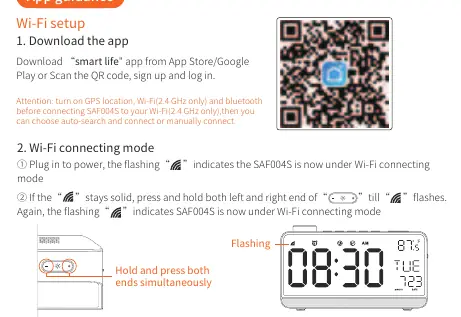
The SAF004S is a smart alarm clock radio featuring Wi-Fi connectivity, sleep-aid functions, and voice control compatibility. To begin, plug the device into a power source. The device will enter Wi-Fi connecting mode automatically (indicated by a flashing Wi-Fi icon). Use the Smart Life app to complete the setup.
Device Overview
The device features a large 12-inch display with time, date, temperature, and radio channel information. The top panel contains the Snooze/Light/Tuner knob, FM radio button, Alarm 1/2 buttons, Sleep Aid button, Setting button, and Brightness control. The back panel includes the 5V input, radio antenna, and headphone jack.
Wi-Fi Setup
1. Download the Smart Life app from the App Store or Google Play.2. Ensure your phone is connected to a 2.4 GHz Wi-Fi network (5 GHz is not supported).3. Plug in the device. If the Wi-Fi icon flashes, it is ready to connect.4. If the icon is solid, press and hold both ends of the brightness control buttons until it flashes.5. Open the app, click the '+' icon, select 'Go to add', and follow the on-screen instructions to pair the device.
General Settings
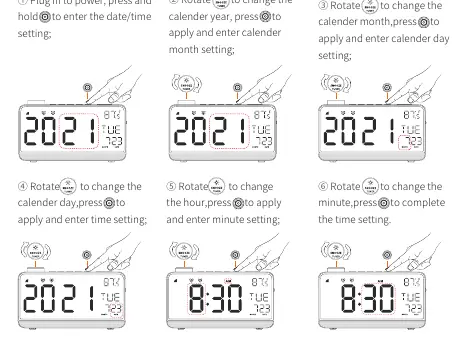
Time and Date: Press and hold the Setting button to enter date/time settings. Rotate the Snooze/Tuner knob to adjust values and press the Setting button to confirm each step (Year, Month, Day, Hour, Minute).
Brightness: Press the Brightness control button to cycle through Day, Night, Closed, and Auto modes.
Alarm Clock Configuration
1. Under the time-display interface, press the Alarm 1 or Alarm 2 button to turn the alarm on/off.2. Press and hold the Alarm button to enter setting mode.3. Rotate the Tuner knob to adjust the hour and minute.4. Select the alarm sound (S-01 to S-06 are nature sounds, F-07 uses FM radio).5. Use the volume control to adjust the alarm sound level.
Sleep-Aid Mode
1. Press the Sleep Aid button to activate/deactivate the mode.2. Press and hold the Sleep Aid button to enter settings.3. Rotate the Tuner knob to select the sound (S-01 to S-04 are white noise, F-05 uses FM radio).4. Adjust the night light brightness and set the duration (5 to 120 minutes).
FM Radio
1. Press the FM button to turn the radio on/off.2. Press and hold the FM button to automatically scan and save stations (87.5MHz-108MHz).3. Rotate the Tuner knob slowly to find stations or quickly to switch between saved stations.
Voice Control
The device is compatible with Amazon Alexa and Google Home. Ensure the device is linked to the Smart Life app first. In the Alexa app, enable the 'Smart Life' skill and log in with your Smart Life credentials to authorize control.
Troubleshooting
- Device connection failed: Ensure you are using a 2.4 GHz Wi-Fi network. Place the router, phone, and device close together during setup.
- Bluetooth connection failed: Ensure phone Bluetooth is enabled and the device is not connected to another phone.
- App cannot control device: Check if the device is powered on and the Wi-Fi signal is stable. Clear app cache or restart the router.
- Wi-Fi Reset: Press and hold both ends of the brightness control buttons until the Wi-Fi icon flashes quickly.
Cautions and Storage
Do not disassemble the device. Place on a stable, horizontal surface. Keep away from water, fire, and high humidity. Wipe with a soft cloth; do not use abrasive cleaners or alcohol. Store in a safe, dry place.
Practical help
Common problems
Device connection failed
Ensure 2.4 GHz Wi-Fi is used, place devices close to the router, and reset Wi-Fi by holding brightness control buttons.
Bluetooth connection failed
Confirm phone Bluetooth is enabled and the device is not paired with another phone.
App cannot control device
Verify device power, check Wi-Fi signal, or clear app cache.
Before use
- Ensure 2.4 GHz Wi-Fi network is available.
- Download the 'Smart Life' app.
- Place the clock on a stable, horizontal surface.
- Connect the power adapter to a 5V-2A source.
Specs in practice
- FM Frequency
- 87.5-108MHz range.
- Communication
- Supports Wi-Fi (2.4GHz) and BLE.
Images and diagrams
- Button panel: Located on top, includes controls for Snooze/Light/Tuner, FM, Alarms, Sleep Aid, Settings, and Brightness.
- Switch panel: Located on the back, includes 5V input, radio antenna, and headphone jack.
Model compatibility
- Requires 2.4 GHz Wi-Fi network.
- Compatible with Amazon Alexa and Google Home.

Manual page author
Michael Turner
Technical manual editor
Reviews PDF manuals for structure, safety notes, and practical product details so readers can find the right information quickly.