Home / Clocks
User Manual for La Crosse Technology 10-Inch Atomic Analog Wall Clock 404-54667
Quick guide for the La Crosse Technology 10-Inch Atomic Analog Wall Clock (404-54667). Learn how to set up the atomic time signal, manually set the time, mount the clock, and troubleshoot reception issues.
Table of contents
Manual images
Click an image to enlargeQuick guide from the manual
This guide provides essential instructions for setting up and maintaining your La Crosse Technology 10-Inch Atomic Analog Wall Clock. The clock is designed to automatically synchronize with the WWVB Atomic Time Signal. If the signal is unavailable, the clock can be set manually.
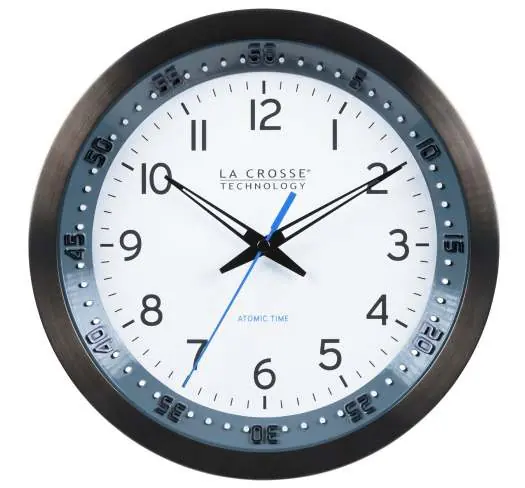
Device Overview
The back of the clock features the following controls:
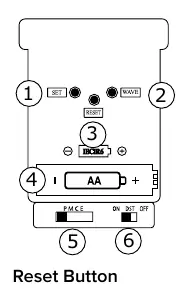
- SET: Used to manually set the time.
- WAVE: Initiates an atomic time search.
- RESET: Resets the clock if it becomes unresponsive.
- Battery Compartment: Requires one AA alkaline battery.
- Time Zone Selector: Set to P (Pacific), M (Mountain), C (Central), or E (Eastern).
- Daylight Saving Time Selector: Set to ON for DST all year or OFF for Standard Time all year.
Setup and Operation
Follow these steps to power up the clock:
- Select your Time Zone and DST settings using the selectors on the back.
- Insert one AA alkaline battery into the battery compartment.
- The hands will move to the 12 o'clock position and search for the WWVB Atomic Time Signal for up to 8 minutes.
- If no signal is found, the clock will run from 12:00. It will continue to search for the signal on its own for up to 5 nights.
For best reception, place the clock on an exterior wall near a window with the front or back facing Fort Collins, CO.
Manual Time Setting
If the atomic signal is not received, you can set the time manually:
- Fast set: Press and hold the SET button to move the hands quickly.
- Step-by-step: Press and release the SET button to move the hands forward one minute at a time.
Note: The Atomic Time Signal will override your manual setting if the transmission is received in the future.
Troubleshooting
If the clock does not respond when trying to set the time, press the RESET button once. The hands will move to the 12 o'clock position and begin searching for the WWVB signal again.
Specifications
- Clock Face Diameter: 8.50 inches (21.6 cm)
- Dimensions: 9.84 inches diameter, 1.57 inches deep
- Power: 1 AA Alkaline Battery (not included)
- Battery Life: 12+ months
- Movement: Atomic Quartz
Care and Maintenance
To ensure longevity and safety:
- Do not mix old and new batteries.
- Do not mix alkaline, standard, or rechargeable batteries.
- Clean battery contacts before installation.
- Ensure correct polarity (+ and -).
- Remove batteries during long periods of non-use.
Manufacturer information
La Crosse Technology
Practical help
Common problems
Clock not receiving atomic signal
Place on an exterior wall near a window facing Fort Collins, CO. Allow up to 5 nights for signal reception.
Clock not responding to manual set
Press the RESET button once to restart the search process.
Before use
- Select Time Zone (P, M, C, E) and DST settings.
- Insert one fresh AA alkaline battery.
- Ensure the clock is placed indoors.
- Check that battery contacts are clean.
Specs in practice
- Time Zone Selector
- P=Pacific, M=Mountain, C=Central, E=Eastern.
- DST Selector
- ON=DST All Year, OFF=Standard Time All Year.
- Power Requirements
- 1 AA Alkaline Battery (not included).
Images and diagrams
- 1: SET button for time adjustment.
- 2: WAVE button for atomic search.
- 3: RESET button.
- 4: Battery compartment.
- 5: Time Zone selector.
Model compatibility
- Atomic signal reception may be limited in certain areas due to signal strength or interference.
- Manual setting is possible if atomic signal is unavailable.

Manual page author
Emily Carter
User documentation editor
Prepares concise manual descriptions and highlights the most useful setup, operation, and maintenance information for readers.