Home / Clocks
User Manual for La Crosse Technology 10.83-Inch Reeves Wall Clock 404-3027
Quick guide for the La Crosse Technology 10.83-Inch Reeves Wall Clock (Model 404-3027). Includes battery installation, time setting, mounting instructions, and maintenance tips.
Table of contents
Quick guide from the manual
To get your La Crosse Technology 10.83-Inch Reeves Wall Clock running, follow these simple steps:
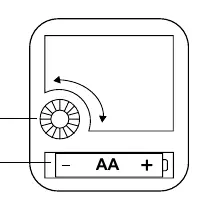
- Insert one fresh AA alkaline battery (not included) into the battery compartment, ensuring correct polarity (+ and -).
- Rotate the Time Set Wheel to adjust the clock to the current time.
- Use the integrated hanging hole on the back to mount the clock indoors on a wall.
Note: The quartz movement ensures accurate timekeeping. If the clock stops or steadily loses time, replace the battery.
Care & Maintenance
Proper battery management is essential for the longevity of your clock:
- Always use the correct size and grade of battery.
- Replace the entire set of batteries at once; do not mix old and new batteries or different types.
- Clean the battery contacts on both the battery and the device before installation.
- Ensure correct polarity (+ and -) when installing.
- Remove batteries if the clock will not be used for an extended period to prevent leakage and corrosion.
- Dispose of used batteries according to local regulations.
Specifications
- Movement: Quartz - Step Motion
- Power Requirements: 1 AA Alkaline Battery (not included)
- Battery Life: 7+ Months
- Dimensions: 10.83 in (27.05 cm) Diameter, 1.65 in (4.2 cm) Depth
- Placement: Indoor
- Construction: Plastic, Glass, Metal
Warranty & Support
La Crosse McCormick, LLC provides a 2-year limited warranty against manufacturing defects. For online support, visit www.lacrossetechnology.com/support.
Official resources from the manual
Manufacturer information
La Crosse Technology
Practical help
Common problems
Clock does not operate
Replace the battery with a fresh AA alkaline battery.
Clock steadily loses time
Replace the battery with a fresh AA alkaline battery.
Battery leakage or corrosion
Remove batteries during periods of non-use and clean contacts.
Before use
- Purchase 1 fresh AA alkaline battery
- Clean battery contacts before installation
- Verify battery polarity (+ and -)
- Ensure the clock is mounted indoors
Specs in practice
- Battery Life
- Expected to last 7+ months with a fresh alkaline battery
Images and diagrams
- The diagram shows the back of the clock movement, identifying the Time Set Wheel and the battery compartment.
Model compatibility
- Indoor use only
- Requires 1 AA Alkaline battery

Manual page author
David Miller
Documentation analyst
Organizes user manual content into clear summaries, with attention to model details, product context, and everyday usability.