Lighting / Controllers Dimmers
User Guide for Leviton Decora Digital 0-10V LED/Fluorescent Dimmer
Complete user guide for the Leviton Decora Digital 0-10V Dimmer. Learn how to install, wire for single-pole or 3-way applications, configure advanced settings, and troubleshoot common issues.
Table of contents
Quick guide from the manual
The Leviton Decora Digital 0-10V Dimmer is a Bluetooth-enabled lighting control device designed for 0-10V dimmable LED and fluorescent ballasts. Key requirements for installation include a neutral wire and a wall box depth of at least 2-3/4 inches. The device supports both single-pole and multi-location (3-way) control. For multi-location setups, you must use a compatible Decora Digital remote (e.g., DD00R-DL), as standard 3-way switches are not compatible.
Important: Always turn off power at the circuit breaker before beginning any wiring work. The device is intended for use with copper or copper-clad wire only.
Installation and Wiring
Before installing, ensure you have the necessary tools: slotted/Phillips screwdriver, electrical tape, pliers, pencil, cutters, and a ruler.
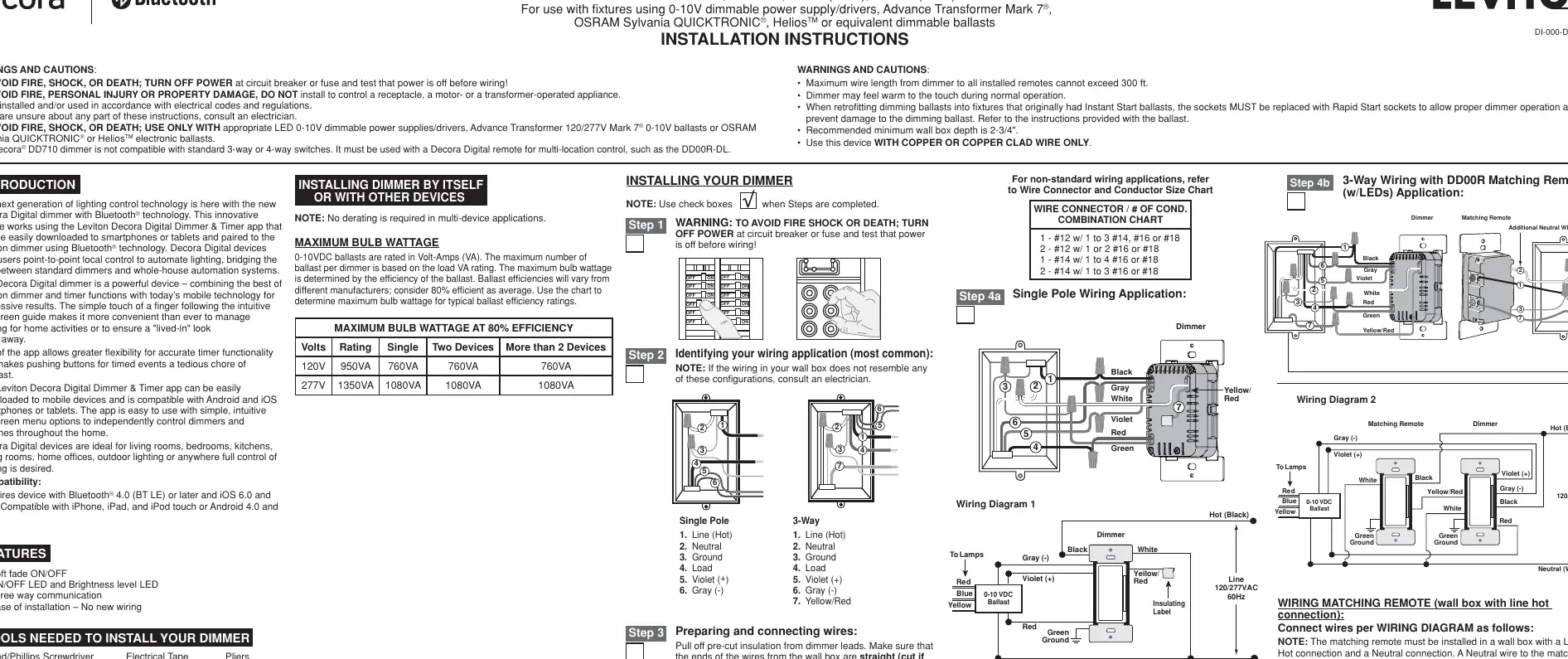
Preparation
- Turn off power at the circuit breaker.
- Strip insulation from dimmer leads and wall box wires as indicated (5/8 inch).
- Ensure wall box wires are straight.
Wiring Applications
- Single-Pole: Connect the dimmer leads to the corresponding wall box wires (Line, Neutral, Ground, Load, Violet +, Gray -). Ensure the insulating label remains on the second red lead.
- 3-Way (Multi-location): Requires a Decora Digital remote. The dimmer and remote must be wired according to the specific diagrams provided in the manual, ensuring the neutral wire is connected to both the dimmer and the remote.
Operation
The dimmer features a rocker switch and a DIM/BRIGHT bar.
- Turn ON: Tap the top of the rocker.
- Turn OFF: Tap the bottom of the rocker.
- Brighten: Press the top half of the DIM/BRIGHT bar.
- Dim: Press the bottom half of the DIM/BRIGHT bar.
The locator light illuminates when the load is in the OFF position to help locate the switch in the dark.
App Setup
Download the Leviton Decora Digital Dimmer & Timer app from the Google Play Store or Apple App Store. Pair your mobile device with the dimmer using Bluetooth technology to access advanced features like scheduling, sleep timers, and remote control.
Advanced Programming
The dimmer includes two programming modes accessed by holding the rocker and DIM/BRIGHT bar.
- Mode A (Brightness): Configure Maximum Brightness Level, Minimum Brightness Level, and Preset ON Level.
- Mode B (Fade/LED): Configure ON Fade Rate, OFF Fade Rate, and LED Options (such as locator light timeout and brightness display behavior).
The device will exit programming mode after 3 minutes of inactivity.
Troubleshooting
- Lights Flickering: Check for bad connections or loose wire connectors.
- Light does not turn ON: Verify the circuit breaker is on, the lamp is functional, and the neutral wire is properly connected.
- Intermittent operation: Ensure the load does not exceed 950VA (120V) or 1350VA (277V).
- Remote not working: Ensure total wire length does not exceed 300 feet and wiring is correct.
- Factory Reset: If the dimmer is unresponsive, hold the top of the rocker until the locator LED blinks to reset to factory settings.
Manufacturer information
Leviton
Practical help
Common problems
Lights are flickering
Check for bad connections or ensure wires are secured firmly with wire connectors or terminal screws.
Light does not turn on
Verify the circuit breaker is on, the lamp is not burned out, and the neutral (white) wire is properly connected.
Intermittent dimmer operation
Confirm that the controlled load does not exceed 950VA at 120VAC or 1350VA at 277VAC.
Remote does not operate lights
Ensure the total wire length from the dimmer to all remotes does not exceed 300 feet and verify wiring configuration.
Before use
- Turn off power at the circuit breaker.
- Verify the wall box contains a neutral wire.
- Ensure wall box depth is at least 2-3/4 inches.
- Use only with copper or copper-clad wire.
- Download the Leviton Decora Digital Dimmer & Timer app.
- Check that your mobile device supports Bluetooth 4.0 or later.
Images and diagrams
- Wiring Diagram 1: Shows standard single-pole installation with Line, Neutral, Ground, Load, and 0-10V control wires.
- Wiring Diagram 2: Shows 3-way installation with a matching remote, requiring a neutral wire at both locations.
Model compatibility
- Requires a neutral wire connection.
- Not compatible with standard 3-way or 4-way switches; must use Decora Digital remote (e.g., DD00R-DL).
- Requires Bluetooth 4.0 (BT LE) or later.
- Compatible with iOS 6.0+ or Android 4.0+.

Manual page author
Michael Turner
Technical manual editor
Reviews PDF manuals for structure, safety notes, and practical product details so readers can find the right information quickly.