Lighting / Controllers Dimmers
User Manual for Leviton ODDMT-MDx Smart Multi-Tech 0-10V Dimming Wallbox Sensor
Quick guide for the Leviton ODDMT-MDx sensor. Learn about installation, wiring, app configuration, pushbutton settings, and technical specifications.
Table of contents
Manual images
Click an image to enlargeQuick guide from the manual
The Leviton ODDMT-MDx is a Smart Multi-Tech 0-10V Dimming Wallbox Sensor designed to automate lighting control using Passive Infrared (PIR) and Microphonics technology. This device requires a neutral wire for installation and is compatible with 0-10V ballasts. Configuration can be performed via the Leviton Smart Sensor App or through manual pushbutton settings on the device.
Description
The sensor monitors room occupancy by dividing the field-of-view into zones. It uses PIR to detect motion and Microphonics to detect human activity even behind obstructions where PIR might fail. It features a vacancy mode for manual-ON/auto-OFF operation, making it suitable for energy code compliance.
Installation and Wiring
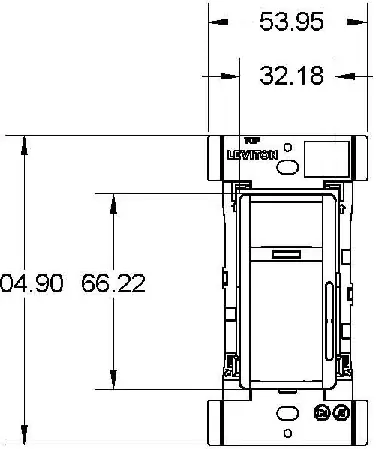
The device fits in a standard wallbox and is gangable with other units. Important: A neutral wire is required for operation. Ensure the wiring follows the diagram provided in the manual, connecting Line, Neutral, Ground, Load (Blue), and the 0-10V control lines (Violet +, Pink -).
Configuration
There are two primary ways to configure the sensor:
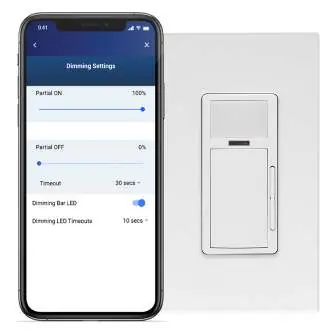
- Leviton Smart Sensor App: Use a Bluetooth-enabled Android or iOS device to adjust sensitivity, timeouts, operating modes (Occupancy/Vacancy), partial-ON/OFF levels, and daylighting hold-OFF settings.
- Pushbutton Configuration: For installers without a smart device, the sensor supports 12 pre-configured modes. This requires removing the front face cover to access the button.
Pushbutton Hold Configuration Modes
The following modes are available via the pushbutton:
- Modes 1-6 (Auto-ON/Auto-OFF): Various combinations of PIR/Microphonics sensitivity (75% or 100%) and timeouts (10 or 20 minutes).
- Modes 7-12 (Manual-ON/Auto-OFF): Similar sensitivity and timeout combinations as above, but requiring manual activation.
Specifications
- Input Voltage: 120-277VAC, 50/60Hz.
- Load Ratings: LED/Electronic Ballast up to 8A @ 120V or 5A @ 277V.
- Coverage: 180° field-of-view, approximately 1,100 sq ft.
- Operating Temperature: 32 to 104°F (0 to 40°C).
- Network: BLE 4.2, BLE 5.0.
Safety and Compliance
The device is designed to comply with ASHRAE 90.1, IECC, and 2022 Title 24, Part 6 requirements. It is UL and cUL listed and FCC/ICC certified.
Manufacturer information
Leviton
Practical help
Common problems
Sensor does not turn lights on or off as expected.
Check if the device is in Vacancy mode (requires manual-ON) or Occupancy mode (Auto-ON). Adjust sensitivity or timeout settings via the app or pushbutton configuration.
Device not powering on.
Verify that a neutral wire is connected. The ODDMT-MDx requires a neutral wire for operation.
Unable to configure via app.
Ensure the smartphone has Bluetooth enabled and is within range. Use the Leviton Smart Sensor App.
Before use
- Verify the presence of a neutral wire in the wallbox.
- Ensure the lighting load is compatible (0-10V ballast).
- Download the Leviton Smart Sensor App on a Bluetooth-enabled device.
- Confirm the wallbox is standard size.
- Check that the load does not exceed 8A (at 120V) or 5A (at 277V).
Specs in practice
- 0-10V Dimming
- Compatible with 0-10V dimmable LED drivers/ballasts.
- PIR + Microphonics
- Dual technology: PIR detects motion, Microphonics detects sound/activity even without line-of-sight.
- 1100 sq ft coverage
- The sensor can effectively monitor an area of approximately 1,100 square feet.
Images and diagrams
- The Wiring Diagram shows the connection for Line, Neutral, Ground, Load (Blue), and the 0-10V control wires (Violet/Pink).
- The Field of View diagram illustrates the 180-degree coverage pattern, showing major motion coverage up to 1,100 sq ft and minor motion up to 400 sq ft.
Model compatibility
- Requires neutral wire.
- Compatible with 0-10V ballasts.
- Fits in standard wallbox.
- Supports multi-way systems for up to 5 devices using Push to Pair (P2P).

Manual page author
Emily Carter
User documentation editor
Prepares concise manual descriptions and highlights the most useful setup, operation, and maintenance information for readers.