Electronics / Digital Signage
User Manual for LG 22SM3G Digital Signage Monitor
Quick guide for the LG 22SM3G Digital Signage Monitor. Includes installation steps, safety precautions, connection instructions, troubleshooting, and technical specifications.
Quick answers from the manual
Quick answer
- The LG 22SM3G is a digital signage monitor. This manual covers safety, installation (wall mount/portrait), connections, and troubleshooting. p. 1, 2
Key actions
- Install on wall p. 19, 20
- Connect to PC p. 25, 26
- Prevent image sticking p. 29
First start
- Install batteries in remote (1.5V AAA), connect power, and connect video source via HDMI. p. 23, 25
Show 4 more answers Show less
Problems and fixes
No signal
Check cable connection, input menu, or frequency range.
p. 27
Power won't turn on
Check power cord connection and clean the contacting port.
p. 27Maintenance and reset
- Clean the product with a soft cloth; unplug before cleaning. p. 9
Technical specifications
| Parameter | Value | Meaning | Pages |
|---|---|---|---|
| Resolution | 1920 x 1080 @ 60 Hz | Maximum and recommended resolution | p. 30 |
Where to find it in the PDF
- Safety Precautions p. 3, 13
- Assembly and Preparation p. 15, 22
- Troubleshooting p. 27, 29
- Specifications p. 30, 32
Table of contents
Manual images
Click an image to enlargeImportant Information from the Manual
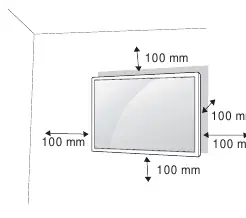
This manual provides essential instructions for the safe operation and installation of the LG 22SM3G Digital Signage Monitor. Key safety measures include ensuring proper ventilation (at least 100 mm clearance from walls), using only authorized power cords, and avoiding installation in areas with high humidity, dust, or direct sunlight. The monitor is intended for indoor use only.
Assembly and Preparation
The monitor supports various installation configurations:
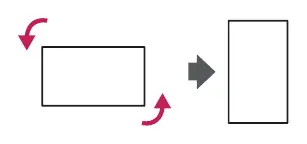

- Portrait Layout: Rotate the monitor counterclockwise 90 degrees when facing the screen.
- Wall Mounting: Use a VESA-compliant wall mount. Ensure the monitor is securely fixed to the wall. Maintain a 100 mm clearance on all sides for proper ventilation.
- Logo Bracket: Instructions are provided for attaching and removing the LG logo bracket.
- Kensington Lock: A security slot is available on the back of the monitor for theft prevention.
Making Connections
To connect external devices:
- PC Connection: Use a shielded interface cable with a ferrite core (e.g., D-sub 15-pin or DVI-D/HDMI). HDMI connection is recommended for the best image quality.
- Input Selection: Change the input mode on the monitor to match the connected device.
Troubleshooting
If you encounter issues, check the following:
- Power Issues: Ensure the power cord is securely plugged in and the outlet is functional.
- No Signal/Invalid Format: Check the signal cable connection and ensure the PC's output resolution/frequency is within the monitor's supported range.
- Image Sticking: To prevent image retention, use a screen saver and change the background/character colors at least every 12 hours.
Technical Specifications
The monitor features a TFT LCD screen with a maximum and recommended resolution of 1920 x 1080 @ 60 Hz. It includes built-in wireless LAN (IEEE 802.11a/b/g/n/ac) and Bluetooth capabilities. Always refer to the product label for specific model and serial number details.
Manufacturer information
LG Electronics
Practical help
Common problems
No signal or Invalid Format message
Check if the signal cable is connected properly, access the input menu to verify the signal, or adjust the PC graphics card frequency/resolution to match the monitor's specifications.
Power won't turn on
Verify the power cord is correctly plugged into the outlet and clean the contacting port if necessary.
Image sticking (after-image)
Use a screen saver, avoid displaying static images for long periods, and change background/character colors at least every 12 hours.
Before use
- Ensure 100 mm clearance from walls for ventilation.
- Use only certified HDMI cables for the best quality.
- Install 1.5V AAA batteries in the remote control.
- Check that the power source voltage matches the product specifications.
- Ensure the installation surface is flat and stable.
Show more Show less
Specs in practice
- Maximum Resolution
- 1920 x 1080 @ 60 Hz (HDMI1/HDMI2).
- Wireless LAN
- IEEE 802.11a/b/g/n/ac standard.
- Horizontal Frequency
- 30 kHz to 83 kHz.
Images and diagrams
- Portrait layout rotation (counterclockwise 90 degrees).
- Wall mount plate installation steps.
- Wall clearance requirements (100 mm).
- Remote control battery installation.
Model compatibility
- Requires VESA standard wall mounting brackets.
- HDMI connection is recommended for optimal image quality.
- Some PCs may require manual audio output settings to HDMI.

Manual page author
Michael Turner
Technical manual editor