Electronics / Digital Signage
Owner's Manual for LG 105BM5N-B Digital Signage Display
Quick guide for the LG 105BM5N-B Digital Signage Display. Includes installation instructions, wall mount specifications, connection guide, and usage precautions.
Table of contents
Manual images
Click an image to enlargeQuick Guide
This manual provides essential information for the setup and operation of the LG 105BM5N-B Digital Signage Display. Before operating, ensure all tapes are removed from the front of the screen. The product requires specific wall mounting hardware and proper ventilation clearance. Be aware that the screen may flicker when turned on in cold conditions, which is normal.
Installation
The display is designed for wall mounting. Ensure the wall mount support complies with VESA standards.
- VESA Dimensions: 1000 x 400 mm
- Screw Specifications: M8
- Clearance: Allow at least 10 cm (3.9 inches) of clearance from the wall for proper ventilation.
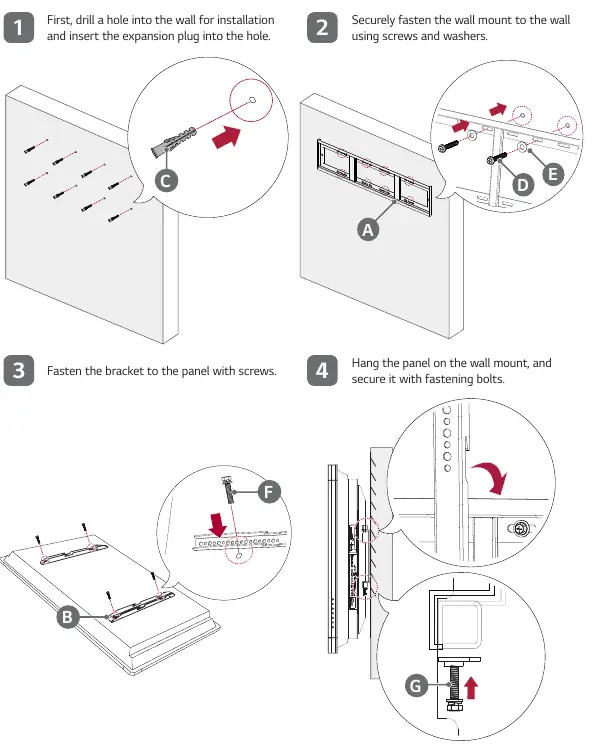
Installation Steps:
- Drill holes into the wall and insert expansion plugs.
- Securely fasten the wall mount support to the wall using screws and washers.
- Fasten the bracket to the back of the display panel using the provided screws.
- Hang the panel on the wall mount and secure it with fastening bolts.
Orientation: Do not install the product on a ceiling or sloped wall. Ensure the display is installed in the correct orientation as specified.
Connecting to Power
Connect the provided power cable to the power terminal at the bottom of the product. Use the power switch to turn the unit on ('I') or off ('O'). The AC OUT terminal can be used to output AC power (250 W or less).
Input/Output Terminals
The display features various ports for connectivity:
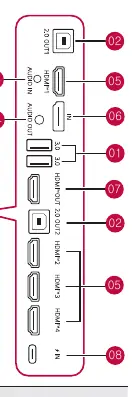
- Side Terminals: Include USB 3.0, 2.0 OUT 1/2, AUDIO IN/OUT, HDMI 1/2/3/4, DP IN, HDMI OUT, and USB Type-C.
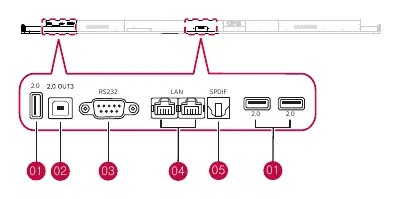
- Bottom Terminals: Include USB 2.0, 2.0 OUT 3, RS232, Wired LAN, and SPDIF.
Precautions for Use
- Dust: The warranty does not cover damage caused by use in excessively dusty environments.
- Afterimage Prevention: To prevent afterimages, use the screen-saver function, avoid displaying fixed patterns for extended periods, and switch images regularly. The maximum recommended time for switching the screen is 12 hours.
Specifications
- Recommended Resolution: 5120 x 2160 (5K) @ 60 Hz.
- Operating Temperature: 0 °C to 40 °C (32 °F to 104 °F).
- Operating Humidity: 10 % to 90 %.
- USB-C Power: Maximum rated power is 100 W.
Manufacturer information
LG Electronics
Practical help
Common problems
Screen flickers when turned on
This is normal if the product is cold; no action is required.
Afterimage on screen
Use the screen-saver function, avoid fixed images for long periods, and switch screen content at least every 12 hours.
Missing components
Contact customer support if any listed components are missing.
Before use
- Remove all tapes attached to the front of the display.
- Ensure the wall mount support is VESA 1000x400 compliant.
- Verify the wall can support the weight of the display.
- Allow at least 10 cm of clearance around the display for ventilation.
- Use a certified USB-C cable (1.5m or less) for USB-C connections.
- Keep the product box for future transport.
Specs in practice
- VESA Dimensions
- 1000 x 400 mm mounting pattern using M8 screws.
- Operating Temperature
- Must be operated between 0°C and 40°C.
- Video Daisy Chain
- Supported via HDMI OUT up to 3840 x 2160 @ 30 Hz.
Images and diagrams
- The installation diagram illustrates the 4-step process: drilling, mounting the bracket to the wall, attaching the bracket to the panel, and hanging the panel.
- Input/Output terminal diagrams distinguish between side and bottom port layouts.
Model compatibility
- USB-C ports do not support DPM (Sleep mode).
- Video daisy chain is configured through HDMI OUT.
- The product warranty is void if the front panel is exposed to direct sunlight.

Manual page author
David Miller
Documentation analyst
Organizes user manual content into clear summaries, with attention to model details, product context, and everyday usability.