Electronics / Monitors
User Manual for LG 24BA450 LED Monitor
Quick setup guide for the LG 24BA450 LED monitor. Includes assembly instructions, cable connection guide, safety warnings, and compatibility information.
PDF source: polski · summary: English
Quick answers from the manual
Quick answer
- This guide provides instructions for assembling the LG 24BA450 monitor, connecting cables, and important safety precautions. p. 1, 6, 7, 8
Key actions
- Assemble the stand p. 6
- Connect cables p. 7, 8, 12
First start
- Connect the power cable and signal cables (HDMI/DP/D-SUB) to the monitor and your PC. p. 8, 12
Show 2 more answers Show less
Problems and fixes
Device malfunction or compatibility issues
Use the supplied cables instead of third-party adapters.
p. 9, 10, 11Where to find it in the PDF
- Assembly p. 6
- Connections p. 8, 12
Table of contents
Manual images
Click an image to enlargeQuick Setup Guide
This document provides essential instructions for the initial setup and safe operation of the LG 24BA450 and 27BA450 series LED monitors. It is recommended to use the components supplied with the product to ensure optimal performance and compatibility.
Assembly Instructions
Follow these steps to assemble the monitor stand:
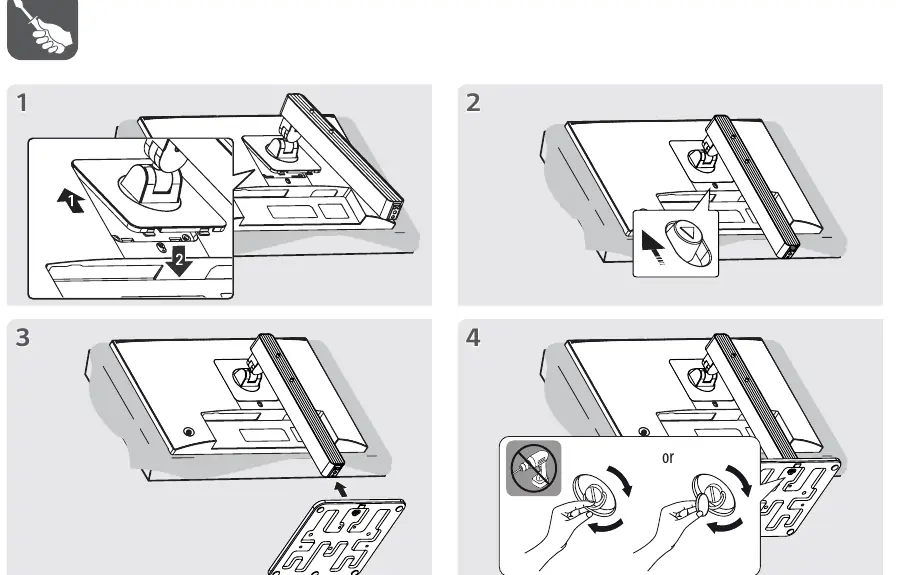
- Place the monitor screen face down on a soft surface to prevent damage.
- Attach the stand base to the monitor body.
- Secure the stand using the provided screws or locking mechanism.
- Ensure the stand is firmly attached before placing the monitor in an upright position.
Connecting Cables
The monitor supports various input connections. Ensure all cables are securely connected to the corresponding ports:
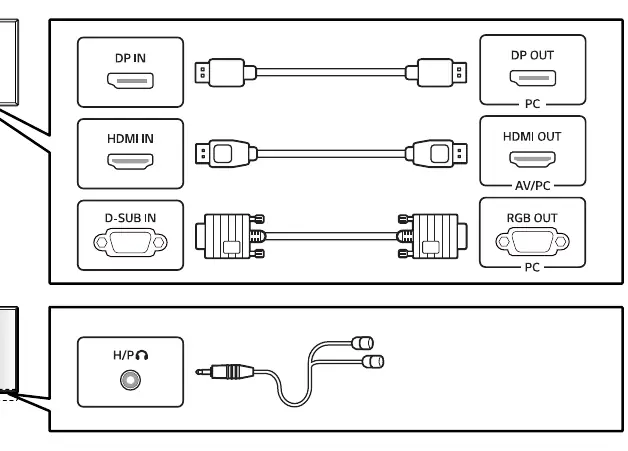
- DP IN: Connect using a DisplayPort cable.
- HDMI IN: Connect using an HDMI cable.
- D-SUB IN: Connect using a VGA/D-SUB cable.
- Headphone/Audio: Connect audio devices to the H/P port.
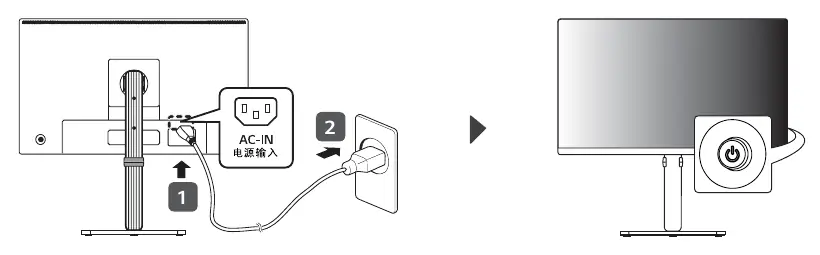
- Power: Connect the power cable to the AC-IN port on the back of the monitor and plug it into a power outlet.
Important: Using third-party DVI to HDMI or DisplayPort to HDMI adapters may cause compatibility issues or device malfunction. Always use the cables supplied with the product.
Safety Precautions
- Do not touch the screen surface with your hands or sharp objects to avoid damage.
- Take a 10-minute break after every 30 minutes of screen use.
- Children under 2 years old should not view the screen; children over 2 years old should limit screen time to less than 1 hour per day.
- Excessive screen time may cause eye strain or vision damage.
Regulatory Information
The monitor complies with hazardous substance regulations. Refer to the hazardous substances table in the manual for details regarding lead, mercury, cadmium, and other materials used in the circuit board, casing, and components.
Manufacturer information
LG Electronics
Practical help
Common problems
Compatibility issues with video signals
Ensure you are using the cables supplied with the product. Using third-party DVI to HDMI or DP to HDMI adapters may cause the device to malfunction.
Before use
- Verify all supplied components are present.
- Ensure the monitor is placed on a stable surface.
- Check that all cable connections are secure.
- Avoid touching the screen surface during assembly.
Show more Show less
Images and diagrams
- Assembly steps for attaching the stand to the monitor.
- Cable management routing instructions.
- Port identification for DP, HDMI, D-SUB, and Headphone connections.
- Power connection procedure.
Model compatibility
- Use only supplied cables to avoid compatibility issues.
- DVI to HDMI or DP to HDMI adapters are not recommended.

Manual page author
Emily Carter
User documentation editor