Computers / Laptops
User Manual for LG Stylus Pen PEW8
Quick guide for the LG Stylus Pen PEW8. Includes technical specifications, compatibility with the 16T90TP model, and service information.
Quick answers from the manual
Quick answer
- The PEW8 is a dedicated stylus pen for the LG 16T90TP laptop, enabling precise touch actions. p. 1
Key actions
- Refer to LG Easy Guide or Owner's Manual for usage and tip replacement. p. 1, 2
Problems and fixes
Service fees for repairs
Repairs due to improper use, negligence, or unauthorized modification are subject to fees.
p. 1Technical specifications
| Parameter | Value | Meaning | Pages |
|---|---|---|---|
| Model | PEW8 | Product model name | p. 1, 2 |
| Protocol | MPP 2.0 | Communication protocol | p. 1, 2 |
| Weight | 13 g | Weight including battery | p. 1, 2 |
Where to find it in the PDF
- Product Specifications and Service Info p. 1, 2
Table of contents
Quick guide from the manual
The LG Stylus Pen (PEW8) is a dedicated accessory designed specifically for the LG 16T90TP laptop. It enables precise touch actions that are difficult to perform with fingers. For detailed usage instructions, maintenance, and pen tip replacement, please refer to the LG Easy Guide or the Owner's Manual available in the LG PC Manuals.
Product Components
The stylus consists of the following main parts:
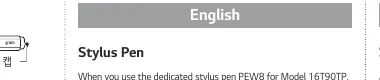
- Pen tip
- Pen cap
Technical Specifications
- Model: PEW8
- Dimensions: 162 mm (length) x 10.4 mm (diameter)
- Weight: 13 g (including battery)
- Protocol: MPP 2.0 (18 - 210 kHz)
- Battery: 80 mAh (Built-in Li-Ion, 3.85 V)
- Operating Temperature: +5 °C to +40 °C
Service and Warranty
Repairs arising from the following circumstances are subject to service fees:
- Improper use of the product
- User negligence (e.g., breaking, submerging in water, unauthorized dismantling or remodeling)
- Failure to heed precautions in the user manual
- Natural disasters (fire, salt air, gas, earthquake, storm, flood, etc.)
- Using incorrect voltage or defects in the connecting device
- Replacing expendable parts
- Damage from external causes
Please refer to the Service section on the Limited Warranty Statement of your LG 16T90TP Laptop for detailed support instructions.
Regulatory Notices
This equipment complies with FCC and IC radiation exposure limits for an uncontrolled environment. It is designed to comply with Class B digital device limits. Users are advised not to make unauthorized modifications to the equipment, as this could void the authority to operate the device.
Manufacturer information
LG Electronics
Practical help
Common problems
Stylus not responding
Ensure the device is charged and compatible with the LG 16T90TP model.
Physical damage or water exposure
Service fees may apply for repairs; contact an authorized service center.
Need to replace pen tip
Refer to the LG Easy Guide or Owner's Manual for specific replacement procedures.
Before use
- Verify compatibility with LG 16T90TP laptop
- Check for physical damage
- Ensure the pen is charged
Images and diagrams
- The diagram illustrates the two main components of the stylus: the Pen tip and the Pen cap.
Model compatibility
- Designed specifically for the LG 16T90TP laptop.

Manual page author
Michael Turner
Technical manual editor
Reviews PDF manuals for structure, safety notes, and practical product details so readers can find the right information quickly.