Lighting / Outdoor Lighting
User Manual for Lightpro Switch 238A
Comprehensive user guide for the Lightpro Switch 238A. Includes installation instructions for wall or ground mounting, app pairing steps, technical specifications, and safety guidelines for your 12V outdoor lighting system.
Quick answers from the manual
Quick answer
- The Lightpro Switch 238A is a smart switch for 12V outdoor lighting systems, controlled via the Lightpro app. It requires a 2.4GHz Wi-Fi connection and must be used with a 12V transformer. p. 5
Key actions
- Install the switch on a wall or ground spike. p. 5
- Pair the device using the Lightpro app on a 2.4GHz Wi-Fi network. p. 5
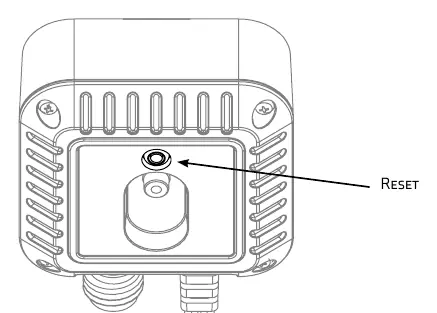
- Reset the device by holding the reset button for 5 seconds. p. 5
First start
- Download the app, ensure 2.4GHz Wi-Fi, and follow the 'Add device' steps in the app. p. 5
Show 4 more answers Show less
Problems and fixes
Device not connecting
Check that your router is set to 2.4GHz, not 5GHz.
p. 5Maintenance and reset
- Hold the reset button for 5 seconds. p. 5
Technical specifications
| Parameter | Value | Meaning | Pages |
|---|---|---|---|
| Input | 12V AC/DC | Operating voltage | p. 5 |
| Max Capacity | 150W | Maximum load | p. 5 |
| Protection Class | IP44 | Water resistance rating | p. 5 |
Where to find it in the PDF
- Installation and Setup p. 2, 3, 5
Table of contents
Manual images
Click an image to enlargeQuick guide from the manual
The Lightpro Switch 238A is a smart switch designed for use with the Lightpro 12-Volt outdoor lighting system. It allows for remote control via a smartphone or tablet using the Lightpro app. To ensure proper operation, the system requires a 2.4GHz Wi-Fi connection and a permanently powered 12V transformer.
Product Description
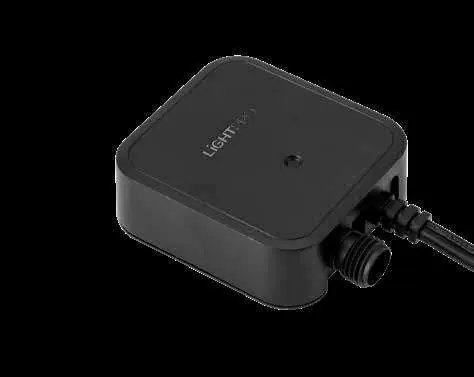
The Lightpro Switch is a smart control unit for 12V outdoor lighting. It is compatible only with the Lightpro 12V system. Any modifications to the product may affect safety, warranty, and system operation.
Installation
Before installing, ensure the transformer is connected and powered. The switch can be installed in two ways:
Option 1: Wall mounting
- Fix the wall bracket to the wall using the supplied screws.
- Place the Switch into the wall bracket.
Option 2: Ground placement
- Push the ground spike into the ground up to the marking.
- Place the Switch onto the spike.
App Pairing
- Download the Lightpro app.
- Ensure your smartphone is connected to a 2.4GHz Wi-Fi network.
- Open the app and click the '+' icon in the top right corner.
- Select 'Add device' and choose 'Switch (Wi-Fi)'.
- Confirm the device is flashing.
- The app will connect to the Switch; this may take up to 2 minutes.
Reset Procedure
If you need to reset the device, locate the reset button on the unit and hold it for 5 seconds.
Safety and Maintenance
- Safety: This product is for 12V systems only. Do not use in areas where combustible gases, fumes, or liquids are stored.
- Temperature: Suitable for ambient temperatures between -20°C and 50°C.
- Maintenance: Clean regularly with a soft, clean cloth. Avoid high-pressure washers or aggressive chemical cleaners.
- Stainless Steel: If the product has stainless steel parts, clean them with a stainless steel cleaning agent once every 6 months.
- Access: Always install the product in a location accessible for maintenance. Do not permanently embed or brick in the unit.
Technical Specifications
- Product: Lightpro Switch
- Article Number: 238A
- Input: 12V AC/DC
- Maximum Capacity: 150W
- Usage (max): 1W
- Protection Class: IP44
- Dimensions: 230 x 68 x 33 mm
Practical help
Common problems
Device not connecting to the app
Ensure your Wi-Fi router is set to 2.4GHz. The device is not compatible with 5GHz networks.
Switch not operating
Ensure the transformer is permanently switched on.
Before use
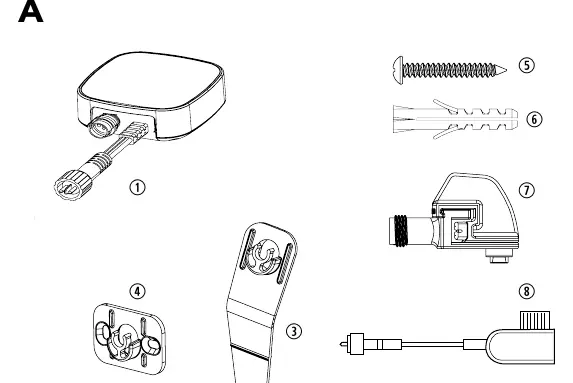
- Check all parts are included in the packaging
- Ensure a 12V transformer is available and powered
- Download the Lightpro app
- Verify your Wi-Fi network is 2.4GHz
Show more Show less
Images and diagrams
- Figure A: Package contents including switch, spike, and brackets.
- Figure B/C: Wall mounting procedure.
- Figure D/E: Ground spike installation procedure.
- Figure F: Location of the reset button.
Model compatibility
- Only for use with Lightpro 12V outdoor lighting system.
- Requires 2.4GHz Wi-Fi network.

Manual page author
Michael Turner
Technical manual editor