Electronics / Gaming Consoles
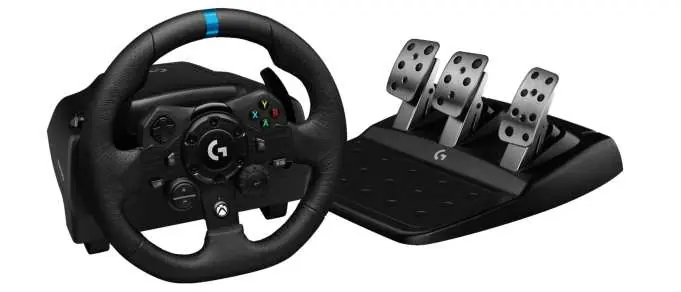
Logitech G923 Racing Wheel and Pedals Setup Guide
Quick setup guide for the Logitech G923 Racing Wheel and Pedals, including connection instructions, mounting, button layout, and G HUB software settings.
Table of contents
Manual images
Click an image to enlargeQuick guide from the manual
This document provides essential instructions for setting up and configuring the Logitech G923 Racing Wheel and Pedals for Xbox One and PC. Key procedures include connecting the hardware, mounting the wheel to a table, and configuring advanced features like Dual Clutch and force feedback via Logitech G HUB software.
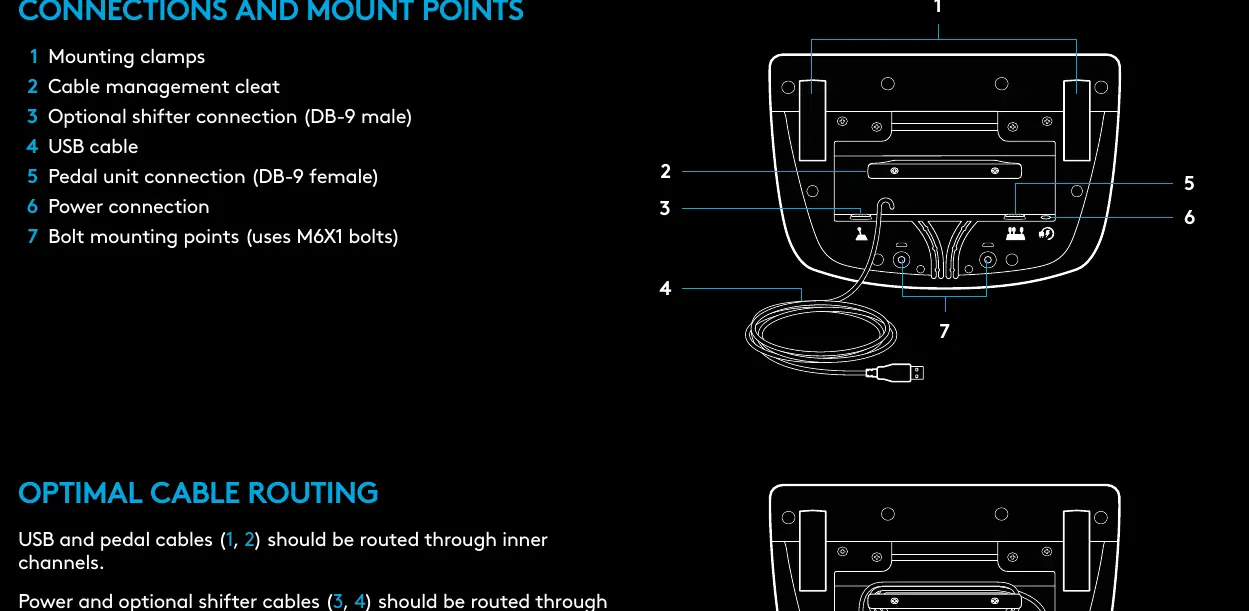
Connections and mount points
The wheel base features several connection ports and mounting options:
- Mounting clamps: Integrated system for securing the wheel to a table.
- Cable management: Use the cable management cleat to secure cables.
- Ports: Connections for the pedal unit, power adapter, USB cable, and optional shifter (DB-9).
- Bolt points: M6X1 bolt points are available for permanent mounting.
Optimal cable routing: Route USB and pedal cables through inner channels, and power/shifter cables through outer channels.
Installation
Connect the power adapter and USB cables as shown in the diagrams. Upon connection, the wheel will perform a full rotation calibration. Once complete, the wheel is ready for use. For PC users, installing Logitech G HUB is required to enable force feedback and RPM LED features.
Mounting clamps
The wheel features a built-in clamping system. Push down and rotate the clamp knobs to lock or unlock. Rotate the knobs to tighten or loosen the clamps. For thicker tables, remove the clamp extenders.
Force Feedback and TRUEFORCE
The G923 uses dual motors for force feedback. Supported titles utilize TRUEFORCE, which integrates directly with game physics and audio for high-definition, real-time feedback. If the wheel overheats, force feedback may temporarily shut down; allow the wheel to cool and power it down by unplugging it.
Dual Clutch System
The dual clutch system allows for maximum traction during grid starts. To set it up:
- Enter setting mode by holding the left/right gear paddles and left/right stick buttons for two seconds.
- Select the desired button (LSB or RSB) for the dual clutch function.
- Depress clutch and gas pedals, engage first gear, and use the +/- buttons to adjust the bite point until the car moves.
- Press the Select button to save settings.
Logitech G HUB Settings
Use G HUB to customize your experience:
- Sensitivity: Adjust wheel and pedal response curves.
- Operating Range: Limit rotation up to 900 degrees.
- Centering Spring: Adjust return-to-center force (recommended off for games with native force feedback).
- Torque: Control overall force feedback strength (TRUEFORCE games only).
- Combined Pedals: Toggle for compatibility with older racing titles.
Manufacturer information
Logitech
Practical help
Common problems
Force feedback shuts down during use.
The wheel has an overheat protection circuit. Allow the wheel to cool down and unplug it to power it down.
Pedals behave incorrectly in modern racing games.
Ensure the 'Combined Pedals' option in G HUB is unchecked.
Force feedback or RPM LEDs not working on PC.
Ensure the Logitech G HUB software is installed and running.
Before use
- Ensure all cables are securely connected to the wheel base.
- Route cables through the designated channels to prevent slack.
- Secure the wheel to a stable table using the integrated clamps.
- Install Logitech G HUB software on your PC.
- Ensure the wheel is on a flat surface for calibration.
Specs in practice
- Operating Range
- The maximum rotation angle of the wheel, adjustable up to 900 degrees.
- Combined Pedals
- A setting that treats gas and brake pedals as a single axis, primarily for older games.
Images and diagrams
- The wheel base includes 7 connection/mounting points: clamps, cable management, shifter port, USB, pedal port, power, and bolt points.
- The pedal unit includes bolt points, a carpet grip system, a release clip, and adjustable pedal face positions.
Model compatibility
- Compatible with Xbox One and PC.
- TRUEFORCE features require supported game titles.
- Dual Clutch function is not supported in all games.

Manual page author
David Miller
Documentation analyst
Organizes user manual content into clear summaries, with attention to model details, product context, and everyday usability.