Electronics / Remote Controls
User Manual for Mandis 06-5FHW48-A001X Remote Control
Quick guide for the Mandis 06-5FHW48-A001X replacement remote control. Learn button mappings for IKEA UPPLEVA TV and Sound System.
Table of contents
Manual images
Click an image to enlargeQuick guide from the manual
This document provides the button mapping for the Mandis 06-5FHW48-A001X replacement remote control. It is designed to replace the original remote for IKEA UPPLEVA TV and IKEA UPPLEVA SOUNDSYSTEM devices. The manual outlines the correspondence between the original remote buttons and the buttons on the replacement unit.
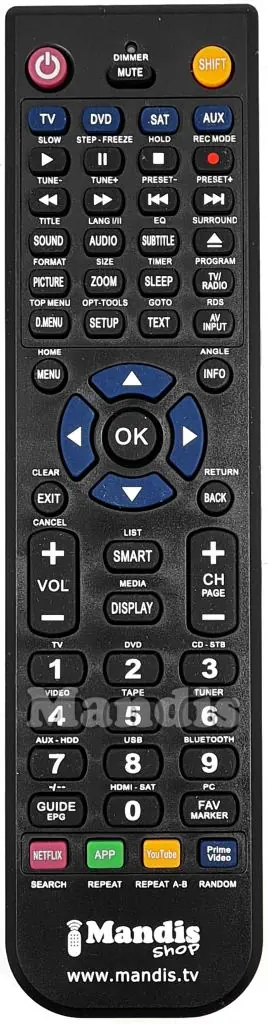
Device Compatibility
The remote is compatible with the following systems:
- IKEA UPPLEVA TV
- IKEA UPPLEVA SOUNDSYSTEM
Using the Remote
The remote functions by mapping the original remote's buttons to the new layout. Use the provided tables in the manual to identify the correct button for your desired function. The tables are divided into 'Original' (the function on your original remote) and 'Rechange' (the corresponding button on the Mandis remote).
Shift Function
Some functions require the use of the Shift key. To access these, press the Shift button followed by the specific function button as indicated in the mapping table (e.g., Shift + Green button for specific app functions).
Button Mapping Overview
The remote includes standard navigation, volume, channel, and media playback controls. Refer to the mapping tables for specific assignments, such as:
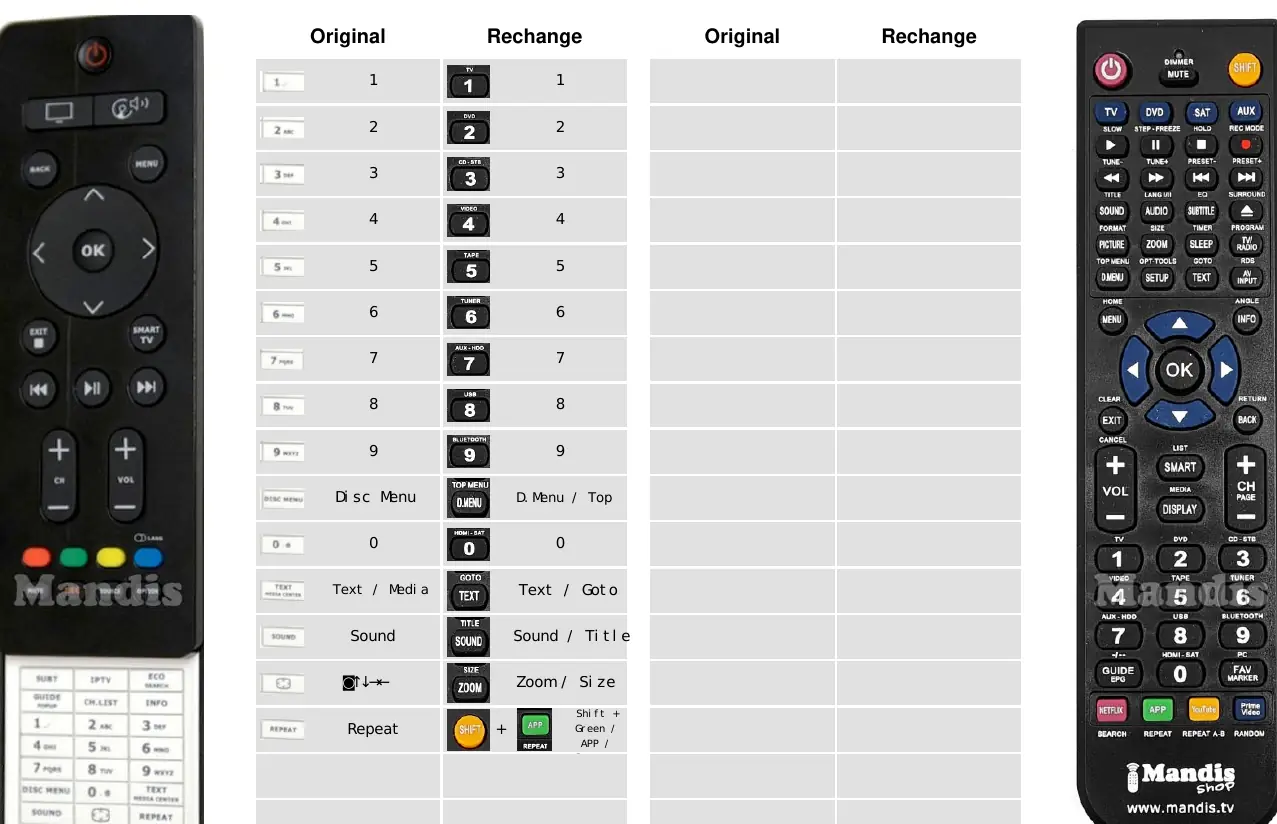
- Power: Standard power on/off.
- Navigation: Up, Down, Left, Right, and OK buttons for menu navigation.
- Media Controls: Play, Pause, Stop, Skip Prev/Next, and Record functions.
- Direct Access: Dedicated buttons for Netflix, YouTube, Prime Video, and other media services.
Manufacturer information
Mandis
Practical help
Common problems
Remote not responding to device
Ensure fresh batteries are installed and there is a clear line of sight between the remote and the device's infrared sensor.
Cannot find a specific function
Check the mapping table in the manual. Some functions may require pressing the 'Shift' key before the function button.
Before use
- Insert fresh batteries into the remote control.
- Identify if you are using the remote for the TV or the Sound System.
- Consult the mapping table to locate the desired function button.
- Ensure the device is powered on.
Images and diagrams
- The remote layout features a standard numeric keypad, navigation arrows, volume/channel controls, and dedicated media playback buttons.
Model compatibility
- Designed specifically for IKEA UPPLEVA TV models.
- Designed specifically for IKEA UPPLEVA SOUNDSYSTEM models.

Manual page author
David Miller
Documentation analyst
Organizes user manual content into clear summaries, with attention to model details, product context, and everyday usability.