Electronics / Remote Controls
User Manual for Mandis 076R0NV010 Remote Control
Quick guide for the Mandis 076R0NV010 replacement remote control. View the button mapping between your original Orion remote and the Mandis replacement.
Table of contents
Quick guide from the manual
This document serves as a reference guide for the Mandis 076R0NV010 replacement remote control. It provides a direct mapping between the buttons on your original remote and the corresponding buttons on the Mandis replacement unit. Use this guide to locate specific functions that may be labeled differently on the new remote.
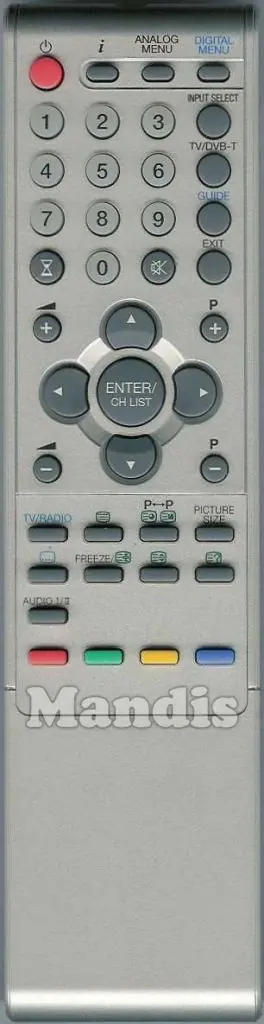
Button Mapping
The replacement remote is designed to replicate the functionality of the original Orion 076R0NV010 remote. Because the layout and labeling may differ, please refer to the following mapping logic:
- Original: The function or button label found on your original remote control.
- Rechange: The specific button or combination of buttons to press on the Mandis replacement remote to achieve the same function.
For example, if you need to access the "Digital Menu," look for the "D. Menu / Top" button on the replacement remote. If you need to use "Timer" functions, look for the "Sleep / Timer" button.
Usage Tips
Since this is a replacement remote control, it is generally plug-and-play. Ensure that you have installed fresh batteries and that the remote is pointed directly at the infrared receiver on your television. If a specific function does not appear to work, verify the mapping in the provided tables to ensure you are pressing the correct button on the replacement unit.
Manufacturer information
Mandis
Practical help
Common problems
Button does not perform the expected action
Check the mapping table in this guide. The function may be assigned to a different button or a combination of buttons on the replacement remote.
Remote is unresponsive
Ensure the batteries are fresh and correctly inserted. Point the remote directly at the TV's infrared sensor, ensuring there are no obstructions.
Before use
- Insert fresh batteries into the remote control.
- Verify that the remote is compatible with your specific TV model.
- Clear any obstructions between the remote and the TV's infrared sensor.
- Review the button mapping table to familiarize yourself with the new button layout.
Images and diagrams
- The manual provides a visual comparison between the original remote layout and the Mandis replacement layout.
- Use the provided images to visually identify the buttons on your new remote.
Model compatibility
- This remote is a replacement for the Orion 076R0NV010 model.

Manual page author
Emily Carter
User documentation editor
Prepares concise manual descriptions and highlights the most useful setup, operation, and maintenance information for readers.