Electronics / Remote Controls
Mandis 1369D-EU Replacement Remote Control User Guide
Quick guide for the Mandis 1369D-EU replacement remote control. Learn the button mapping between your original remote and the Mandis replacement unit to ensure full functionality.
Table of contents
Quick guide from the manual
This document serves as a reference guide for the Mandis 1369D-EU replacement remote control. It provides a direct mapping between the buttons on your original remote and the corresponding buttons on the Mandis replacement unit. Use this guide to identify the correct button to press for specific functions.
Button mapping overview
The manual consists of tables that compare the Original remote buttons with the Rechange (replacement) remote buttons. To use the replacement remote effectively:
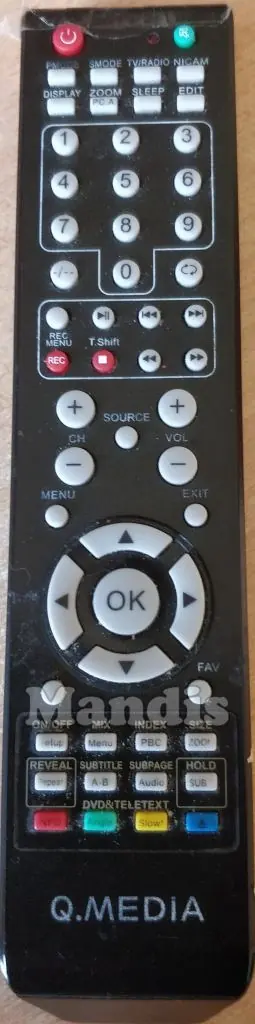
- Locate the function you wish to perform in the Original column.
- Find the corresponding button or button combination in the Rechange column.
- If a function is listed as Shift + [Button Name], you must press the Shift button on the replacement remote before pressing the target button to activate that specific function.
Using the replacement remote
The Mandis replacement remote is designed to replicate the functionality of the original Q-MEDIA remote. Most standard buttons (Power, Volume, Channel, Navigation) function identically to the original. For advanced features or secondary functions, refer to the mapping tables provided in the document to see if a Shift key combination is required.
Manufacturer information
Mandis
Practical help
Common problems
Button does not perform the expected action
Check if the function requires pressing the 'Shift' key first, as indicated in the mapping table.
Remote not responding
Ensure batteries are inserted correctly and the remote is pointed directly at the device's IR sensor.
Before use
- Verify the model number 1369D-EU matches your device.
- Insert fresh batteries into the remote.
- Keep the original remote mapping table handy for reference.
Images and diagrams
- The left image shows the original remote layout.
- The right image shows the Mandis replacement remote layout.
- The tables in the document map specific original buttons to their corresponding buttons on the replacement remote.
Model compatibility
- Designed specifically as a replacement for Q-MEDIA 1369D-EU.

Manual page author
Emily Carter
User documentation editor
Prepares concise manual descriptions and highlights the most useful setup, operation, and maintenance information for readers.