Lighting / Fixtures
PT23 Bluetooth Pedal Multimedia Controller User Manual
Quick guide for the PT23 Bluetooth pedal multimedia controller. Learn how to pair, switch modes, and configure settings for Android, iOS, and Windows.
Table of contents
Manual images
Click an image to enlargeQuick Start Guide
The PT23 is a wireless Bluetooth pedal designed for hands-free control of multimedia apps, e-books, presentations, and short video platforms like TikTok. To begin using the device, ensure it is charged, turn the power switch to ON, and pair it with your device by holding the connect button for three seconds.
Product Description
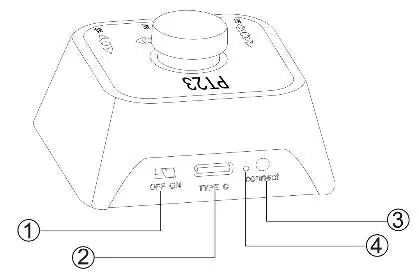
The device features a compact design with a central button and four distinct modes. It includes a built-in rechargeable battery and a Type-C charging port. The rear panel contains the power switch, charging port, LED indicator, and the connect button used for pairing and mode switching.
Function Description
The PT23 operates in four different modes, which can be cycled by clicking the connect button. Each mode offers different control inputs:
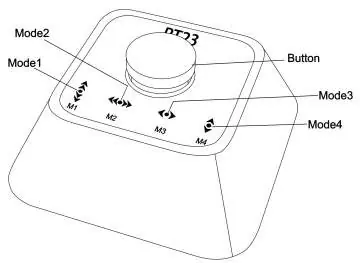
- Mode 1: Simulates hand flip over (Up/Down). One press: Up; Double press: Down; Press and hold: Continue Up; Double press and hold: Continue Down.
- Mode 2: Simulates hand flip over (Left/Right). One press: Left; Double press: Right; Press and hold: Continue Left; Double press and hold: Continue Right.
- Mode 3: Turn left or right. One press: Left; Double press: Right; Press and hold: Continue Left; Double press and hold: Continue Right.
- Mode 4: Turn up or down. One press: Up; Double press: Down; Press and hold: Continue Up; Double press and hold: Continue Down.
Instructions
Follow these steps to set up and use your controller:
- Power On: Turn the power switch on the back of the device to the ON position.
- Pairing: Press and hold the connect key for three seconds to enter Bluetooth pairing mode. Search for "PT23" on your device and select it to connect.
- Switching Modes: Click the connect key to cycle through the four available modes.
Note for iOS Users: To ensure proper functionality on iOS systems, navigate to Settings > Accessibility > Touch and enable Assistive Touch. Adjust the sensitivity to one-third of the position.
LED Indicators
- Charging: LED is on.
- Fully Charged: LED is off.
- Low Power: LED flashes.
Technical Specifications
- Bluetooth Version: 5.3
- Bluetooth Range: 10 meters or more
- Battery Capacity: 230mAh
- Dimensions: 55 x 52 x 30 mm
- Weight: 37g
Practical help
Common problems
Device does not connect to Bluetooth
Ensure the device is in pairing mode by pressing and holding the connect key for three seconds until it is discoverable.
Controls not working on iOS
You must enable Assistive Touch in iOS Settings > Accessibility > Touch and adjust the sensitivity to one-third.
Device unresponsive or LED flashing
The battery is low. Connect the device to a power source using the Type-C charging port.
Before use
- Charge the device fully using the Type-C port.
- Turn the power switch to the ON position.
- Enable Bluetooth on your host device (Android, iOS, Windows, etc.).
- For iOS, enable Assistive Touch in accessibility settings.
- Pair the device by holding the connect button for 3 seconds.
Specs in practice
- Bluetooth 5.3
- Provides a stable, low-energy wireless connection with a range of at least 10 meters.
- 230mAh Battery
- Built-in rechargeable lithium battery for portable operation.
- Type-C Charging
- Standard port for recharging the internal battery.
Images and diagrams
- The rear panel houses the power switch, Type-C charging port, LED indicator, and the connect button.
- The top surface features the main control button and indicators for the four operational modes (M1-M4).
Model compatibility
- Compatible with Android, iOS, HarmonyOS, and Windows.
- Wireless connection distance is 10 meters; performance may degrade beyond this range.

Manual page author
Michael Turner
Technical manual editor
Reviews PDF manuals for structure, safety notes, and practical product details so readers can find the right information quickly.